Auto-Notes in CRM: How to Judge Completeness, Tone, and Usefulness
Auto-notes in CRM should be judged not by smooth wording, but by facts, tone, and usefulness for the manager. We break down the criteria, common mistakes, and a practical checklist.
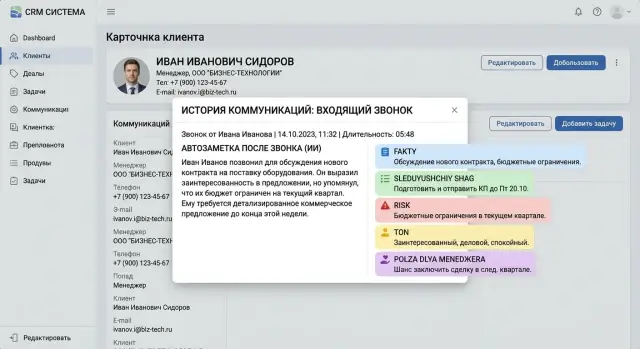
Why smooth text can be misleading
A neat note easily creates a false sense of order. The text reads well, the phrases are polite, and the meaning seems clear enough. But the next day the manager opens the CRM and does not understand what exactly was promised to the customer, what they were unsure about, or which next step was already agreed on.
This is a common trap: auto-notes in CRM are judged by style, not by substance. A smooth formulation hides gaps better than a clumsy one. If the entry sounds confident, the team is less likely to notice that it has no deadline, no owner, or no reason for the refusal.
The difference between a pretty note and a useful one is usually obvious right away. A pretty note says: “The customer is interested, we discussed the terms, and agreed to come back to it later.” A useful note says it differently: the customer needs a May launch, is waiting for a quote for 50 users, has doubts about integration with the current CRM, and a follow-up call is set for Thursday at 3:00 PM.
The second version has less fluff and more support for action. A note like that can be handed to another manager without losing context. It makes it clear what to do next and what to check before the next touchpoint.
When a note looks good but does not hold the facts, the team pays for it every day. Agreements get lost. Managers ask the customer the same questions again. The next step falls through simply because nobody noticed the deadline or mixed up who was supposed to send the materials.
The same problem appears after chat. A soft summary like “we discussed the details and possible options” sounds decent, but it does not help. If the note does not include the customer’s objections, budget constraints, and the exact outcome of the conversation, it is just taking up space in the CRM.
The easiest way to review these notes is by three criteria: completeness, tone, and usefulness. Does the note contain facts, agreements, objections, and the next step? Does it assign feelings or intentions to the customer that they never expressed? Can another manager continue the work without listening to the call again?
These three questions quickly put the text in its place. Nice language is pleasant, but secondary. If a note does not help decide the next action, it has failed the team, even if it is written flawlessly.
What a note should capture every time
A polished phrase is not very helpful if the note does not show what the customer wanted and what happens next. After a call or chat, the record should answer normal work questions. A manager, a team lead, or a colleague should open the CRM and understand the situation in 15 seconds without replaying the conversation.
The minimum should stay simple. If the auto-note does not include these items, it is too early to call it useful:
- the reason the customer reached out
- the result of the interaction so far
- the agreement with a date and an owner
- the risk or reason for the pause, if no decision was made
The reason for contact should be specific. Not “we discussed the product,” but “the customer asked about data migration, launch timelines, and pricing for 50 users.” That immediately removes confusion. The note shows what the conversation was about, and there is no need to guess whether it was a new request, a complaint, or a repeat contact.
The result should also be stated clearly. After the conversation, it should be obvious whether the customer moved forward, took a pause, declined, or is waiting for materials. A phrase like “the call went well” is not enough. It sounds nice, but it says nothing about the outcome.
Agreements are where the meaning of a note is most often lost. If the system writes “send the proposal later,” that is almost an empty line. Much better is this: “The manager will send the estimate by 4:00 PM on Wednesday, and the customer will respond after budget approval on Friday.” Now there is an action, a deadline, and the person responsible for the next step.
The risk should not be hidden behind polite wording. If the customer is hesitating, comparing vendors, asking to return in a month, or waiting for approval from a manager, that should be recorded directly. Otherwise the CRM creates a false sense that the deal is moving normally when it has already stalled.
A good auto-note after a chat or call is usually short. But it always has four anchors: why the customer came, how the conversation ended, who does what next, and what might get in the way. That is enough for the note to work as a tool, not as a neat retelling.
How to measure completeness without a complicated scheme
Completeness is better measured by what is missing, not by how smooth the text sounds. If a note does not answer the simple questions “who,” “what,” “when,” and “why,” the manager has to listen to the call again or reread the chat.
For an auto-note in CRM, that is already enough for a first practical check. You do not need a 30-point matrix. You need a short list of required elements for each type of contact.
The set of fields will be different for an inbound lead and for a complaint. But the logic is the same: the note should capture the person, the essence of the request, the next step, and the reason the customer agreed, declined, or asked for a pause.
You can start with this mini-template:
- who reached out and what role they play
- what exactly they want or what they are complaining about
- when the next step or response deadline is set
- why the issue is urgent, delayed, or blocked
- what the manager needs to do after the conversation
Next comes a quick check against the source. Do not review every call in full. Take 10 notes from the week and compare them with a short slice of the recording: a 2–3 minute stretch where the main point was discussed, or with a chat fragment where the customer stated their request and expectations.
This method quickly shows two things: which facts the model missed and whether it added anything unnecessary on its own. For CRM quality control, that is more useful than arguing about wording style.
It helps to score completeness very directly. If your contact type has five required elements and the note captured only four, that is 80%. If the deadline or next step is missing, it is better to count the note as incomplete, even if the rest of the text looks neat.
Keep a separate list of common omissions. In most cases, the model consistently loses the same fields: the decision maker’s name, the promised date, the reason for refusal, the amount, or the discount condition. After a couple of weeks, it becomes clear where the quality of post-call or post-chat notes is breaking down.
This can be tracked in a simple table with three columns: contact type, missing field, and how many times it disappeared. After just 20–30 checks, it becomes obvious what needs to be fixed in the prompt, in the CRM template, or in the post-processing logic. The approach is simple, but it separates a complete note from merely a pretty one very well.
How to check tone without distorting the conversation
A good note sounds calm and precise. It does not diagnose the customer and does not make the conversation softer than it actually was.
If a manager reads the note a day later, they should understand what the person said, what they asked for, and where the tension appeared. For that, you need a neutral business tone without labels like “the customer was difficult,” “they reacted inappropriately,” or “they were clearly not interested.”
The problem usually starts where the model starts guessing motives and emotions. If the conversation never included a direct phrase about irritation, fear, distrust, or urgency, do not write that into the note as a fact. The phrase “the customer doubts the supplier’s reliability” sounds confident, but it may be invented. It is more honest to write: “the customer asked twice about the SLA, support response times, and fault tolerance.”
What to look for during the review
A strong test is very simple: can you show this note to another person on the call without feeling awkward? If not, the tone has already drifted.
Check four things:
- are there labels instead of observations
- are there assumptions instead of the customer’s words
- does the text sound harsh or mocking
- does the note hide a problem
For example, “the customer is aggressive” is worse than “the customer interrupted and asked to go straight to pricing.” “Wanted to squeeze out a discount” is worse than “asked for a 15% discount and said they are comparing three offers.” Even one word like “again,” “didn’t understand,” or “gets confused” can spoil the record.
Also watch for too much confidence. Auto-notes often write as if the conclusion has already been proven: “the customer is ready to buy after approval.” It is better to leave room for reality: “the customer asked for the contract for internal approval and did not confirm a decision.”
There is also the opposite mistake. The text becomes too smooth and removes the unpleasant part. For example, after a hard objection the model writes: “we discussed the budget constraints.” But if the customer clearly said “we are not buying this quarter,” the note must preserve the refusal instead of hiding it in soft wording.
A normal tone does not beautify the conversation and does not make it worse. It stays closer to the customer’s words than to the author’s impression. That is exactly the kind of auto-note in CRM that helps the next manager instead of confusing them.
How to tell whether the note is useful to the manager
A useful note saves not the time needed to read, but the time needed for the next contact. If another manager opens the CRM after a call and still has to listen to the recording, the text did not work. A good note has a simple effect: you can continue the work without its author.
This is easy to check in a real example. The manager is sick, and the customer needs to be handled today. If a colleague understands in a minute what was already discussed, what the customer is waiting for, why the deal stalled, and what to do next, the note is fit for work. If it is just a smooth retelling of the conversation, it adds little value.
Check the note with four questions:
- can a new manager continue the conversation without listening to the call or reading the entire chat
- can a task be created from this note right away, without guesses or extra clarification
- is the reason for refusal, the customer’s concern, or the condition for returning to the conversation visible
- can a manager understand in 20–30 seconds what is happening with the deal
The usefulness is especially clear in tasks. The phrase “the customer is interested, we’ll come back to it later” gives almost nothing. But a note like “waiting for the proposal by Friday, comparing two vendors, asked to show savings calculations, next call at 3:00 PM” already turns into action. You can create a task, set a deadline, and check what exactly the manager promised.
The same goes for the reason for refusal. The wording “not a fit” is useless for both sales and CRM quality control. You need clarity: too expensive, no integration, chose the current vendor, decided to delay until next quarter. Then the team sees not just a lost deal, but a clear barrier.
A manager also does not need a pretty retelling of the conversation. They need to quickly see the stage, the risk, and the next step. If that is buried under polite general phrases, the note only gets in the way. Auto-notes in CRM should be judged not by how “human” they sound, but by one simple test: does the text help make a decision right now?
How to organize the review step by step
One good example means almost nothing. A proper review starts with 30–50 real conversations: short and long calls, simple chats, disputed cases, repeat inquiries, conversations with a clear outcome and those without one. If you only take the “easy” dialogues, auto-notes in CRM will look better than they really are.
Next you need a reference note template. It should be the same for all conversations: reason for contact, facts, manager promises, next step, deadline, risks. It is better if the reference is prepared not from memory, but from a recording or the full chat.
The easiest way to run the review is with a short table.
- Collect the sample and remove personal data if company rules require it.
- Write reference notes using one template.
- Compare the auto-notes with the reference using three criteria: completeness, tone, and usefulness for the manager.
- Tag each mistake by type, not with a vague “bad.”
- Repeat the same check after every prompt change or model swap.
The score should be simple. For example, you can give 0, 1, or 2 points for each criterion. That format is easier to discuss with the team than long comments without a shared scale.
It also helps to break errors into smaller groups. Usually three labels are enough: missing fact, wrong tone, and useless conclusion. Missing fact means the note did not record the budget, deadline, refusal, or promised follow-up. Wrong tone means the customer sounded irritated, but the text made the conversation sound calm. Useless conclusion means the note looks neat, but the manager does not know what to do next.
It is useful to track not only the average score, but also how often each type of error appears. If the overall score goes up after a prompt change but fact omissions increase, that is a bad trade-off. Smooth text should not come at the cost of meaning.
If the team tests several models through a single gateway like AI Router, keep the same set of conversations and the same evaluation template. Otherwise the comparison quickly breaks down: it becomes unclear whether the model got better or just received an easier set.
After any change, the review should be repeated on the same control set. That is the only way to see whether you fixed the problem or just changed the style of the text.
Example with a real scenario
A manager sells a subscription for 480,000 tenge per year. During the call, the customer says the offer suits them, but asks for a 10% discount and wants two days to get approval from the CFO. After the call, the auto-note in CRM saves this entry: “The customer is interested, we discussed the price, and they are waiting for feedback.”
The text sounds neat, but it is almost useless. It does not make clear what discount the customer asked for, under what condition it was discussed, or exactly when the answer is expected.
A call with a discount request and a deadline
A proper note in this case should hold three things: the amount, the condition, and the date. For example: the customer requested a 10% discount for annual payment. Base price: 480,000 tenge. Budget approval by May 14. Promised to come back with an answer on May 15 after 4:00 PM. If the discount is not approved, they are open to discussing quarterly payment without a discount.
That kind of record saves time on the next touchpoint. A new manager does not start from scratch and does not send a vague “just following up on our conversation.” They can continue precisely: check the discount decision, offer a backup option, and avoid confusing the terms.
One inaccurate phrase can break the whole next contact. If the system records “the customer agrees to a 10% discount,” when in fact the customer was the one asking for it, the manager may easily send a message confirming a discount nobody ever promised. That looks careless and immediately damages trust.
A chat with short questions and a change of topic
In chat, mistakes are not obvious right away because the questions are often short. The customer writes: is there an integration with Bitrix24, then asks where the data is stored, and finally requests a contract template. A weak note after the chat usually looks like this: “Interested in integration and security, requested documents.”
The problem is that it mixes three different intentions into one general sentence. The manager will not know what has already been answered, what still needs to be opened, and what must be sent today.
It is much better when the note preserves the flow of the conversation: asked about integration with Bitrix24, then clarified data storage, then requested a contract template after the answer. Expects the documents today by 6:00 PM.
If the note helps start the next contact with an exact phrase and without rereading the chat, it is good enough. If the manager still has to open the call recording or scroll through the chat, the note failed.
Where teams make mistakes most often
Most often, the team celebrates text that is pleasant to read but impossible to work with. The note sounds neat: “the customer is interested,” “we discussed the terms,” “we need another contact.” The problem is that after such a note the manager still has to listen to the call again.
The first mistake is simple: the model writes general phrases instead of agreements. If the customer said they would reply on Thursday, asked for a quote for 50 licenses, and is waiting for an email from Anna, that is exactly what should remain in the CRM. When the note replaces details with a polite summary, it loses meaning.
The second mistake is more dangerous. The text mixes fact and guess. For example: “the customer doubts the price.” That may be true, or it may be the model’s fantasy. The fact sounds different: “the customer said that a budget above 300,000 tenge will not be approved.” In the first case, the manager gets an interpretation. In the second, they get support for the next step.
Auto-notes in CRM often look even and calm, but they lack three things:
- the deadline
- the amount or volume
- the person responsible for the next step
Without these, the note is almost useless. A nice tone does not save it if the note does not make clear who should do what and when.
Another common mistake is in the review itself. A manager reads five notes and gives a high score for style: no mistakes, polite, logical. But that is not what should be checked. Ask a tougher question: can another employee continue the deal without opening the call recording or the chat? If not, the note is weak, even if the text looks “smart.”
The template also causes problems often. The same format starts being used for every contact: a first inbound inquiry, a repeat call, a dispute over an invoice, a short chat about delivery. As a result, the model either bloats a tiny dialogue or cuts a serious conversation down to a couple of lines. Context changes what a good note should contain. After a short chat, you need the essence of the question and the answer. After negotiations, you need the terms, risks, and next step.
A decent test sounds like this: if you remove the polished language, is there still a working core in the note? The date, the decision, the objection, the amount, the deadline, the owner. If not, the team is not evaluating the CRM note quality, but the literary packaging.
These mistakes are rarely noticed right away. But they show up quickly in the pipeline: managers repeat questions, forget promises, and argue about what the customer “meant.” Usually it is not the model. The team is simply measuring the wrong thing.
Short checklist and next steps
If a post-call note looks neat, that is not enough. The CRM should receive a record that lets another manager understand, in 30 seconds, what the customer said, what the team promised, and what happens next.
Set a short standard on one page. It is not for the beauty of the text, but for fast quality checks:
- are the mandatory fields present: reason for contact, facts, agreements, deadline, and owner
- does the tone match the conversation, without additions or unnecessary confidence
- is the next step stated clearly enough to be carried out without guessing
- is there a quality threshold below which the note does not enter the CRM without review
- are the cases marked that always go to manual control
It is better to define the threshold in advance. For example, if the note has no next step, facts are mixed up, or the model softened the customer’s dissatisfaction, the record should not be saved automatically. A person should review it first.
Manual review is not needed for every conversation. Usually a clear set of cases is enough: complaints, pricing disputes, a discount promise, contract discussion, mention of personal data, or a risky tone from the customer or the manager. These dialogues are the ones that most often break trust in auto-notes.
If the team builds auto-notes on an LLM, first check the data path, not the text. It is important to understand how the system chooses a model, where it masks PII, and what audit logs remain after processing. For companies in Kazakhstan, this is especially important if there is a requirement to keep data inside the country.
In such a setup, a single API gateway like AI Router on airouter.kz may be a good fit. It provides one OpenAI-compatible endpoint, helps compare different models on the same set of conversations, and supports PII masking, audit logs, and data storage within Kazakhstan. For teams that need data residency or low latency, AI Router also offers hosting of open-weight models on its own GPU infrastructure.
Start small. Take 30 calls and 30 chats, run them through the current system, and compare the auto-notes with the manual ones. If the manager can quickly understand the essence of the conversation and the next step from the note, the system works. If they still have to listen to the recording or reread the chat, it is time to fix the template and the review process.
Frequently asked questions
Why can a polished auto-note get in the way of work?
Because smooth text often hides missing details. If the note has no deadline, owner, objection, or exact outcome, the team loses agreements and asks the customer the same questions again.
What must be included in an auto-note after a call or chat?
Keep a simple minimum: the reason for contact, the outcome of the interaction, the next step with a date and owner, and the reason for a pause or rejection. If one of these is missing, the note is already weak.
How can I quickly assess how complete a note is?
Count missing items, not style. If you expect five mandatory elements for this type of contact and the note kept only four, give it 80%; if the deadline or next step is missing, it is better to count the note as incomplete right away.
How do I tell whether the model invented something for the customer?
Look for conclusions written in place of the customer’s own words. A phrase like “has doubts about reliability” sounds confident, but it is more honest to write that the customer asked about SLA, support response times, and fault tolerance.
What tone should a good CRM note have?
A good tone stays closer to facts than to the manager’s impression. Record observations and direct words, not labels like “difficult client” or “wanted to squeeze out a discount.”
How do I know whether the note is useful for another manager?
Use a simple replacement test. Give the note to a colleague and ask them to continue the conversation without the call recording or the chat; if they immediately understand what was discussed and what to do next, the note works.
How many conversations are needed for a proper review?
For the first check, 30–50 real conversations are enough. Include short and long calls, ordinary chats, disputed cases, and repeat contacts, otherwise the picture will be too flattering.
What mistakes appear most often in auto-notes?
The most common issues are losing the deadline, amount, volume, decision maker, and owner of the next step. The model also likes to soften refusals and replace exact agreements with vague phrases.
When should a note be sent for manual review?
Do not save the note automatically if the model mixed up facts, removed the next step, softened a hard refusal, or mentioned a discount, contract, complaint, or personal data. In those cases, a person should review the text quickly before saving it.
How can several models for auto-notes be compared fairly?
Compare models on the same set of conversations and with one scale: completeness, tone, and usefulness. If you run the test through a single gateway like AI Router, it is easier for the team to switch models without code changes, keep one endpoint, and check where facts are preserved better while storing data inside Kazakhstan.