Contract tests for OpenAI-compatible providers
Contract tests for OpenAI-compatible providers help you find failures in streaming, tools, embeddings, and error formats in about an hour before release.
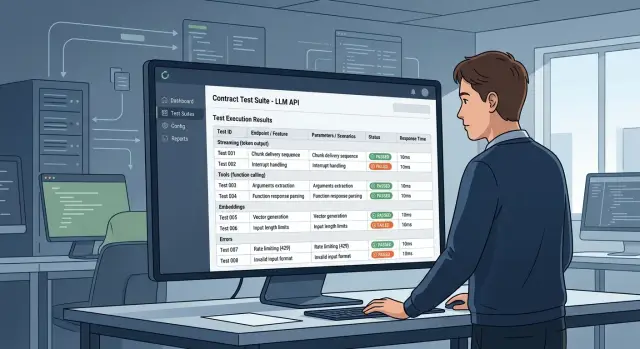
Why “OpenAI-compatible” breaks in the details
The label “OpenAI-compatible” often means only one thing: the provider has a similar endpoint and familiar fields. While the team sends one short request in a sandbox, the difference is barely visible. Problems start later, when the same code reaches production and runs into response details.
The same request can return different JSON. In one place usage arrives at the end, in another it is missing. One provider puts finish_reason where the SDK expects it, while another shifts the structure slightly and the parser starts failing.
Streaming is even more annoying. On short answers, the stream looks fine, but on long ones it may cut off halfway, send events in a different order, or mix service fields with text. As a result, the UI freezes, the response assembly logic loses part of the text, and token counting starts lying.
With tools, mismatches usually appear later. The provider says function calls are supported, but the function name arrives in one field, the arguments in another, and sometimes the arguments are empty altogether. The agent sees that a tool was chosen, but cannot execute it.
Embeddings are often the quietest failure. The request succeeds, a numeric array comes back, but the dimension is no longer what the index or downstream service expects. This is especially painful before migration, when the team changes only base_url and expects everything else to stay untouched.
Errors only look similar from the outside. The text may be understandable, but the codes, nesting, and fields differ enough that retries, fallbacks, and rate-limit handling start behaving strangely. That is why OpenAI API compatibility should be treated not as a promise, but as a hypothesis that needs to be checked quickly with contract tests.
What set of calls is enough
If you are changing only base_url, you do not need a large test rig. For the first run, five calls are enough. They quickly show where compatibility exists only in words.
A minimal set usually looks like this:
- A normal
chat completionwithout streaming. It checks the basic response: role, text,finish_reason,usage, and the overall JSON shape. - The same request with streaming. This shows how chunks arrive, whether there is
delta, whether token order breaks, and whether the stream ends correctly. - A call with tools and a required
tool_choice. Providers often accept the schema but returnarguments,tool_call_id, or the stop reason in different ways. - An embeddings request with vector-length validation. If the vector size changes between models or does not match expectations, search and ranking will fail quietly later.
- A deliberately invalid request. For example, a nonexistent model or a broken parameter. This test is needed to check the response code, the
errorstructure, and the message body.
It is best to run these calls against the same test model wherever possible. That makes it easier to tell whether the problem is in the provider, the model, or your wrapper code. For tools and embeddings, a separate model is sometimes needed, and that is normal.
Decide in advance what counts as success. For a normal chat, it is not “we got some text,” but a specific set of fields. For streaming, it is not “the stream arrived,” but the full cycle from the first chunk to the final stop signal. For an error, it is not “the server complained,” but a format your client can actually parse.
That kind of set can be built in one evening and often saves several days after release.
How to build the tests in one evening
Start small: one folder, a few JSON files, and a simple launch script. For each scenario, use the same payload across all providers. If you change the prompt text, parameters, and model at the same time, you will not know what actually broke.
Lock down everything that affects the response: model, temperature, max_tokens, tool_choice, and the response format. Even a small change like a different temperature can ruin the comparison very quickly. For contract tests, that is a basic rule.
A good minimal set includes one chat completions call without tools, one with streaming, one with tools and an expected function argument, one embeddings request on short text, and one deliberately invalid request for error checking.
Store two results separately. The first is the provider’s raw response in full, including all fields, chunk events, and the error code. The second is the normalized result, where you map the response to your internal schema. If something goes wrong, the raw response shows the cause, while the normalized one helps you compare providers quickly.
A 200 status proves almost nothing. The script should validate the schema: are there choices, did finish_reason arrive, does the tool_call type match, is the embedding non-empty, is message.content present where you expect it. The same applies to errors: HTTP code, message, details structure.
If the team is changing only base_url, run the set twice: before and after the switch. For a gateway like AI Router, that is especially convenient: you can change the address to api.airouter.kz, keep the same SDK and prompts, and then quickly compare the parser, proxy, and client behavior.
How to check streaming without manual review
It is better to catch streaming with a test, not by staring at the console. One short scenario quickly shows where the provider sends extra chunks, loses the end of the response, or changes the event format in a way that breaks the client silently.
For this test, one simple prompt and one normal non-streaming request are enough. Set temperature: 0 so the final text is easier to reproduce. Then compare the normal response with the assembled stream.
What to measure:
- number of chunks per response;
- time to the first chunk and to the first token;
- field order in
delta; - presence of empty chunks;
- arrival of
finish_reason.
In a normal stream, the assistant role usually arrives first, then parts of the text in delta.content, and at the end finish_reason. If the role arrives late, content comes before role, or the stream ends without a final signal, the client starts behaving oddly: the UI freezes, the response assembly logic breaks, and retries fire unnecessarily.
Empty chunks should also count as an error or at least a separate warning. Sometimes a provider sends them between normal events, and that is not a problem. It is worse when the stream closes after an empty chunk and the final event never arrives.
A separate test should compare the assembled streaming response with the normal non-streaming response. Compare the final string after joining all delta.content values. If the text differs significantly with the same prompt and settings, the problem is often not the model, but the way the provider splits and forwards the stream.
Another common failure involves transport. The provider claims compatibility but changes the SSE format. That should be marked separately, not mixed with model errors. If the client expects standard SSE events with data but receives its own wrapper, the stream technically exists, yet the SDK no longer understands it.
A good streaming test ends with a short report: how many chunks arrived, whether the first token came on time, in what order role and delta arrived, whether the final text was assembled, and whether finish_reason was delivered. That is usually enough to tell in a few minutes whether the provider can be connected to production.
Where tools break most often
With tools, failures show up quickly: the provider accepts the request, but the model returns a different function name, changes the JSON arguments, or writes a normal text response instead of calling the tool. In a test chat, that is tolerable. In production, that shift breaks the next step in the chain.
First compare what your code expects with what actually comes back. The function name must match character for character. Arguments should be parsed as JSON and checked by type: string, number, array, required fields. It is better to store and compare tool_call_id separately if you later pass the function result into the next request.
One scenario with one function proves almost nothing. Add a second one where the model has two functions with similar descriptions available. That kind of test often exposes odd behavior: one provider picks the wrong function, another changes the order of calls, a third mixes a tool call with normal text.
Also catch the case where the model says something like “I’ll call the function now” but does not actually call it. That response looks plausible, so it is easy to miss by eye. The test should check the actual tool_call, not the text.
It is also useful to break the schema on purpose. Define a required field that does not exist in properties, or ask the model to return an argument of the wrong type. A normal server responds quickly with 400 and a clear error body. Weak compatibility looks different: the server silently accepts garbage, and your code fails only after the model response.
If you are changing only base_url, tools are often what create the false impression of compatibility. One successful call here means very little.
What to watch in embeddings
Embeddings break more quietly than chat completion. The request succeeds, the status is 200, the logs look calm, and then search in the database suddenly returns strange matches. So it is not enough to check that the API simply returned a response. You need to verify that it behaves the same in both simple and edge cases.
Start with vector length. The same text should return a vector with the same dimension on every run. If the model returns 1536 numbers today and 3072 tomorrow, the vector index will start failing even if the application does not crash formally.
Then check order. If you sent a batch with multiple inputs, the outputs should arrive in the same order. Otherwise, it is easy for the team to save the embedding from one line into another record. Those errors are usually noticed only through strange search relevance.
Your test set should include a short phrase, an empty string, a long text near the limit, a batch with multiple inputs, and a repeated copy of the same text. The empty string and the long text are not just for show. One provider will return a clear error, another will return a vector for empty input, and a third will silently trim the text. Any of those can be acceptable if it is consistent and the test captures it. If the behavior shifts from request to request, you will get random defects in search, deduplication, and recommendations.
Also check data types. The vector should come back as an array of numbers, not strings like "0.123". The difference looks small at first, but later it breaks serialization, similarity metrics, and database loading.
Another useful test is batch latency. Measure the delay for one input and for a batch, for example 8 or 16 lines. If the batch is almost as fast, that is a good sign. If latency grows several times over, the provider is probably processing each item separately, and time and cost will quickly get out of control on large volumes.
If you compare direct access to a provider with the same call through AI Router, this set immediately shows where the behavior differs and where everything matches down to the types, order, and vector size.
How to verify the error format
Errors break integration more often than normal responses. A provider may honestly return 401 or 429, but put a JSON body there that your client does not expect. As a result, retries, alerts, and failure handlers behave strangely.
First compare two things: the HTTP code and the error.type field. The code tells you what class of failure you got, and error.type is what the client uses to branch logic. If the code is 429 but the error type looks like a normal invalid_request_error, incompatibility has already been found.
Also look at the error text, but do not build logic on it. Wording changes most often: one provider says invalid api key, another says authentication failed, and a third adds the project or region name. That is useful for humans, but a bad foundation for code.
A minimal run should be split into several checks: 401 for an invalid or empty key, 429 for limits, 400 for broken JSON or an unknown model, and a separate scenario where the server returns HTML or plain text instead of JSON.
Many people skip the last case. They should not. If an intermediate layer returns HTML with 502 Bad Gateway, a client that expects JSON with an error field will fail during parsing. That kind of failure is hard to read in logs because it hides the original cause.
If your SDK reads rate-limit headers, check those too. Some clients expect numbers in specific headers and calculate the time until the next retry themselves. If the header disappears, gets renamed, or arrives empty, the retry queue quickly drifts.
An example before switching providers
The team changes only base_url and expects everything to stay the same. On paper that sounds logical: the same OpenAI-compatible API, the same SDK, the same prompts. In practice, differences often appear in the very first run.
First, the developers run a simple chat completion without streaming. The response arrives, the test is green, and a false sense appears that migration is nearly done. A few minutes later, streaming is enabled, the first chunk arrives in an unexpected format, and the client fails before it can assemble the full response.
Next comes the tools call. The model returns arguments not as an object, but as a string containing JSON. The parser expected one format and got another, and the business logic stops. Then embeddings are tested: the request succeeds, status 200, no errors, but the vector dimension does not match what the search index was built for. Search does not fail immediately; it just starts returning strange results quietly.
That is why a short test set is more useful than a long demo. A normal chat, the same request in streaming, one tool call, one embeddings request, and one bad request for error handling usually give the team a real list of work before release.
Where teams usually make mistakes
The most common mistake is simple: the team sees HTTP 200 and assumes compatibility has been confirmed. In reality, the response may arrive with broken JSON, an extra field, an empty choices, or a cut-off streaming flow. The request is formally successful, but the application fails later while parsing the response.
The second trap is comparing different models as if they were the same contract. If one test runs on a GPT-like model and another on a weaker open-weights model, differences in tools, embeddings, or error format prove nothing. You should compare the same scenarios on models that are as close as possible.
Another bad habit is not saving raw responses. Logs like “parse error occurred” are almost useless. You need the full raw response: headers, body, stream chunks in order, error code, request id, and response time. Otherwise the discussion quickly turns into guesswork.
It also helps to separate problem classes right away. A network failure, timeout, or connection drop is one story. A response schema mismatch, strange tool behavior, differences in embeddings, or another error format is a different one. If the provider returned 502 or the connection dropped, the contract is not the issue. If it consistently returns tool_calls in another shape or breaks SSE events, that is a real incompatibility.
And one more common gap: teams test only the happy path. Production does not fail on the ideal request, but when the model receives an invalid tool, a too-long input, or hits a limit. So the minimal set should include bad cases too: 400, 401, 429, 500, an empty tool result, and a stream cut off after a few tokens.
Short checklist before connecting
Before the first request, it is more useful to run the same set of checks than to read the provider’s promises. With an OpenAI-compatible API, what usually breaks is not the model response itself, but the details around it: streaming chunks, tools, embeddings, and the error body.
Check a few simple things:
- use the same payload in every run;
- test streaming, tools, embeddings, and errors separately;
- fail the test on the response schema, not on the model text;
- decide in advance which differences the client can tolerate and which it cannot;
- save the result together with the date, model, and provider.
That sounds boring, but this minimal setup catches real failures very quickly. One provider may return normal text in streaming but omit a service field in one of the chunks. Another may answer chat completions correctly, but change the format of tool_calls. A third may return embeddings, only with a vector size different from what your index expects.
The same goes for errors. If the test expects error.type, error.message, and the HTTP code, it will catch incompatibility in seconds. If you compare only the message text, it is easy to miss the problem until the first production failure.
Also agree on tolerances inside the team. An empty delta in streaming often does not matter. Missing tool_calls or a different array format is already critical. It is better to write these rules down early, otherwise one engineer will mark the run as successful while another rejects the same provider.
What to do after the first runs
The first run almost always finds differences. Usually they are not major breakages, but small schema shifts: one provider puts tool_calls somewhere else, another returns embeddings with an extra wrapper, a third makes a 429 error look like a regular 500 with text in the body. Those things are better fixed immediately in an adapter instead of being spread across the whole application.
If the response format does not match what your code expects, add a thin normalization layer. Let it bring streaming, tools, embeddings, and errors into one shape before the data reaches business logic. It is not the most exciting work, but it pays off quickly: later, switching providers does not break half the service.
After the first fixes, move the test set into CI. Run it before every model, provider, and SDK version change. One release with a “almost compatible” API can easily burn a day of the team, especially if the problem shows up only in streaming or tool calls.
Testing only the successful response guarantees nothing. Keep separate runs for rate limits and timeouts. It is worth checking at least four things: that 429 arrives with the expected code and error body, that the client timeout does not break the retry request, that streaming ends predictably after a disconnect, and that 5xx and validation errors differ in format.
If the team routes different providers through a single endpoint, for example through AI Router, use the same set of contract tests for all routes. AI Router has a practical advantage here: you can switch providers through one OpenAI-compatible endpoint and quickly see whether the differences come from the route or from your client.
Do not try to cover everything at once. Start with a small set of 10–15 calls that catches the most common failures. Then expand it for your own scenarios: long context, empty embeddings, request cancellation, retry after 503, multiple tools in one response. That gives the team not an archive of examples, but a real safeguard before any switch.
Frequently asked questions
What do contract tests for an OpenAI-compatible API actually check?
Contract tests check the shape of the API response, not the quality of the model’s text. They catch shifts in usage, finish_reason, streaming events, tool_calls, embeddings, and the error body before release.
Which requests are enough for the first provider check?
For a first pass, five calls are enough: a normal chat completion, the same request with streaming, a tools call with a strict tool_choice, an embeddings request, and one deliberately invalid request. That set quickly shows where the provider only looks like OpenAI API on the surface.
Why doesn’t status 200 prove compatibility?
Because 200 OK only means the server responded without an HTTP error. The JSON can still differ from what your SDK expects, and the stream can end before finish_reason.
How can you check streaming quickly without watching it manually?
The easiest way is to send the same prompt twice: once without streaming and once with it. Then join delta.content into one string and compare the final result, while also checking event order, empty chunks, and the final stop signal.
Where do tools usually break?
In tools, the most common differences are the function name, the arguments format, and whether the tool_call appears at all. The model may say it will call a function but never actually do it, or it may return JSON arguments as a string that your code cannot parse.
How do you know embeddings are really compatible?
With embeddings, start by checking vector length, result order in a batch, and data types. If the dimension changes, the order shifts, or numbers arrive as strings, search and ranking will soon produce strange results.
Which errors should be tested first?
Check at least 400, 401, 429, and one 5xx or non-JSON response separately. Your client should be able to read the HTTP code, error.type, error.message, and, if needed, rate-limit headers.
Should raw responses from tests be stored?
Yes, save the raw response in full: body, headers, code, stream chunks in order, and response time. Without the raw response, teams usually argue about symptoms instead of seeing the exact failure point.
When is it safe to change only base_url?
Only after you run the same contract tests before and after the switch. If you change base_url to api.airouter.kz but keep the same SDK and prompts, the tests will quickly show whether your parser and client logic can handle it.
What should you do if the provider is almost compatible but the responses differ slightly?
First add a thin normalization layer between the API and your business logic. Then lock in the differences with tests and run them in CI before every model, provider, or SDK change.