Models for a Russian and Kazakh Assistant: How to Choose
A practical guide to choosing assistant models for Russian and Kazakh: what to check in mixed requests, language switching, and business tasks.
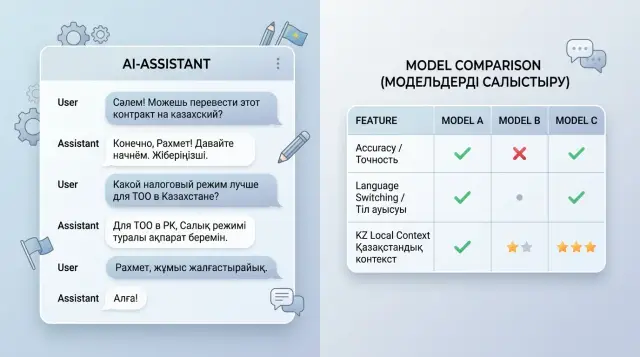
Why one model often breaks down across two languages
Russian and Kazakh put different kinds of pressure on a model. They have different sentence structure, different word order, and a different natural way of expressing an idea. Even when the meaning of the request is simple, the model may keep the facts but lose the response language, tone, or the required format.
Many models are more confident in Russian because they have seen more data. The picture is often worse with Kazakh: the vocabulary is narrower, there are fewer real business scenarios, and word forms change more sharply. Because of that, the model sometimes only partially understands the request and starts drifting into Russian, especially if the question contains Russian or English terms it knows well.
This becomes especially obvious with mixed input. A user writes one sentence in two languages, adds a product name, an internal request code, and a local term like IIN, BIN, ESF, or the name of a government service. The model reads the request, but the answer does not match what the person expects: it switches languages halfway through, loses politeness, drops instruction steps, or oversimplifies the meaning.
The problem is not just about translation. The assistant has to keep the conversation context. If a customer started in Kazakh, clarified a detail in Russian, and then switched back to Kazakh, a weak model often resets the dialogue state. It usually looks like this:
- it answers in Russian even though the customer is writing in Kazakh;
- it mixes both languages in one paragraph for no reason;
- it breaks the format and turns a list into plain text;
- it confuses local terms and gives a generic answer.
Real work in Kazakhstan quickly exposes these failures. A general-purpose model may sound polite, but it often does not understand the difference between IIN and BIN, how people phrase requests in banking, retail, or public services, and which words they casually mix in everyday messages. You may not see that on a demo. You will see it right away in real conversations.
When choosing a model, do not look only at a nice answer in one language. It is much more useful to check three things: whether the model keeps the user's language, whether it breaks on mixed requests, and whether it understands the local context without guessing. This is where one "universal" model usually falls apart.
What tasks the assistant should handle
If the team has not described the tasks in advance, model comparison quickly turns into an argument about which one sounds "smarter." That is not enough for an assistant. The same model can do well on a simple question but get lost in a long conversation or break a ready-made answer template.
First, split the scenarios by type of work. Usually there are at least three: a short answer to a question, a dialogue with clarifications, and an action based on a template. These are different kinds of load for the model. In the first case, accuracy matters most. In the second, the model has to keep context and not lose the customer's language. In the third, it must not add extra text because that ruins the email, the request card, or the answer meant for review.
It is better to take 5-7 tasks directly from the team's real work. For example: answer a customer question about a limit, a plan, or a request status; continue the conversation after several clarifications; build an answer from an approved template without extra phrases; briefly summarize a long dialogue for an operator; find a rule in an internal knowledge base and explain it in simple words.
For each scenario, record the input language and the output language separately. Do not leave it at "the model will understand." In Kazakhstan, a customer can easily write something like: "Check the request status қандай and when will there be an answer?" If the assistant must answer entirely in Kazakh, that needs to be written down as a rule. If the answer is supposed to be in Russian but with official service names in Kazakh, that should also be part of the test.
Another choice is speed versus accuracy. For support chat, a fast draft in a couple of seconds is often more useful than an almost perfect answer that arrives too late. But for banking terms, invoices, medicine, or internal policies, it is better to tolerate a small delay if the model is less likely to confuse amounts, deadlines, and wording.
Once these scenarios are described, comparing models becomes much easier. Otherwise one model wins at conversation, another is better at template writing, and the team ends up with an average result that works poorly in production.
What to check in mixed queries
A mixed query quickly shows whether the model understands real speech or just guesses from the first words. A user may start in Russian, then switch to Kazakh, add a contract number, and ask for the answer in another language. If the model gets confused by that context shift, it will show up immediately in actual work.
Give it a sentence where the language changes in the middle: "Check request 1542, жауапты қазақша бер, the client needs it by 3:00 PM today." A good answer will keep the full meaning: what needs to be checked, which language to answer in, and which deadline must not be missed. A weak model often grabs only the last part of the sentence and forgets the rest.
Look not only at the general meaning but also at the details. On mixed requests, models often lose numbers, dates, sums in tenge, LLP names, and document numbers. Sometimes they change the order of facts, translate a company name even though they should not, or distort the date. For support and sales, that is no longer a small issue.
A short test set is enough:
- a Russian question with a Kazakh clarification about the answer language;
- one sentence where the language changes without a pause;
- a request with a date, an amount, a company name, and a contract number;
- a message with slang, transliteration, or a simple typo;
- two versions of the same request to check stability.
Also check messy input separately. People write "schet faktura", "otvet kazakhsha", "zhaloba", switch keyboard layouts, drop letters, and shorten words. A good model restores the meaning without making things up. A bad one invents details that were never in the question.
Compare answers not by how polished they look, but by whether the model held onto the task after the language change. If it kept the user's intent, did not lose facts, and did not break on everyday input, that model is ready for the next testing stage.
How to test language switching
When an assistant works in Russian and Kazakh, the most visible failure is often not about facts, but about the response language. The customer writes in Kazakh, then asks a clarification in Russian, and by the fifth turn the model starts mixing both languages in one paragraph or simply switches to Russian on its own. For support, that is a bad sign: the answer looks sloppy and damages trust.
That is why you should not look only at the first reply. Check a long dialogue where the language changes many times. That is where you can see whether the model keeps the rule or loses it under context pressure.
A practical test
Build one scenario with 10-15 messages. Let the user switch languages almost every message: first Russian, then Kazakh, then Russian again. Add quotes from emails, chats, or requests inside the dialogue. A good model answers in the customer's language, but leaves the quote as it appears in the source.
A simple example: the customer writes in Russian, "Check the refund status," and inserts a quote from a previous conversation in Kazakh: "The order has not been delivered yet." A normal answer stays in Russian, while the quote remains untranslated. If the model translates the quote, mangles it, or answers with mixed text, that is an error.
Usually it is enough to watch four things:
- does the model answer in the language of the customer's last message;
- does it preserve quotes, plan names, and phrases from documents without changing them on its own;
- does it remember the chosen language after 8-10 turns;
- how often does it return to Russian without a reason.
Then give it a long conversation where the customer explicitly says once: "Answer in Kazakh from now on." After that, insert several Russian fragments: an operator note, CRM text, a system message. Many models hold up for 2-3 turns and then switch back to Russian because there is more Russian text in the context. That kind of failure is easy to miss if the test is short.
It is better to score the result in percentages, not by feeling. For example, out of 100 dialogue turns, the model answered in the correct language 92 times, mixed languages 6 times, and switched back to Russian 2 times. For business, that is much clearer than a vague assessment like "the answers look fine."
If the team runs such tests through AI Router, it is convenient to check the same set of dialogues across several models through one OpenAI-compatible endpoint at api.airouter.kz and avoid changing code. That makes it easier to see not only text quality, but also which model breaks down less often when switching languages under the same conditions.
A good model in this test does not necessarily look "smarter" on the surface. It simply keeps the conversation language to the end and does not create extra work for operators.
Where local context matters
An assistant may answer general Russian fairly well but fall apart on simple day-to-day details from Kazakhstan. You do not see this on abstract questions, but on phrases about tenge, IIN, BIN, branches, acts, contracts, and internal company processes.
If the model confuses IIN with BIN, writes sums in rubles instead of tenge, or does not understand that the customer is talking about a branch in Shymkent, the mistake quickly reaches the business. For support teams, that means extra tickets. For a bank or a clinic, it is a risk of giving the customer the wrong answer at the very first step.
A good test set usually includes requests like these:
- "Check the contract status by the company's BIN and tell me which branch to contact in Astana";
- "Менде IIN бар, бірақ шарт нөмірін ұмытып қалдым, не істеуім керек?";
- "How much is 250,000 tenge in installments over 6 months with no fee?";
- "Find the nearest branch on Kunaev Street and answer in Kazakh".
Examples like these immediately show whether the model understands mixed input and local entities. It should read city, street, and company names in both languages without mangling "Almaty", "Astana", "Shymkent", "Kyzylorda", "Kunaev", "Tole Bi", and similar forms. A common problem is that the model confidently corrects the spelling even though the user wrote it correctly.
Also pay attention to Kazakh names and word forms. Many models can read short Kazakh text reasonably well, but fail on names, forms of address, and inflections. If the assistant misspells a customer's name or breaks a word form in a final answer, it immediately feels чужим and careless.
Another layer of testing is your industry's vocabulary. In banking, the model must distinguish between an account, a loan, a grace period, and a late payment. In retail, it must distinguish returns, stock, inventory, and pickup. In healthcare, it must distinguish booking, referrals, and test results. In the public sector, it must distinguish requests, certificates, registries, and request status.
If the model passes the general set confidently but gets lost on local terms and data, it will fail in production exactly where the cost of an error is highest.
How to compare step by step
If you choose a model based on intuition, the one that simply sounds more confident almost always wins. That is a bad method. You need a short test with real requests, where you can see not only the style of the answer but also failures in mixed language, local terms, and sudden switching between Russian and Kazakh.
Start with a small but real sample. Usually 30-50 requests from support, sales, or internal service are enough. Remove names, phone numbers, contract numbers, and other personal data. Keep only the task itself and the context without which the answer loses meaning.
Then it is better to follow a simple plan.
- Split the requests into three groups: simple dialogue, mixed language, and phrases with local context. In the last group, add words like "EDS", "tenge", "BIN", "Kaspi", government service names, and common business phrases from Kazakhstan.
- Give all models the same prompt. Do not change temperature, max tokens, the system instruction, or the answer format. Otherwise you are comparing not the models, but random settings.
- Rate the answers on a simple scale, for example from 1 to 5. Look at accuracy, response language, intent understanding, and whether the model makes things up.
- Save not only the scores, but also the misses. One bad example is often more useful than the average number.
- Repeat the same test a week later. If the result jumps around a lot, that model is risky to put into production without extra control.
I would not overcomplicate the table at the start. A few columns are enough: request, model, score, response language, error, comment. In an hour you will already have a picture, and after two runs the quality spread will become visible.
If you test through a single API gateway like AI Router, it is easier to keep the same scenario for different providers and not rewrite the integration for every model. But the principle does not change: one set of requests, one set of settings, one scale. Only then is the comparison fair.
An example for customer support
Imagine the support team for an online store in Kazakhstan. The customer first writes in Russian: "Can I return the item if the packaging is open?" A minute later they clarify in Kazakh: "If there is a receipt, how many days will it take to get the money back?" At this point, a weak model often breaks down: it answers in Russian again, confuses the return period with the money transfer time, or starts writing too generally, as if it were an excerpt from the policy.
A good assistant keeps the dialogue steady and without extra noise. If the customer switched to Kazakh, the reply also goes in Kazakh. If the store policy says returns are approved within 14 days, the assistant does not turn that into 10 business days and does not invent exceptions. For support, that matters more than a fancy style.
What the check looks like
The team usually takes the same dialogue and runs it through several models. They do not look at which model sounds "smarter," but at which one makes fewer mistakes in simple but costly places.
The check usually comes down to four questions:
- does the model keep the customer's language after switching;
- does it keep the exact return period and amount without inventing details;
- is it polite but brief;
- does it follow the required format, for example 3 short bullet points without long explanations.
Then they add small traps. For example, the knowledge base says: "delivery is not refunded if the product is not defective," while the customer phrases it as if they expect a full refund. A decent model will notice the difference and ask for clarification. A weak one will confidently give the wrong amount in tenge.
In practice, it is more useful to compare models on scenes like these rather than on abstract tests. For business, the winner is not the one that gave the strongest answer once, but the one that made 2 mistakes instead of 11 across 100 dialogues.
If the team tests several options through one API, as is often done through AI Router, the comparison is faster: one set of dialogues, the same settings, and then you can see the real difference in tone, accuracy, and language switching. For support, that is direct protection against extra complaints and manual fixes.
Mistakes when choosing a model
Teams often choose a model with a high spot in a general ranking and then get weak answers in a real chat. A general benchmark shows the average picture. It says very little about how the model responds to your wording, your documents, and your typical support failures.
The first common mistake is testing only clean Russian. In real life, the user writes differently: "Сәлем, my payment won't go through," "I need a certificate, but answer in Russian." If the model gets confused by that switch, the assistant starts asking for clarification where the person expects a quick answer. Every extra round in the dialogue increases the load on operators.
Another common issue is comparing models under different conditions. One gets a more detailed system prompt, another uses a different temperature, and a third has its context window cut down. After that, the team argues about quality even though the test is already broken. A comparison only makes sense with the same settings, the same history format, and the same set of requests.
The selection most often breaks in four places:
- they use 20 polished examples and forget about short, messy, and incomplete messages;
- they look at token price but do not count the number of follow-up contacts;
- they check only the first answer, not 6-8 turns in a row;
- they do not give the model old context: request number, previous answer, language change in the middle of the dialogue.
The cheapest model is often the most expensive one in practice. If it often asks the user to rephrase, confuses IIN with a contract number, or loses the response language, an operator still has to step in. Savings on requests quickly disappear in team time and customer frustration.
Another trap is short tests with no dialogue memory. On the first message, the model may look good. By the fifth, it has already forgotten that the customer asked for an answer in Kazakh, and by the seventh it repeats advice that did not work. For support, that is a normal scenario.
A proper selection looks more boring, but more honest: the same prompt, the same settings, and a set of real dialogues in Russian, Kazakh, and mixed form. If you run those checks through a single gateway like AI Router, it is easier to keep the test conditions identical and change only the model. Then you can see not who looks better in a demo, but who really keeps the conversation going.
A quick check before launch
You do not need a huge test lab before release. You need 30-40 real requests and a strict check for the little things that break trust in the assistant with a single answer. In a bilingual scenario, that is especially noticeable: the user quickly sees if the model confuses the language, the amount, or the meaning of a mixed request.
Start with five long dialogues in a row. In each conversation, let the user rephrase several times, clarify details, and ask for the answer in Russian and then in Kazakh. If the model suddenly slips into another language in the fourth or fifth message, that will happen in production too.
Also check facts that must not be distorted. The assistant may sound smooth and still lose numbers. For business, that is worse than awkward style. Take real examples: an invoice for 128,450 tenge, a delivery date of May 12, a contract number, or a branch name in Astana or Shymkent. The model must preserve them without losses and without "creativity."
A short run can be built in five steps:
- give a mixed request where Russian and Kazakh are in the same message;
- ask for an answer in only one language, then switch languages in the next message;
- add an amount, a date, an item code, and a company name;
- include a conversational word or local phrase;
- check how the model behaves if the main model is unavailable.
A mixed request should not trigger extra interrogation. If the user writes: "Order 5489 is late, tell me the new delivery date," a normal model understands the task right away. A bad one starts asking which language to use or loses part of the meaning.
Then review the text itself. In Russian and Kazakh, you do not need perfect literary phrasing, but there should not be gross errors. If the model constantly breaks agreement, confuses cases, or writes Kazakh like machine translation, users will notice it on day one.
And one more practical step: the team chooses a backup model in advance. Not as a vague "we'll think about it later," but as a concrete rule for when and where to switch. For example, one model handles the main flow, and another keeps a similar answer style and handles long context better. Then a provider outage will not stop support in the middle of the day.
What to do after choosing
Choosing a model does not end the work. After the pilot, it is better to keep not one but two models: the main one for most dialogues and a backup for difficult cases. That way the team does not lose quality if the first model starts slipping in Russian, Kazakh, or long mixed-language replies.
The backup model is not there just for show. Often the main model is faster and cheaper on routine questions, while the second one handles long context, documents, and language switching in one conversation better. For support teams, that is a normal setup: the first model answers the bulk of requests, and the second one handles the rare but costly mistakes.
After launch, collect live examples from real work, not just general benchmarks. Once a month, add new requests to the test set: customer complaints, messages with typos, short Kazakh replies, mixed phrases like "статус заявки кайда?" and dialogues where the person started in Russian and then switched to Kazakh. That kind of set quickly shows where the model started to confuse language, meaning, or tone.
Also keep an eye on three metrics and do not collapse them into one average score:
- cost for a typical scenario or for 1,000 requests;
- speed of the first response and the full response;
- error rate across Russian, Kazakh, and mixed requests.
If a model is cheaper but breaks down more often in Kazakh, that is bad savings. The team will end up spending more time on manual fixes, repeat answers, and complaint handling.
When you need to run one test set across different models quickly, there is no reason to rewrite the integration every time. In AI Router, you can use one OpenAI-compatible endpoint, change only the model, and keep the same SDKs, code, and prompts. That is especially useful for teams that need to compare several options honestly and understand whether the difference comes from the model itself or from the surrounding setup.
The working setup is simple: one main model, one backup option, one shared test set with fresh real examples each month, and separate control of cost, speed, and errors for each language. Then model selection stays part of the workflow, not a decision everyone forgets right after launch.