Choosing the Right Model Type for a Task on a Single Domain Dataset
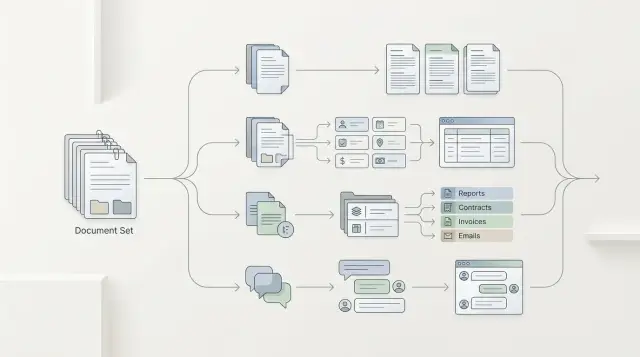
Choosing the right model type is easier when you run one domain dataset through summarization, extraction, classification, and chat, then compare the metrics.
Why the model brand gets in the way
A loud name often pulls the team in the wrong direction. A model can sound convincing in chat and write polished answers, yet still mix up a date, contract number, or amount when it needs to pull fields from a document. For a demo, that is still tolerable. In a real workflow, that kind of mistake breaks the whole scenario.
That is the common trap: a strong chat model gets mistaken for universal quality. But summarization, extraction, classification, and chat require different behavior. Where an operator needs a short, clear answer, one model may be convenient. Where you need strict JSON with no missing fields, it may fail on every fifth example.
The provider name also tells you almost nothing about the result on your data. General benchmarks are useful, but they rarely resemble bank correspondence, telecom tickets, or internal retail requests. Domain texts contain a lot of abbreviations, local terms, awkward phrasing, and noise. On such a dataset, the difference between a famous brand and a less visible model can disappear after one evening of testing.
The brand debate usually ends quickly if you build one shared set of examples. It is enough to take a few dozen real fragments, hide personal data, and give every model the same task. After that, the picture becomes more grounded: for chat, you check whether the answer is useful to a person; for extraction, you count missing and extra fields; for classification, you verify the labels; for summarization, you judge what the model kept and what it lost.
If the team runs that dataset through one gateway, such as AI Router, the comparison gets cleaner: the same request, the same parameters, different models. Then the choice is based on behavior in your task, not on brand recognition.
What to put in a domain dataset
A dataset falls apart if it only contains convenient examples. For comparison, you need 50–200 real cases of the same task, not a mix of different scenarios. If you are checking customer support responses, do not place contracts, news, and marketing texts next to each other.
It is better to take data from the live flow: tickets, emails, requests, chat fragments, incident cards. Then the choice is based on what the team really sees every day, not on a polished demo sample.
A good dataset almost always has several layers: common cases that appear most often; rare phrasings where the meaning is the same but the words are different; noisy texts with typos, extra details, and broken sentences; borderline examples where even a person needs 10–20 seconds to answer.
Without that, the test often lies. Classification may look strong on short, clean texts, then drop sharply on long requests. Chat, on the other hand, sometimes holds up better when the user writes in a scattered and mixed-up way.
The same input is needed for all four model types. Do not shorten the text for summarization, do not clean it up for extraction, and do not rewrite the request for chat. Otherwise, you are comparing not the approaches, but the data preparation.
The expected answer should also stay simple. For extraction, that is one field or a fixed set of fields. For classification, one label from a closed list. For summarization, a short note with 2–3 facts. For chat, an answer that follows rules you can check with a checklist.
How to run a fair test
A fair test breaks in two places: when each model gets a new prompt and when answers are compared on different examples. At that point, you are no longer measuring the model, but the tester’s luck.
Start by fixing the conditions. The same system prompt, the same temperature, one response format. If you expect JSON for extraction, all candidates should return the same JSON with the same fields. If a model cannot keep the format, that is part of the result, not a reason to rewrite the task around it.
Then run all options on the same dataset. Do not split documents based on gut feeling and do not give the hard cases only to chat and the easy ones only to classification. Take one common slice, for example 300 domain records with short, medium, and noisy examples. If the team tests models through one OpenAI-compatible gateway, it is easier to keep one SDK and one codebase, changing only the model and parameters.
Quality by itself tells you very little. Alongside it, track the total cost of the run, the cost of one successful answer, average latency, the 95th percentile, and the share of errors: empty response, broken JSON, refusal, missing field.
Only then do you see the full picture. Sometimes a model is 2% better, but costs 6 times more and responds twice as slowly. For a production scenario, that is often a bad tradeoff.
Before the full test, check a small sample by hand. Twenty to thirty examples are enough to notice major failures: the model mixes up fields, cuts off numbers, loses negation, or writes extra text instead of the schema. That quick review saves hours and prevents a long run with the wrong setup.
Where summarization wins
On one domain dataset, summarization usually wins when the source text is long, uneven, and a person needs to understand the whole situation quickly. This is common for customer emails, call transcripts, internal guidelines, complaints, and incident reviews.
Imagine a claims package: the application, correspondence, rules, and an operator note. Extraction will pull out the date, policy number, and status. Classification will answer a narrow question, such as whether manual review is needed. Summarization can assemble the full picture: what happened, which documents are already available, what response deadline applies, and what is blocking the decision.
You should not look at the smoothness of the text, but at whether the model preserved the anchor details. If the short summary lost the event date, payout limit, response time, or a rule-based restriction, that answer already falls short. It is shorter, but the meaning has weakened.
It also helps to flag overly polished summaries separately. Sometimes the model removes repetition and noise, but throws away the cause-and-effect chain along with it. The source said: the document is missing, so the deadline was moved, and then the case was sent for manual review. In a weak summary, only the delay remains, and the person loses the context.
Another common failure is invented details. If the model added a promised deadline, a rejection reason, or an approval status that was not in the text, that is an error.
Summarization only wins when, after reading it, a person can choose the next action: approve, escalate, request a document, or send the case back for review.
Where extraction wins
Extraction wins when the output is not a pretty paragraph, but a set of fields that the system sends onward right away: into CRM, scoring, search, or reporting. If an operator or service needs a date, contract number, request type, and amount, a free-form answer only gets in the way.
The field schema has to be defined before the test, not after it. Otherwise one model returns "date", another "request_date", and a third writes everything as text, and the comparison loses meaning. For each field, it is better to define the format, allowed values, and what counts as an empty answer from the start.
On domain data, this becomes clear very quickly. Take customer requests: a model may understand the text well, but still consistently miss the account number or communication channel. Those misses are usually more important than stylish wording. If a field is needed for routing a request, one omission already breaks the chain.
It helps to analyze errors by type. There are usually four: empty, even though the value is in the text; extra field that is not in the schema; wrong format; wrong value in a formally correct format.
Check how well the model handles JSON separately. It is a boring test, but it quickly brings you back to reality. One model may extract meaning correctly in 9 out of 10 cases, but on every fifth request break brackets, change data types, or add comments. In production, that response is often worse than a simpler model with slightly lower recall but clean structure.
If the model understands the document but cannot keep the schema, chat or summarization is usually a better fit. If it consistently returns fields according to the contract, extraction has already won.
When classification works best
Classification works best where the system needs one answer from a fixed set. If you have a stream of requests, emails, or tickets, and the label triggers the next action, chat often only gets in the way. It writes in a more detailed way, while the business process needs a short and unambiguous result.
In many tasks, this is the most practical option. A classifier is usually cheaper, faster, and more stable at scale. This is especially visible in banking, telecom, or retail, where thousands of similar messages arrive every day.
Classes are best defined in advance and described with simple examples. For a customer support queue, it might look like this:
- "Card blocked" - "my card was stolen, stop the transactions now"
- "Disputed transaction" - "I do not recognize this payment"
- "Limit change" - "increase the transfer limit"
- "Technical error" - "the app will not let me into my account"
The worst performers are vague labels like "other" or "account question." The model starts mixing neighboring categories, and the team later has to sort the queue manually. If two labels sound similar, check that pair separately. For example, "disputed transaction" and "fraud" often overlap in wording, but they are not the same from a process perspective.
It helps to separate obvious and borderline cases. On obvious examples, almost any strong model will show good results. The mistakes hide in short phrases, mixed intent, and rare phrasings. That is why a separate set of borderline examples is often more useful than another thousand easy ones.
Accuracy alone is not enough. If a model gets 94% right but costs five times more than another model with 92%, the decision is no longer obvious. Look at the cost per decision, latency, and the share of errors in similar classes.
When chat is more useful
Chat is needed where a person refines the task during the conversation. It is not for rigid template answers, but for cases where the request starts vague and then becomes narrower: "Show me the terms", "What if the client is a sole proprietor?", "Only for new contracts." In that work, summarization and classification quickly hit a wall after one turn.
Do not look at the pretty first response; look at 2–3 turns in a row. The model should remember constraints from the previous message, not lose entities, and not change terms halfway through the dialogue. If by the second turn it is already mixing up the product, tariff, or customer status, it is too early to trust it.
A good chat model does not just answer; it asks for clarification when the request is ambiguous. If a user writes "my document did not arrive", the model can first ask for the document type, delivery channel, and deadline. That is more useful than a confident but random piece of advice.
Another simple test: can the model admit that it does not have enough data? In domain texts, this shows up immediately. If the database does not contain the rule, a good model will say so or ask for a fragment of the policy. A weak one will start inventing exceptions and sound convincing right up to the first check.
Chat has a cost. It often spends extra tokens on polite paraphrases, context repetition, and long introductions. If the task boils down to a label, a field, or an exact fact, that format only slows down the answer and increases the cost.
So chat should stay where the conversation really changes the result. In all other cases, it is worth checking first whether a stricter format solves the task better.
A simple example from bank support
The same customer message can be run through four model types, and the result will differ in meaning, not in brand quality. This is especially noticeable in bank support, where the message is often long, scattered, and written in frustration.
Imagine a complaint: "On May 12, 48,900 tenge was charged to my card for a purchase I did not make. The payment went through the app, and I was at work at the time. I had already called support, case number 18427, but there is still no reply." For an operator, that is one case. For the system, it is several tasks at once.
If you take the same text without changes, the outputs will differ. Summarization compresses the message into 1–2 sentences: a disputed card transaction, with the client still waiting for a reply on an already opened case. Extraction pulls out the fields: 48,900 tenge, May 12, channel "app", case number 18427. Classification sends the case to the disputed transactions queue rather than the general support line. Chat does not guess details and asks one precise question, such as: "Do you confirm that you did not share the card or codes with third parties?"
The difference is immediate. Summarization helps the operator understand the essence quickly and avoid reading the text twice. Extraction is needed where fields go into CRM, fraud checks, or an investigation form. Classification saves time on routing. Chat is useful when you cannot move forward without one more answer.
In practice, teams often expect one chat model to cover everything at once. Usually that does not work out. Chat may rewrite the complaint nicely, but miss the amount or confuse the transaction channel. Extraction, by contrast, handles structure well, but will not explain the context to the operator.
That is why you should compare not "which model is better overall", but which type of model gives the needed output at each step of request handling.
Where teams go wrong
Most often the test breaks before the first output. The team takes the same set of documents, but writes a detailed prompt for summarization, a short one for extraction, and adds hints and examples for chat. After that, it looks like the model won, when in fact the test conditions won.
That is why you should compare not only models, but also the operating mode: one instruction template, the same context, the same limits on answer length, and one evaluation scheme.
Another common mistake is an overly clean dataset. The test contains neat emails, tidy tickets, and documents without noise. In production, that is almost never the case: people write with typos, forward chunks of conversation, insert contract numbers in the middle of a paragraph, and mix up dates. On such a dataset, summarization and chat often look better than they actually perform in real traffic.
A good test should almost always include incomplete messages, extra text and repetition, contradictory details, rare but important cases, and examples with different lengths and styles.
A third failure is no less common in strong teams. They mix several tasks into one test: they ask the model to classify the request, extract fields, and write a reply to the customer. Then it becomes hard to tell what exactly went wrong. The classification may be accurate, while chat simply hides gaps in extraction.
In practice, it is better to split the run into separate tracks. First check each task on its own, and only then look at the combined flow. That makes it easier to understand whether you need one model type for the whole pipeline or different model classes for different steps.
The last mistake looks harmless: the team only looks at the average score. The average hides expensive failures. If classification delivers 94% accuracy but confuses a fraud complaint with a normal question in 3 out of 100 cases, that tail matters more than the pretty overall number.
That is why you should keep a list of critical misses next to the average score. For a bank, telecom team, or public service, that is usually more important than a one- or two-point difference in the overall table. One missing contract number or wrong request status can end up costing more than the whole debate about which model is "smarter".
A quick check before choosing
Before discussing the model brand, put together a short but honest test. Take the same domain dataset, give all options one prompt, and require one response format. Otherwise, you will compare not model types, but differences in wording.
Usually 10–20 examples are enough if the team has reviewed them and agreed on which answers are good, borderline, or bad. That manual review is almost always more useful than a nice average metric without context.
Look at three things right away: answer quality, request cost, and latency. Sometimes chat sounds polished and useful, but uses more tokens and responds more slowly. Extraction or classification can solve the same task faster and cheaper because they do not try to "converse" where a precise result is needed.
Mini check
- One example set for all runs
- One instruction text without changes per model
- One response format: JSON, class label, or short summary
- Separate notes for cost and latency
- Manual review of 10–20 answers by the team
After a run like that, it usually becomes clear where a strict schema is needed. If you are extracting a contract number, date, amount, or request status, free-form chat only gets in the way. If the operator needs a brief conversation summary or a draft reply to the customer, the conversational format often wins.
If you compare models through AI Router, the task gets easier: the model changes, while the code and entry point stay the same. For teams in Kazakhstan and Central Asia, it is also a convenient way to keep one LLM API gateway without rebuilding the integration for every provider. That leaves less unnecessary noise in the test.
What to do next
Start with one clear business task. Not with the idea of "let’s test every scenario at once," but with a narrow set of examples from one process. 80–150 real cases is enough if the team can quickly say whether an answer is good or not. Then the choice will rest on facts, not on brand.
After that, it is better to move in short cycles. Take one domain dataset and one evaluation format for all model types. Compare 2–3 models in each type, not dozens of options at once. Look not only at the average score, but also at failures in hard examples. And choose in advance not only the quality winner, but also a backup option on price.
A backup option is almost always needed. The highest-quality model may be too expensive for the full flow or may create too much latency during peak hours. If the gap is small, the cheaper model often wins in real work.
When the integration does not change on every run, the comparison is cleaner. That is one practical reason why teams like to test through airouter.kz: they can switch models and providers without rewriting the SDK, code, or prompts. In that setup, it is easier to compare answers, price, and stability, instead of the surrounding plumbing.
After such a run, you usually do not end up with "the best model overall," but with a clear decision table for specific steps in the process. For example, classification goes to production by default, chat stays for complex dialogues, and extraction is enabled where field accuracy matters. From there, you can launch a pilot and measure the impact in money and team time.
Frequently asked questions
How do I know which model type I need?
If the system needs a date, amount, contract number, or another set of fields for CRM, search, or reporting, choose extraction. If an operator needs to quickly understand a long text and decide what to do next, summarization is usually a better fit.
Chat is useful when a person уточняет the question during the dialogue. Classification works best when the output must be one label from a fixed list.
How many examples do I need for the first test?
For a quick first pass, 10–20 examples are usually enough. That kind of run helps you catch obvious failures: missing fields, invented details, broken JSON, and extra text.
For a fairer comparison, it is better to collect 50–200 real cases of the same task. Then you can see how the model behaves on noisy and borderline examples.
Can I give each model its own prompt?
No, that quickly makes the comparison meaningless. When you change both the model and the prompt, you no longer know what caused the difference.
It is better to fix one system prompt, one temperature, and one response format. If a model cannot keep the conditions, that is part of the result.
What should a good domain dataset include?
Use live texts from the flow you want to automate: emails, tickets, chats, requests, incident cards. Do not mix different tasks in one dataset if you want a fair comparison.
It helps to include common cases, rare phrasings, texts with typos, and borderline examples. On a too-clean sample, almost any strong model looks better than it will in real work.
What metrics should I look at besides quality?
Look not only at answer quality. Track the total run cost, the cost per successful answer, average latency, the 95th percentile, and the error rate.
In practice, a model with slightly better quality often loses if it is noticeably more expensive, slower, or frequently breaks the format.
When does summarization win over the other options?
It is useful when the source text is long, uneven, and a person needs to understand the situation quickly. That is common for customer emails, call transcripts, complaints, and incident reviews.
Check not whether the text sounds polished, but whether the facts were preserved. If the summary lost the date, deadline, limit, or reason for the decision, the answer is not helping anymore.
When should I choose classification right away?
Classification is best for streams of similar requests where the label triggers the next action. It is usually cheaper and faster than chat when the system needs one short answer from a fixed set.
A pre-defined class list with simple examples works well. The vaguer the labels, the more often the model confuses neighboring categories.
What if the model understands the text but breaks JSON?
Do not try to rescue the result with manual edits after every failure. If the task needs strict JSON, keeping the schema is part of quality, not a minor detail.
Usually there are two paths: simplify the schema and test again, or choose a model that consistently returns the right structure. If the schema keeps falling apart, that option is a poor fit for production.
Why does the model brand often lead people to the wrong choice?
A big name often sells the demo well, but it does not guarantee results on your data. Domain texts are almost always full of abbreviations, noise, local terms, and awkward phrasing.
That is why it is better to close the brand debate with a short test on real examples. Sometimes a less visible model delivers the same or better result after just one evening of testing.
How can I simplify comparing multiple models in one integration?
The easiest way is to keep the same code, SDK, and request format, and change only the model and parameters. Then you compare answers, cost, and latency, not differences in the surrounding setup.
If the team uses one OpenAI-compatible gateway, that kind of test is much easier. With AI Router, it is also convenient for teams that want a single API and a test without rebuilding the integration.