Choosing a Model Family for a New Feature: A Decision Tree
Choosing a model family for a new feature: we break down the decision tree by language, response format, latency, budget, and data requirements.
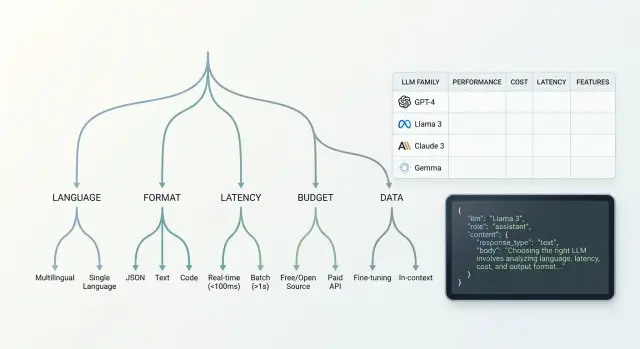
Why one model does not fit every feature
The same model can write a great reply to a customer and still be bad at filling fields for a system. That is normal. Tasks only look similar from the outside. Inside, they have different requirements.
A simple example: the feature "answer a question about an order" can survive a little extra text if the meaning is accurate and the tone is calm. But the feature "extract the contract number and status from an email" can break because of one extra line. If the model adds an explanation instead of clean JSON, the workflow stops.
The difference is not only in quality, but also in the cost of a mistake. Extra text gets in the way of automated processing. Broken JSON interrupts the chain and sends the task to manual review. A slow reply frustrates the user and slows down the operator.
That is why the "best model" is almost never the best for everything at once. One model family handles format better. Another is cheaper on long prompts. A third understands Russian, Kazakh, or mixed messages much better. Sometimes a model looks great in a demo but falls apart in production, where there are many short requests, noisy data, and a strict time limit.
Every new feature has its own risk, which means its own set of checks. For internal search, you can forgive a rare inaccuracy and choose a cheaper option. For extracting details, moderation, or support replies, the cost of a miss is higher. There, format, stability, and predictable behavior across hundreds of similar requests matter most.
It is better to start model selection not with rankings, but with a simple question: what will break first if the model makes a mistake. This approach is especially useful when the team has access to several families through one API. Then the difference shows up not in vague claims, but in your feature, your data, and your latency limit.
Where to start before selecting models
Start not with the model, but with one simple task. If a feature does three things at once, the comparison quickly loses meaning. It is better to describe one user step and one result you expect from the model.
Example: a user writes "check if I can return the item." You do not need a long text, but a short answer with the decision and the reason. Even here it is clear that accuracy, answer length, and a clear format matter.
Next, define the input data. The model may only read the user question, or it may also receive the conversation history, a document excerpt, a customer card, or form fields. This has a big impact on the choice. Some models handle long context better, while others work well on short prompts and cost less.
It helps to describe the task in one line: what comes in, what should come out, and how many steps sit between them. Without that, the choice quickly turns into a debate based on gut feeling.
Set the hard limits right away. What is the maximum acceptable response length? How many calls can you make per request: one, two, five? If the feature has to respond in 2–3 seconds, a long chain of multiple model calls may not work, even if the quality is higher.
Do not delay example collection. Before the first test, gather at least 20–30 real requests, not invented phrases from a meeting. You need live wording with mistakes, short phrases, extra details, and empty fields. That is where it becomes obvious where the model gets confused.
A good sample set usually includes a simple case, a borderline case, a noisy case, and a rare case. Then the LLM decision tree is built on facts, not on a polished demo.
How language affects the choice
Language quickly eliminates part of the models. What sounds smooth in Russian may confuse facts in Kazakh or break on mixed requests, where part of the sentence is in Russian, part in Kazakh, and terms are left in English.
That is why it is better to test not one shared set of examples, but three separate streams: Russian, Kazakh, and mixed. For teams in Kazakhstan, this is a normal situation. One customer writes: "I need a statement for March," another says "Наурыз айы бойынша шот керек," and a third mixes both languages in one message.
It is worth adding the things models most often get wrong:
- amounts, dates, and contract numbers
- first names, last names, and company names
- addresses, branches, and cities
- spoken abbreviations and local slang
A good test example: "They charged 12,450 tenge on 03.04, the card is in the name of Aliya Nurpeisova, the branch address is Astana, Sarayshyk 7." A weak model may rewrite the text smoothly but lose the amount, confuse the name, or simplify the address. For a working feature, that is already an error, even if the answer sounds confident.
Do not look only at style. Check the meaning: did the model preserve the fact, number, name, customer request, and language of the response. If the feature summarizes information, check whether details disappear. If the feature replies to customers, watch the tone. The text should be simple, calm, and free of bureaucratic language.
In practice, the winner is often not the strongest model in the general rankings, but the one that keeps Russian and Kazakh more consistently without losing facts. If you have one gateway to access multiple providers, this test is much easier to run: you can send the same set of requests to different families and immediately see where meaning breaks, not just style.
What response format does the feature need
Model families are often chosen not by text quality, but by how reliably the model keeps the required format. If a feature must trigger an action, write data into a CRM, or build a card in the interface, a nice answer alone does not help.
First, define one main output type. Free text is good for explanations, draft emails, or short replies to an operator. JSON is needed when code reads the answer. A table is convenient for a person comparing options. A tool call is needed when the model has to choose a command and pass arguments.
This is a quick filter. Two models may write text equally well, but one consistently returns JSON that matches the schema, while the other breaks fields on the third example.
Where format breaks most often
Check the schema not only on normal requests. Give the model empty input, very long input, and noisy text with extra symbols, broken phrases, and mixed languages. That is where you can see whether it can hold the structure without manual fixing.
Also test long context and nested fields separately. A simple schema with two strings rarely causes problems. But an array of objects, nested statuses, rejection reasons, and quotes from the conversation break much more often. If the feature reads a long conversation and has to return complex JSON, the list of suitable models becomes much shorter.
A good example is a support feature where the model reads a customer conversation and must return the ticket category, urgency, a short summary, and an escalation flag. Free text may still work for a person. For a ticket queue, strict JSON is required, or the integration will start failing.
Build in a retry from the start. If the model returns text instead of the schema, the system can send the same context one more time with a strict instruction to fix the format, or run the response through a simple validation step. This is normal production protection, not a temporary workaround.
Where latency and budget limits begin
When choosing a model, do not start with a quality score. Start with two hard limits: time to first token and time to full response. Without these boundaries, tests almost always drift toward the strongest model, even if it is too slow or too expensive.
In online scenarios, people notice the pause almost immediately. If a chat responds after 3–4 seconds, the interface already feels heavy. For background tasks, the rule is different: the user is not waiting at the screen, so you can choose a slower model if it delivers better quality or a lower cost at scale.
Typical targets look like this:
- support chat and on-screen search answers: first token in 1–2 seconds, full response in 5–8 seconds
- an assistant inside a work interface: first token in 2–3 seconds if the answer is more accurate and longer
- background classification, document processing, nightly reports: price and stability on the stream matter more than first-token speed
Budget is calculated not from one nice example, but from 1,000 real requests. The calculation includes the system prompt, conversation history, retrieved knowledge-base fragments, the response format, and the output tokens themselves. If the model often fails the JSON structure and you make a retry, the cost rises immediately.
A simpler way to calculate it: take 1,000 typical requests from a week, add the average context length, the share of retries, and a buffer for long conversations. Then compare not the model price on paper, but the cost of the feature in production. The difference often reaches 1.5–2x even between families with similar pricing.
In practice, it is useful to run the same set of requests through several models and look at two tables: latency and total cost at volume. If the team works through one OpenAI-compatible gateway, this test is easier to run without changing the SDK or code. In that sense, AI Router is convenient as a single comparison point: you can switch base_url to api.airouter.kz and test multiple providers in one scenario.
If a model passes quality checks but does not fit the latency or budget limits, do not discard it immediately. Often a better setup is a combination: a cheaper model handles the main flow, and a stronger one is used only for hard cases or for rechecking.
What to check in the data before the first test
The first filter for a model is not response quality, but the data you will send it. If you do not sort this out in advance, the team quickly runs into unnecessary risks: personal data goes outside the intended boundary, logs end up somewhere else, and the pilot has to be rebuilt.
First, map the request itself. Look for PII, trade secrets, contracts, account numbers, addresses, diagnoses, call recordings, or customer attachments. Sensitive data often sits not in the main text, but in the chat history, the system prompt, the file name, and service fields.
Then decide what the model should see in plain form. If a phone number does not affect the answer, mask it before sending. If the feature works with patient requests or banking applications, it is useful to divide data into three groups right away: what can be sent as is, what needs masking, and what cannot be sent outside the boundary at all.
Also check the data path after the request. Where does the system store logs, files, model responses, and temporary caches? Who can read them? How long do they live? This is often missed during the pilot, and later it turns out that only the API call is safe, not the surrounding services.
If your environment requires data to stay inside the country, that must be checked before the first test, not after a successful demo. For companies in Kazakhstan, not only the model and price matter, but also where processing, storage, and logging happen. In such cases, teams often choose a gateway or hosting where data can remain inside the country while preserving a familiar OpenAI-compatible workflow. In AI Router, this scenario is handled at the API gateway level: data can be stored inside Kazakhstan, PII can be masked, audit logs are available, and limits can be set at the key level.
At the end, write down the rules: what content labels you use, what audit logs you collect, and what key limits teams and services need. This takes an hour. The savings later are measured in weeks.
How to build the decision tree step by step
A practical tree is best built as a series of cutoffs. That way, the choice moves faster: you remove unsuitable branches right away and do not waste time on expensive runs.
First, check the language and text quality on your own examples. Take 20–30 real requests for the new feature and see how the models write in the required language, handle terminology, and understand mixed messages. If the feature works with customer conversations, judge not only how smooth the reply is, but also the meaning, tone, and factual accuracy. Families that already struggle here do not need to go any further.
Then check the response format. If the feature must return JSON, a set of fields, or a strict schema, test exactly that. A model can write good text and still break the structure on every tenth request. In the decision tree, that is a separate branch: free text, predictable JSON, and agent-style output require different families.
The next filter is latency and price. Look at the range, not one lucky run. If the answer must come in 2–3 seconds, long-thinking models often drop out, even if they are stronger on complex tasks. If the feature is high-volume, calculate the cost across 1,000 typical requests, not just one demo task.
After that, check the data requirements. Where can prompts and logs be stored, is PII masking required, can data be sent outside the country. For teams in Kazakhstan, this is often not a formality but a hard constraint.
At the end, keep 2–3 families and run them on the same test set. Track four things: answer quality, valid schema rate, average latency, and cost. The winner is usually obvious without long debates.
Example for a new support feature
Imagine a store chat. A customer writes in Russian or Kazakh: asks where the order is, asks for a refund, or complains about a delivery error. The feature must reply briefly and return JSON with the topic so the system can route the conversation to the right flow.
Under these conditions, the decision tree narrows the choice quickly. If the operator needs a reply in under 2 seconds, large slow models usually drop out first. For a support line, this is a normal trade-off: a little less depth, but the conversation does not freeze and the queue does not grow.
Next come several checks. The model must clearly understand both Russian and Kazakh in short, natural phrases, not only in clean test cases. It must return clean JSON without extra text before or after the braces. It is also important that it does not confuse the topic of the request if one message includes both emotion and facts, for example a delayed delivery plus a request for compensation. And of course it must stay within budget when there are thousands of such messages per day.
The last filter here is often the strictest: personal data. Support messages almost always contain an order number, a phone number, and sometimes an address. If you send that to the model as is, the team will quickly run into data requirements. So it is wiser to hide PII first, and only then ask the model to draft the answer and return the topic field.
For teams in Kazakhstan, this scenario often leads to a fast model family through a local gateway. That keeps the familiar OpenAI-compatible call and separately handles data storage, auditing, and masking. But the overall conclusion is the same for any stack: in this kind of case, the winner is usually not the smartest model, but the most stable and fastest one.
Common mistakes when choosing
Most often, teams do not make mistakes in comparing the models themselves, but in setting the boundaries. If you do not define a price ceiling, the strongest model almost always wins, and a week later the bill breaks the feature’s economics. For a new capability, it is better to set the cap right away: how much one successful response may cost, how much you can spend per day, and where some buffer is acceptable.
Another common mistake is testing on a few neat examples. Almost any model looks convincing there. The problems start on the live stream: Russian with English inserts, typos, empty fields, copied Excel text, long order numbers, text without punctuation. If these are missing from the test set, the conclusions will be too optimistic.
It is also worth catching failures that are not visible in a polished demo. A model may return broken JSON, cut off the response halfway, or miss the time limit. For a feature that passes the result to another system, this is often more important than a few points of quality difference. Measure not only accuracy, but also the share of valid responses, timeouts, and retry count.
Data mistakes usually show up last, which makes them the most expensive. If the feature handles customer requests, medical data, or internal documents, logging questions cannot be postponed. You need to decide in advance where prompts are stored, who sees the audit logs, how PII is masked, and whether data can be sent to an external provider at all.
For teams in Kazakhstan, this is especially important. Data residency requirements and AI content labels are better checked before the pilot, not after the first complaint from security. If you use an API gateway like AI Router, some of these restrictions can be handled at the infrastructure level. But the order is always the same: data and reliability constraints first, then quality comparison.
A short check before launch
Before release, it is useful to pause for 15 minutes and run through a short checklist. That is cheaper than later fixing bad JSON, chasing timeouts, or explaining to security why personal data remained in the logs.
For model selection, a general impression from the demo is not enough. You need a set of live requests: 20–50 examples from the feature you are launching, with expected answers рядом. If the feature is in support, take real customer messages with different lengths, typos, and a mix of Russian, Kazakh, and English.
Check five things:
- there is a test set of real requests and a clear reference answer
- limits are set for latency, cost per request, and context length
- there is a separate test for format: JSON, table, or correct tool call
- a decision has been made about PII, logs, and data storage location
- there is a fallback route if the primary model is unavailable or becomes too slow
This check is especially important where mistakes are visible immediately. If the feature must return a structure for a CRM, one extra comment from the model already breaks the integration. If the feature reads a long conversation, a short context window will produce fragments of meaning even if everything looked fine on simple examples.
For teams in Kazakhstan and Central Asia, one more question is often added to the list: storing data inside the country. It is better to make that choice before launch. Otherwise, the whole setup may need to be redone for security requirements.
What to do after the first selection
After the first selection, do not roll the model out across the whole feature. Take one narrow scenario where the result is easy to check. For support, for example, this could be only answering a question about order status, not the entire request flow at once.
Such a pilot quickly shows weak spots. You will see where the model breaks the format, where it confuses the response language, and where it simply becomes too expensive.
Keep two models right away: a primary and a backup. The primary works in normal mode, while the backup is there in case of price spikes, provider outages, or quality drops. It is a simple insurance policy that saves a lot of time later.
Once a week, look not only at the team’s average rating. You need numbers for the same metrics:
- cost per successful response or per 1,000 calls
- format error rate
- average latency and the tail of slow responses
- number of user complaints or manual corrections
If one model writes a bit better but breaks JSON in 8% of cases, it often loses to a more stable option. For production, that matters more than a pretty result on a few lucky examples.
When comparing providers, it is useful to keep one OpenAI-compatible endpoint. Then the team changes the model or base_url, while the SDK, code, and prompts stay the same. For such checks, AI Router works well as a single access point: you can quickly switch models and providers without building a new integration for each one.
If the feature works with customer requests, it is better to check data before the pilot on real requests. Verify data storage inside the country, PII masking, and audit logs in advance. Otherwise, a good paper test quickly runs into security and compliance requirements.
A good outcome of the first selection looks quite practical: one scenario, two models, clear metrics, and a simple rule for when the system switches to the backup route.
Frequently asked questions
Why does one model rarely fit every function?
Because tasks have different costs when they fail. In chat, an extra sentence usually does not matter, but in an integration, one comment instead of clean JSON can break the workflow.
Where should I start when choosing a model family?
Start with one narrow function, not a broad idea. Define what comes in, what should come out, what format you need, and how many seconds you have for a response.
How many real examples should I collect before the first test?
Usually 20–30 real requests are enough to spot the first failures. Use actual phrases with mistakes, empty fields, short messages, and extra details, not invented examples.
Should I test Russian, Kazakh, and mixed messages separately?
Yes, if users write in Russian, Kazakh, and a mix of both. A model may sound smooth in one language and still lose facts, dates, or names in another.
When does a function need JSON, and when is plain text enough?
If the response is read by code, use JSON or a tool call. If a person reads the text and needs an explanation, free-form text is fine, but it is still better to set the length and tone in advance.
What speed limits should I set right away?
For chat and in-app interfaces, set a hard limit for time to first token and time to full response before comparing models. If a user is waiting on screen, a slow model quickly becomes frustrating, even when it writes better.
How do I calculate the budget for a model fairly?
Do not calculate the model price on paper only. Estimate the cost of one successful response at scale. Add the system prompt, history, long requests, and retry calls if the model sometimes breaks the format.
What should I check about PII and data storage before the pilot?
First, identify what data you are actually sending to the model. Phone numbers, account numbers, addresses, diagnoses, and service fields should be reviewed in advance, masked where needed, and the storage of logs and caches should be decided separately.
Do I need a backup model after the first selection?
Yes, it is a simple safety net. The main model handles the normal flow, and the backup saves you when latency rises, quality drops, or the provider is temporarily unavailable.
Why compare models through one API gateway?
Yes, it is easier to compare models on the same set of requests without extra work. If you have one OpenAI-compatible endpoint, the team can change base_url and test different families without rewriting the SDK, code, or prompts.