Checking Links and Details After Email Generation
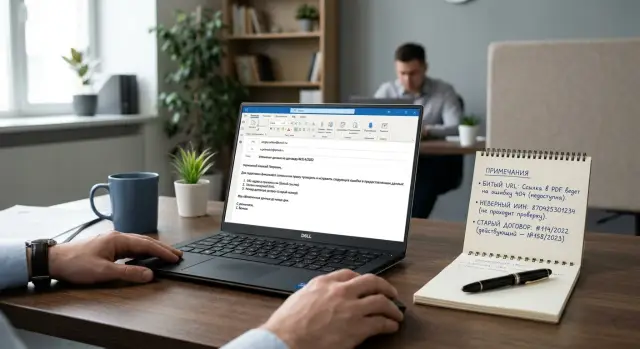
Checking links and details after email generation helps catch broken URLs, IIN mistakes, and old contract numbers before the client sees them.
Why errors still reach the client
An email can look neat and convincing even when it already contains a mistake. People quickly judge the meaning, tone, and structure, while they often scan numbers, details, and addresses only diagonally. That is why an email can seem ready even though it already contains an old contract number or a link to someone else’s page.
One common reason is an old template. It may still contain a previous client’s details, last month’s payment information, or an outdated contract block. The model treats that text as the base and carries it forward, especially if the prompt does not include an exact list of current data.
People make mistakes in just as predictable a way. Before sending, an employee usually reads the email the way a client would: is it polite, is the meaning clear, are there any obvious mistakes. In that mode, a 12-digit IIN can easily seem correct simply because it looks familiar. The brain is good at recognizing patterns and bad at noticing one wrong digit in a long string.
Contract numbers work the same way. If a company has dozens of similar documents, the difference often comes down to one date, one letter, or the last two digits. Numbers like 24-0518 and 24-0581 look almost the same, especially late in the day or in a long email thread. This is not about carelessness. Such sequences are hard to verify without a separate cross-check.
Links are even trickier. A URL can look convincing: a familiar domain, a familiar structure, the right word at the end. But it may lead to an old form, a test page, or another client’s document. If the reviewer does not open the link, they see a normal address and move on.
Errors most often reach the client where the team relies on one quick read. That is not enough for this job. Links, details, and identifiers need to be checked in a different mode: slowly, literally, almost like counting money before payment. As long as there is no separate step for numbers and links, even a good email can still go out with an expensive mistake inside.
What to check in every email
Even a well-written email can fail because of one detail. The client reads the message quickly, clicks the link, looks at the amount, the details, and the contract number. If even one of those parts is wrong, trust drops immediately.
The easiest way is to split the check into four areas: links, payment details, contract data, and recipient data. The point is not the writing style, but the fields the client will use right now.
First, open every link in the email. Check the payment page, the document, the personal account, and any attachment if there is a link to it. The link should lead where the text promises, without an error, an old redirect, or someone else’s domain.
Then compare the IIN, BIN, and bank details. Look at them character by character, not by overall meaning. One missing digit in an account number or BIC can break the payment, and the client usually notices it before the company does.
After that, check the contract number, date, and document version. A very common mistake looks like this: the email is new, but the contract number was pulled from an old template. The same happens with the date of an attachment and an older version of the offer.
Finally, compare the client’s name, the company name, and the form of address. If the subject line names one recipient but the body mentions another, the email looks like a mass mailing, even if everything else is correct.
Do not look only at the email itself. Check the attachments too. Sometimes the text is right, but the PDF inside still contains an old contract number or old payment details. The client will consider the whole package wrong, not just one file.
A typical example is a payment email for a contract. The manager writes the correct amount, but inserts an old invoice link where the contract and the BIN are already different. Formally, the email is almost correct. For the client, it is already questionable.
If you review a lot of outgoing emails, do not change the order. First links, then payment details, then contract data, then name and company. The same route noticeably lowers the risk of missing a small but costly mistake.
How to build a reference for comparison
Email mistakes often start not in the text, but in the source data. If a manager takes the contract number from an old email and accounting copies the details from its own spreadsheet, verification quickly loses its value. You need one source of truth that the team uses before sending.
Usually one file, one system record, or one client card is enough, and one specific person or department should own it. It can be CRM, an accounting system, or an internal spreadsheet with limited editing access. There should be as few copies as possible. Otherwise someone will definitely check the email against an outdated version and think everything is fine.
The source should store only current data that often ends up in the email: company details, the correct format of the company name, the IIN or BIN, working URLs, current contract numbers, and the list of fields employees must not edit manually.
It is better to keep links separate instead of pulling them from an old thread. For each link, it helps to note where it is used, who owns it, and when it was last checked. That makes it easier to catch broken URLs before the email is sent.
The same order applies to contracts. Keep current numbers in one place and archived ones in another, with the end date of validity. Otherwise an old number will sooner or later return to the email through autofill or copy and paste from a template.
Mark the fields that should not be edited manually. These usually include the IIN, BIN, bank account, contract number, amount, payment date, and payment or document links. If someone can freely rewrite those fields, any verification quickly becomes a formality.
A good source of truth should not be complicated. It should answer one question fast: what exactly am I comparing this email with right now. If that takes more than a minute, the source is already inconvenient and will soon start causing errors.
How to check an email step by step
Start with the recipient, not the text. An error in the recipient is worse than a typo in a paragraph: the email goes to the wrong person, and then it is hard to take back. Immediately check who the email is going to, whether the subject matches the content, and whether the right files are attached. If the email is about a contract but the attachment is an old version of the act, the client will notice that before finishing the first screen.
Keep the source of truth nearby: CRM, the client card, the contract template, or the invoice from the accounting system. Do not compare data from memory. Memory fails most often where everything seems familiar.
Then open each link directly from the email. Do not look only at the URL text. Opening it immediately reveals a broken page, an old redirect, or a transition to a test account instead of a live one. If the email has several links for payment, documents, and the personal account, check them one by one, even if they seem standard.
After the links, move to the payment details. Compare the IIN, contract number, date, amount, and payment deadline with the original record, not with other parts of the email. An email can look logical and still be wrong. An old contract number can easily carry over from a previous template, while the amount is already current. You often cannot spot that by eye.
The working order is simple: first identifiers, then money, then deadlines. The IIN and contract number are best checked character by character. Check dates together with the month and year, because the error often hides in the period itself. Compare the amount together with the currency and the format, especially if the email is assembled from several fields.
If the email is sensitive, send a test copy to yourself or a colleague. It takes a couple of minutes, but it catches what ordinary reading misses: a broken attachment, awkward line breaks, an extra space in the details, or the wrong subject line on a mobile screen. For emails about payment, contracts, and personal data, this test should be a rule.
When the whole check follows the same route, errors drop within a week. People stop jumping around the email and start checking the parts that actually cause problems for the client.
A contract and payment email example
This is especially clear in a simple work case. A manager prepares an email for a client after agreeing on a contract extension. They take a template, ask the model to assemble the final text, and insert data from CRM: the contract number, amount, payment deadline, and a button that leads to the payment page.
The email looks neat. The tone is even, the date is correct, and the amount matches. In that kind of setting, small errors are easy to miss.
But there are two problems in the text. The model pulled the contract number from last month because it appeared more often in the conversation history than the new one. And the payment button leads to an old page that the team used before the payment form was updated.
If the email goes out without a check, the client will notice the mismatch right away. They will open the contract, see the wrong number, and either ask for a correction or simply delay payment. It is even worse if they click the button and land in the wrong place. After that, trust in the email drops, even if the amount and other details were correct.
Usually this can be fixed in one short pass. Compare the contract number in the email with the deal card or the latest approved file, open the link in the button and check that the page is active and refers to the right client or plan, look at the payment deadline and the amount next to the contract rather than only in the email body, and remove old details from the text if the model pulled them from a previous thread.
In practice, the mistake is usually found not through complex logic, but through a simple mismatch. The deal card shows contract No. 54-11/25, while the email suddenly says No. 54-10/25. Then the manager opens the payment button and sees an old page with the previous service description. Both issues can be fixed in a few minutes.
The takeaway is simple: a smooth text does not mean an accurate text. A model can write an email with no spelling mistakes and still insert an old contract number or a broken URL. That is why the review should be built around checking against the source, not around the feeling that the email looks right.
Where verification fails most often
Most errors appear not during generation, but after it. The email already looks believable, so people read it for meaning and miss the details. That is how a broken URL, someone else’s IIN, or an old contract number reaches the client.
One of the most common failures starts with a familiar step: an employee opens an old thread and copies a successful piece of text. It saves a couple of minutes, but the email keeps leftovers — a link to an old payment form, a contract number from another case, or details from a previous deal. If there are many templates, the eye quickly stops noticing those leftovers.
Problems also often appear in the last round of edits. The manager changes the amount, the lawyer asks for an updated phrase, the accountant sends a new invoice, and someone manually edits the email a minute before sending. At that point, the data begins to drift: one version in the first paragraph, another in the attachment, and a third in the subject line.
Another weak spot is having several systems with different versions of the same data. CRM stores one contract number, the accounting system stores another, and a PDF in the document folder has a third version. In Kazakh companies, this is especially noticeable with payment details: the IIN or BIN has already been updated in one system, while the email template still pulls the old value from another. Even automatic verification can make a mistake here, because it compares the email against the wrong source.
File names add to the confusion too. "Contract_final.pdf", "Contract_final_2.pdf", and "Contract_new_may.pdf" almost guarantee a mistake if the employee is in a hurry. The wrong file gets attached, while the email text already refers to the new version. The client opens the attachment and sees a different number, a different date, or old payment terms.
Usually the failure looks like this: the email text was built from fresh data, the attachment came from an old folder, the link was copied from a previous chain, and the details were pulled from a system that had not been checked in a long time.
The most dangerous situation is a mix of nearly correct data. When the email is 95% right, the team relaxes. But the client notices exactly the remaining 5%.
Why automatic verification makes mistakes too
Automatic verification often misses not the hard errors, but the most annoying ones. The system sees that a string looks like an IIN, a link looks like a URL, a contract number looks like a contract number, and marks the email as fine. That is not enough for sending.
The most common problem is that the system checks form, not meaning. An email can contain a valid 12-digit IIN, but it belongs to a different client. A contract number can match the template, even though a new one is already active in the database. The machine does not get the field length wrong, but it does get the value itself wrong.
The same happens with payment details. If someone manually replaced the BIN, account number, or contract number in the template, a formal check usually will not notice. It will say the field is filled in. The client will receive an email with someone else’s or outdated data.
Automatic verification most often breaks in four places. It checks only the email text and does not compare it with the attachment. A short link passes as working, but the redirect leads to an old or closed page. A number, IIN, or amount appears in the email but does not match the client card or the latest contract version. After a detail is edited, nobody records who changed it and when.
Attachments create many of these failures. The text already shows the new contract number, while the PDF still has the old one. The manager sees a neat email, does not have time to open the file, and sends everything as is. The client notices the mismatch immediately because they pay by the document, not by the email body.
Short links are not much better. A check may confirm that the domain responds with code 200 and stop there. But the client clicks the link and lands not on payment, but on an old form, a test page, or an access error screen. If the email is about payment, that kind of miss quickly turns into a delay.
A proper check should connect the email to the source data, open the attachment, follow redirects in the link, and keep a change log. Otherwise automation only creates the appearance of control.
A quick pre-send checklist
Review should not take half an hour. If the template is already assembled, a short pause before sending is usually enough. Very often, that one minute saves you from a client call, a follow-up email, and an awkward explanation.
Focus not on style, but on the fields where mistakes cost money or time: the link, IIN, contract number, amount, date, deadline, and recipient address. It is better to keep the same order every time. Then your eyes do not jump around the email, and you miss fewer small things.
A quick checklist can look like this:
- open every link in the email and make sure the page loads and leads where it should;
- compare the IIN with the client card, not with the previous email;
- check the contract number and its version;
- compare the date, amount, and payment deadline with the attachment;
- check the recipient address, especially if the mail client pulled a contact from history.
There is a simple trick: read the email like a client. Do not think about what you meant to send. Look only at what the person will see in the subject line, the body, the attachment, and the address bar.
If a model assembles the email, do not trust fields that merely look plausible. An LLM can easily insert an old contract number from an example, take an IIN from a neighboring card, or leave a broken URL from the template. The text still looks neat.
A good threshold for manual review is 30 to 60 seconds. If one email takes much longer, build a short checklist directly into the form or email template and go through the items in order. That reduces risk without extra bureaucracy.
What to do next
After generation, the email should not go straight to the client. In practice, a separate step in the sending flow works better: the model generates the text, the system checks the fields against the rules, and only then does the email go out.
Start with a simple route. Broken URLs, IIN mistakes, and old contract numbers almost always appear in links, the client card, and inserts from previous templates. If you place the check right after the model response, those mistakes are caught within seconds, before anyone has seen the email.
A working setup usually looks like this: the system checks that every link opens and leads to an allowed domain, compares the IIN, contract number, amount, and date with the record in CRM, ERP, or the contract database, sends the email for manual review if it sees two similar values or cannot confirm a field, and stores all found errors in one log. Once a week, that log should be reviewed and used to fix templates, rules, and prompts.
It helps to use three verification statuses: ok, warning, and stop. The first lets the email move on, the second sends it to an employee, and the third blocks sending. This keeps the team moving and prevents questionable emails from going out automatically.
Do not remove people from the process. IIN checks before sending and contract number verification are easy to automate, but questionable cases are better shown to a person. If a client has two active contracts with close numbers, a person will sort it out faster than any general rule.
Capture not only the errors themselves, but also their source. If the same old contract number keeps appearing, the problem is usually not the model, but the template, reference list, or old email fragment. This kind of log quickly shows what needs fixing first.
If the team works with several models through one gateway, it is convenient to place the verification layer between the model response and the sending service. For example, when working through AI Router on airouter.kz, you can change the model or provider without rebuilding the verification logic itself. For this kind of process, that is more useful than it may seem: the checks stay in place even if the request route changes.
The main idea is simple. Do not send an email just because it looks neat. Send it only after a short, literal check of links, details, attachments, and contract data.
Frequently asked questions
Do I need to open every link in the email?
Yes, every single one. A link can look perfectly normal even if it leads to an old form, a test page, or someone else’s document. Open it directly from the email and check what loads, whose screen it is, and whether it matches the text of the message.
What should I check first before sending an email?
Start with the recipient, the subject, and the attachments. Then check the links, and after that verify the IIN, BIN, payment details, contract number, amount, and deadline. Using the same order every time reduces the chance of missing a small but costly mistake.
Why does an old contract number appear in an email?
Usually it comes from an old template or a previous thread. The model takes a familiar fragment and keeps it if you do not give it the exact current fields. That is why it is better to insert the contract number and links from one source of truth, not from the email text itself.
How can I quickly check the IIN, BIN, and bank details?
Compare them character by character with the client card or the accounting system. Do not rely on memory and do not compare them only within the email, because the email can look logical and still be wrong. Long numbers are easier to read in short groups so the eye does not skip a digit.
Do I need to check PDFs and other attachments separately?
Yes, absolutely. Very often the email text is already new, but the PDF inside is still old. Open the exact file attached to the draft and check the contract number, date, amount, and details inside it.
When does automatic verification stop being enough?
That happens when the system checks only the shape of a field, not its meaning. It sees 12 digits and marks the IIN as valid, even though it belongs to another client. The same goes for links and contracts: without checking against the data source, automation can easily miss an error.
Which source should count as the reference for verification?
Use one source owned by a specific person or team. It can be CRM, an accounting system, or a client card with closed editing. If the team checks emails against different spreadsheets and old emails, mistakes are almost unavoidable.
What if different systems show different details or contract numbers?
Do not send the email until you know which record is the main one. First identify the data owner, then fix the differences everywhere else. If you try to choose what only seems most likely, you will just move the confusion into the next email.
How long should the final manual check take?
For a normal email, 30 to 60 seconds is enough if you already have a clear review flow. If it takes much longer, the problem is often not the email itself but a poor template or an inconvenient source of truth. In that case, it is better to simplify the form and reduce manual edits.
Where should verification be added if an LLM builds the email?
Put it between the model’s response and the email sending step. First the system checks links, details, and contract fields, then a person reviews the unclear parts, and only after that does the email go to the client. Even if you change the model or provider, it is better to keep this layer separate and consistent.