Canary model release: traffic, stop metrics, rollback
A canary model release helps you test a new version on 1-50% of traffic, define stop metrics, and keep a report so you can roll back the decision in minutes.
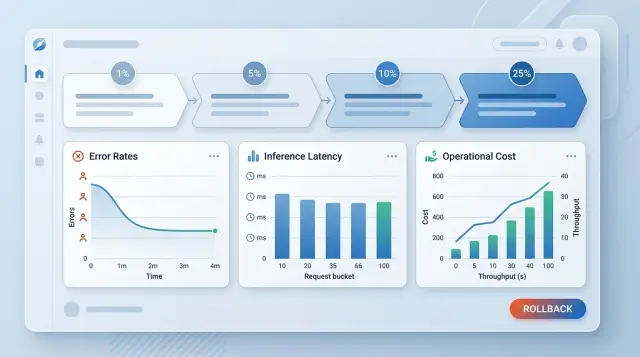
Why a new release breaks more than it seems
One good test on a sample guarantees almost nothing. When a team moves an entire stream to a new model, not only the answer quality changes. Latency, request cost, response length, data format, and the behavior of the whole chain around the model also change.
At 100% traffic, the things that usually break are not the obvious ones. The chat replies a little slower, the parser gets the wrong JSON, the bill goes above plan. The user only sees a "strange answer," and then the team spends hours trying to figure out where the failure happened.
Most often, the problems look like this:
- the model adds extra text around JSON, and the integration cannot parse it
- response time grows by 400-800 ms, and the request queue quickly builds up
- the average request cost jumps because responses are longer
- on rare scenarios, the model makes more mistakes even though the average score looks fine
The average metric is especially deceptive. If you only look at the overall pass rate or one averaged score, it is easy to miss a failure in a specific request group. For example, 95% of conversations may go fine, but requests with tables, addresses, or legal wording may be handled worse by the new model. The dashboard looks green, while tickets are already burning in production for one important function.
A quiet failure usually comes from three sides: latency, cost, and response format. The text may get better, but that brings little business value if the SLA drops, the budget grows, and the downstream service no longer understands the structure of the reply. For teams sending requests through a single endpoint, as in AI Router, the risk is higher for one reason: it is too easy to switch models. One base_url and one flag are not a substitute for checking real traffic.
Another common mistake is starting to argue about rollback only during an incident. One engineer looks at quality, another at cost, a third asks for "another 15 minutes of data." While the team argues, users get bad answers. A canary release only works when the stop rules are known in advance: who makes the decision, which metrics pause the release, and at what threshold the team returns to the old model without discussion.
What to prepare before the first percent
Before launch, you need not a list of hopes, but a proper baseline. First, lock the current model as the baseline: the same version, the same parameters, the same prompt template, and the same limits. Otherwise, in a day, nobody will know whether the new model failed or the team accidentally changed half the setup at once.
Comparison only works on the same set of scenarios. Take a short but realistic set of requests: common user questions, long conversations, rare complex cases, and problematic prompts from past incidents. Both models should run through the same inputs. Otherwise the numbers will look nice but be useless.
The release should have one owner. That person decides when to go to 1%, when to stop, and who approves traffic growth. Next to them, there should be a separate person responsible for rollback. It is better if that person does not argue about answer quality, but simply returns the old model with a pre-agreed command.
Before launch, make sure the team can see logs, errors, and cost in one place. If the new route answers a little better but the price per thousand requests has doubled, that is already a problem. For LLM releases, money leaks quietly, especially when response length grows or the model makes more repeated calls.
A minimal check before the first percent is simple:
- the old model is locked in as the baseline
- the same test scenarios are used for both models
- the release owner and rollback owner are assigned
- latency, errors, the share of empty or truncated responses, and cost are visible
- rollback is done with one clear action
Rollback itself should not require a half-hour call. If you use a single LLM gateway and change only the route or the model name, returning to the previous version takes minutes. If rollback requires code changes, rebuilding the service, and waiting for deployment, you are not ready for 1% traffic yet.
And one more detail that is often forgotten: notify support, the on-call engineer, and the product team that the release is starting. Then the first complaints will not get lost in the general noise. Usually a short message is enough: when we start, what we are changing, who makes the decision, what phrase stops the rollout, and who presses rollback.
How to ramp traffic percentages
Do not give the new model a noticeable share of requests in the first hour. For the start, 1% is almost always enough. At this stage, it is better to use normal, repetitive scenarios: common support requests, simple questions, typical data extraction tasks. Rare and controversial cases at the beginning only make it harder to see the real picture.
That 1% should be held for at least one observation window. The window length depends not on the calendar, but on the shape of your traffic. If the stream is steady and large, an hour may be enough. If requests behave differently in the morning, afternoon, and evening, wait for a full cycle. Otherwise the model may look fine in a calm period and drop during the peak.
After that, it is better to raise traffic in steps: 1%, then 5%, 10%, 25%, 50%, and only then 100%. This pace feels slow, but it almost always costs less than rushing. When a team jumps from 1% straight to 25%, it often misses the moment when quality has already dropped, but the issue is not yet loud enough.
At each step, wait for a comparable volume of requests. If you collected around 800 typical requests in the first stage, then for 5% and 10% you should wait for a sample of similar size and composition. Otherwise you are comparing different hours, different audiences, and different sample sizes.
Do not change region, channel, and model on the same day. If you turn on the new model only for web chat in one region, the team can quickly understand what changed. If on the same day you add a mobile channel, another region, and new routing, the cause of the failure will get lost in the details.
If the team releases a model through AI Router or another OpenAI-compatible layer, it is best to keep everything around it unchanged: the same base_url, the same SDKs, the same prompts, and the same limits. Then you are testing the model itself, not the whole stack at once. That is especially helpful for rollback.
Which metrics pause a release
Traffic growth is stopped not by a feeling, but by thresholds that the team agreed on before launch. A single spike is not a reason to panic. A series of bad minutes is a reason to hit pause.
The first signal is errors above baseline. Look not only at 5xxs and timeouts, but also at empty responses, unexplained refusals, stream breaks, and invalid tool calls. If the share of such failures is noticeably above normal and stays there for 10-15 minutes, traffic should not be increased.
The second signal is latency. For LLMs, this is often more painful than it seems: the answer technically arrived, but the user already left. That is why you track not the average time, but p95 or p99. If your response SLO is 5 seconds and the canary consistently takes 7-8 seconds, it is better to freeze the release immediately.
The third signal is response cost. A new model may write longer answers, call tools more often, or work worse with cache. On small traffic this may look acceptable, but at 20% of requests it starts hitting the budget. It helps to set a hard limit for average response cost or cost per 1000 requests.
The fourth signal is a broken required format. If the product expects JSON, a table of fields, or a strict template for an operator, even a good answer without structure is useless. When the share of responses that fail the schema or need manual fixing grows noticeably, it is better not to expand the canary.
These stop rules are usually enough:
- errors are 20-30% above baseline and stay there for 10-15 minutes
- p95 latency goes beyond the SLO for two windows in a row
- average response cost exceeds the team’s limit
- the share of responses outside the schema is noticeably higher than the current model’s
- manual review shows risk in sensitive scenarios
Manual review is needed where a mistake is expensive or dangerous. In bank support, for example, it is worth separately checking answers about card blocking, disputed charges, and personal data. Automation often misses these things, while a person spots them in ten minutes.
If traffic goes through AI Router, it is easier for the team to compare cost, latency, and audit logs in one place and quickly cap growth through rate-limits at the key level. That does not save you from a bad model, but it does speed up pause and rollback significantly.
Step-by-step release plan
A canary release only works when you compare the same slices of traffic, not the team’s impressions. First, take baseline numbers for the old model for the same day of week, the same hour, and the same scenarios. If the old version handles short night requests and the new one gets daytime traffic with complex conversations, the conclusions will be wrong.
A simple growth ladder is usually enough:
- Capture the baseline on the old model: error rate, latency, cost per 1000 requests, share of manual escalations, and the product signal that matters to you.
- Turn on 1% of traffic for the new model and keep only identical scenarios for comparison.
- Check the metrics after a predefined window, for example 30 or 60 minutes, and record the decision: grow, hold, or roll back.
- Increase to 5%, then 10%, if the new model holds up on quality, latency, and cost.
- Then move to larger steps, such as 25% and 50%, but only if the last two windows passed without stop signals.
After each step, add a release note. One line is enough: time, traffic percentage, which metrics were reviewed, who made the decision, and why. This saves a lot of time when, two hours later, you need to understand where things went wrong.
Do not increase traffic during an incident, provider degradation, or peak load. During those hours, the noise in the data is too high, and teams often make bad decisions in a hurry. If you are releasing through a gateway, it is especially important not to change the route and the percentage at the same time.
If two stop signals fire in a row in neighboring observation windows, roll back immediately. Do not wait for "another 15 minutes." In a model release, extra hope usually costs more than a fast return to the old version.
How to write the report so you can roll back quickly
A canary report is not for the archive. Its job is simple: to show in 2-3 minutes whether you continue the release or bring back the old model.
The top of the report should be short: date, release owner, old model, new model, service where traffic is flowing, and the current decision. If the release goes through a single gateway like AI Router, it is useful to record the model id, provider, and configuration version right away. Otherwise it is easy to confuse what exactly you compared.
What the report should include
One table almost always works better than long text. It shows each traffic increase step, how long you observed the system, and what exactly went wrong.
| Step | Traffic share | Observation time | Errors | P95 latency | Cost per 1000 requests | Quality score | Decision |
|---|---|---|---|---|---|---|---|
| 1 | 1% | 30 min | 0.8% | 2.1 s | 14,200 ₸ | 4.4/5 | hold |
| 2 | 5% | 60 min | 1.6% | 2.8 s | 14,900 ₸ | 4.1/5 | pause |
| 3 | 10% | 20 min | 3.9% | 4.7 s | 15,100 ₸ | 3.6/5 | roll back |
Put these four things side by side: errors, latency, cost, and quality. If you spread them across different dashboards, the team will start arguing instead of deciding. When they are in one row, the picture is clear immediately.
After the table, add 3-5 failed requests. Do not summarize them in general terms. It is better to use the same format:
- input request
- answer from the old model
- answer from the new model
- what exactly is wrong
A few short examples are enough. One request returned a refusal for no reason, another gave a dangerous factual error, and a third was too long and broke the SLA. That kind of block helps the team decide without unnecessary discussion.
At the end of the report, there should be one line with one choice: "go ahead," "hold," or "roll back." Next to it, add the reason in one sentence. For example: "Roll back: at 10% traffic, P95 went above the limit and the error rate almost doubled."
If the team still needs a long call after reading the report, the report is too vague.
Example: a bank support chat
The bank did not move the new model to the entire support chat at once. The team chose only simple requests: "what is my card limit," "where is the nearest ATM," and "how do I check the status of my card delivery." Anything about card blocking, disputed charges, or loan terms stayed on the old model.
This approach lowers the risk significantly. If the new version starts answering strangely, it affects only a narrow set of conversations, not the entire support flow.
In the morning, the new model was given 5% of daytime traffic for these scenarios. Routing was enabled for one hour, and the old and new versions were compared on three metrics: cost per conversation, the share of template-compliant answers, and the number of handoffs to an agent.
After 60 minutes, the picture became unpleasant but clear. The average cost per conversation rose by 26% because the model answered longer and asked for clarification more often. The share of answers outside the approved template increased from 1.8% to 6.4%. Handoffs to an agent also went up: customers kept asking again after vague answers.
What the team saw
One conversation showed the problem better than any summary. A customer asked whether the card was ready for pickup. The old model gave a short answer in the internal template and suggested checking the status in the app. The new model added extra text, guessed at the reason for the delay, and used wording that was not in the approved scenario.
The team did not argue about how critical that was. The thresholds fired, so the release had to be rolled back. That same day, they returned the old model for the entire stream and recorded the reason for stopping.
What went into the report
Five things were included in the report:
- which scenario set went into the canary
- what share of traffic went to the new model and how long the window lasted
- baseline and new values for cost, template compliance, and escalations
- examples of 3-5 failed responses
- the team’s decision and the date of the next launch
The bank approached the second launch more carefully. The team cut the scenario set down to the two simplest cases, lowered the allowed cost increase, and raised the requirement for template-compliant answers. That took less than a day, but the next test produced a clean signal: the problem was not the model itself, but the first request set being too broad.
Mistakes that derail a canary
Most often, the canary breaks not because of the model itself, but because of release discipline. The team wants to move faster and changes several things at once. Then the error rate rises, but nobody can say what caused it.
Typical failures usually look like this:
- the model, system prompt, routing, and limits are changed in one release
- the team looks only at averages and does not split data by request type
- the sample is too small, but traffic is already increased
- the stop reason is not recorded right away
- rollback exists only in the presentation, not in the real process
Average numbers are especially misleading in support and banking. At 1% traffic, everything looks calm because that slice happened to include simple balance requests. At 5%, conversations with long context and identity checks arrive, and the new version suddenly loses quality.
A good habit is simple: before increasing traffic, the team answers two questions. What exactly did we change? How will we roll this back in a few minutes? If the answer is vague, it is too early to expand the release.
If rollback takes 20 minutes, requires three calls, and a manual search for the previous configuration, that is not rollback. That is hope.
Short checklist before increasing traffic
Before raising traffic share, it helps to pause briefly and check the basics. A canary usually does not break on the first percent, but when moving from a small volume to a noticeable one.
If the team looks at the same numbers and understands who presses stop, the risk drops immediately. If one person judges by complaints in chat and another by the dashboard, problems usually drag on longer than they should.
- The stop threshold is already written down and visible to everyone. Not in one engineer’s head, but in a shared document or channel.
- The old model is ready to come back within the same minute. Route, version, and settings are kept next to the new ones, not buried in old tasks.
- The dashboard shows the difference, not just the overall graphs. The old and new models should be side by side.
- There is a separate sample for manual review, especially for sensitive scenarios.
- The report from the previous step is already filled out.
If even one item is not ready, it is better not to increase traffic. An extra 30 minutes of checking usually costs less than a quick rollback after complaints and a late-night log review.
What to do next
If this process works even once, make it the standard for future releases. Do not keep traffic percentages, stop metrics, and rollback steps in one engineer’s head. A short template removes unnecessary debates and helps people stay calm when the new model behaves strangely.
The template usually needs only a few fields: the old and new model versions, the traffic share at each step, stop thresholds, the name of the decision-maker, review time, and the outcome. After a few releases, the history starts working for the team. The records show where the release went smoothly and where it broke: at 5% traffic, after the evening peak, or during long conversations.
Keep not only the problems. Also record the successful steps: which system prompt stayed unchanged, how long you waited between stages, which request limit helped control load, and who approved traffic growth. Then the team does not have to guess why the last release went smoothly.
Rollback should be practiced as regularly as the release itself. Many teams know how to move 1% of traffic to a new model, but lose time when they need to get back quickly. It is useful to run a practice rollback from time to time and measure the simple result: how many minutes the switch took, when the errors disappeared, and whether all alerts arrived on time.
If the team works through a single OpenAI-compatible gateway, it is easier to keep that process under control. For example, in AI Router on airouter.kz you can change base_url to api.airouter.kz and keep your existing SDKs, code, and prompts unchanged. For a canary, that is convenient: fewer places to make a mistake in a hurry, and it is easier to return to the previous model the same way.
After each release, leave a short note in one format: what share of traffic reached production, where the stop fired, who made the decision, and how long rollback or growth took. When those answers sit next to each other, the next release goes faster and more calmly.
Frequently asked questions
What traffic percentage is best to start a canary with?
Usually you start with 1%. That is enough to spot format errors, rising latency, and extra costs without affecting the whole stream at once.
How long should the first 1% of traffic be held before increasing it?
Keep 1% for at least one normal observation window. If traffic changes by hour, wait for a full cycle so you do not mistake a calm stretch for the norm.
Which metrics most often pause a release?
Watch errors, p95 or p99 latency, response cost, and the share of responses that fall outside the required schema. If one of these signals stays above your baseline for several minutes in a row, it is better to freeze traffic growth.
Why not rely only on the average quality score?
The average hides failures in a narrow but expensive group of requests. A model may handle simple chats well and still perform worse with tables, addresses, or legal wording.
What should be prepared before the first percent of traffic?
First, lock in the baseline: the same old model, the same parameters, the same prompt, and the same limits. Then collect a live set of scenarios, assign a release owner and a rollback owner, and keep the metrics in one place.
How can rollback be made fast and drama-free?
Rollback should take minutes, not half an hour. It is best to keep the old route and configuration next to the new one in advance, so you can return to the previous model with one action, without editing code.
Can you change the model and the prompt at the same time?
No, that is not a good idea. If you change the model, prompt, routing, and limits on the same day, the team will not know what actually broke the release.
What kind of report helps the team decide on a release quickly?
A simple table by step works best: traffic share, observation time, errors, p95, cost, quality score, and the decision. Below that, add a few failed requests in the same format so the team can quickly see why you paused or rolled back.
Where should you avoid increasing traffic without manual review?
Manual review should be added where a mistake is expensive. In a bank, that can include card blocking, disputed charges, and answers involving personal data; in other services, that may be payments, healthcare, contracts, or any strict templates.
What should you do if the new model is better but more expensive and slower?
In that case, the release is not a success. If the new model sounds better but hurts SLA, budget, or response format, it is better to keep the old version until the route, prompt, or limits are improved.