Cache Storm from Identical Prompts: How to Smooth API Spikes
Identical prompt bursts hit limits and budgets hard. Learn request collapsing, TTLs, locks, and quick checks that keep API spikes under control.
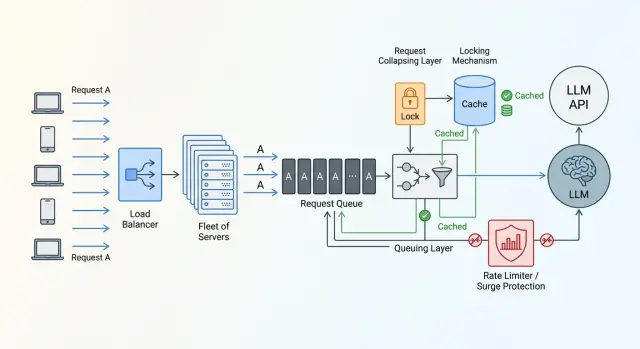
Where the problem starts
The problem usually looks harmless. The same prompt does not arrive just once, but in tens of copies. A user clicks a button, the frontend repeats the request, workers pull jobs from the queue, and retries kick in almost at the same time. In logs, this looks less like an attack and more like normal traffic.
A typical example is a support bot. In the morning, a popular question appears: "Where is my order?" While the first answer is still being generated, the same request can be sent 20, 50, or 100 times. If the system does not understand that this task is already being worked on, it launches the same LLM call separately for every request.
A regular cache only helps after the first response is ready. While the cache is empty, all parallel requests see the same thing: there is no value, so they need to go to the model. That is how a cache storm begins.
This is especially painful with LLMs because the answer is not built in milliseconds. During that time, another batch of identical calls can pile up. Instead of one expensive request, you get many identical ones, and all of them hit the same API.
From there, the problem quickly spreads through the whole chain. The queue gets longer, latency rises, limits are consumed faster, some requests end up in 429s or timeouts, and the bill grows because the same work is paid for again and again.
If traffic goes through a single OpenAI-compatible gateway, this becomes especially clear. For example, in AI Router logs it is easy to spot many identical payloads arriving almost in the same second, even though the business task is the same. That is a good signal: the problem is not the model, but the fact that the system does not combine identical work into one run.
Why identical requests arrive in batches
Identical requests rarely appear by accident. Usually, they share a trigger: a button in the UI, a mass mailing, an automated check, or a scheduled report. If many people do the same thing at nearly the same time, the system does not get a stream of different tasks, but a batch of copies.
This happens more often than it seems. Users open the service at the start of the workday, open support chat after a push notification, or all click the same button after an email. For a person, a few hundred milliseconds does not matter, but for an API, that is already a sharp spike.
Infrastructure adds noise too. One worker sent a request, did not get a response in 10 seconds, and decided to retry. Another did the same. Then the queue handed off the task once more. In the end, one original prompt quickly turns into a series of identical calls, even though the user clicked only once.
Schedulers also often create a crowd. Teams like to schedule tasks at round times: 09:00, 12:00, the top of the hour, the start of the day. If hundreds of tasks start in the same second and build the same prompt, a spike is almost guaranteed. Sometimes this is more dangerous than live traffic, because schedules do not have natural spread.
It is also worth remembering TTL. While a popular answer is sitting in the cache, everyone reads the ready result calmly. As soon as the entry expires, new requests all go after the same answer at once. The cache is empty again, and no one has had time to write the new result back yet.
If several internal services go through one gateway, the effect is even stronger. Different teams may send the same prompt at the same moment if they share one scenario for checking, summarizing, or classifying. From the outside, it looks like a sudden jump in load, even though the reason is simple: several systems asked for the same thing at the same time.
The main cause of the spike is usually not overall traffic growth, but synchronization. Even moderate load becomes expensive quickly if requests match in both meaning and timing.
What counts as the same task
If two requests look the same to a person, that does not mean they are the same task for the system. For caching and collapsing, the text of the user message is not the only thing that matters. The same question sent to different models is already a different call: price, latency, and the answer itself may differ.
That is why a task identifier is built from everything that affects the result. Usually this includes the model and its version, the system prompt, parameters like temperature, top_p, and the token limit, the response format, language, attachments, and the client on whose behalf the request was made.
Even a small change in settings changes the meaning of deduplication. A request with temperature=0 is meant to produce a predictable answer. A request with temperature=0.8 is solving a different task. Combining them is risky: someone will get a result they did not expect.
Before calculating the hash, it helps to normalize the request. Remove extra spaces, standardize case where it does not change meaning, and clean up service fields that may arrive in a different order. Otherwise Where is my order? and where is order? will create two different records, even though they are really the same question.
But it is easy to go too far here. In code, SQL, file names, and some JSON structures, case and spacing matter. If a user attached a PDF, spreadsheet, or image, the task fingerprint should include both the file itself and its version. The same question asked against two different documents is not a duplicate.
In a shared infrastructure, requests almost always need to be separated by customer. One bank and one retailer may ask the same question, but they cannot share the same answer. If you build this logic on top of a shared gateway, customer and data boundaries must stay strict.
A simple rule is this: if a parameter changes the answer, cost, or data-handling rules, include it in the hash. If it does not, leave it out. Then the system will catch real duplicates instead of accidental matches.
How request collapsing works
When identical prompts arrive in the system almost at the same time, there is no reason to send each one to the model separately. One external call is enough. The rest can wait for the same result for a few hundred milliseconds and avoid creating a new spike.
Usually the scheme is built around a task "fingerprint". This is a short string or hash assembled from the prompt, the model, the system message, and the parameters that affect the answer. If the fingerprint matches, the system treats the work as the same.
After that, the flow is quite simple.
- The first request with a new fingerprint becomes the leader.
- The leader creates a record saying the task is already running and goes to the provider.
- The next requests with the same fingerprint do not call the model again, but wait for the leader’s result.
- When the answer is ready, the leader stores it in the cache and returns it to everyone waiting.
This is not quite a regular cache. While the leader has not received the answer yet, the system knows that the work is happening right now. That knowledge is what saves you from the spike.
If the answer comes back successfully, it is a good idea to store not only the text, but also useful metadata: the model, creation time, TTL, token count, and status. Then waiting requests can quickly pick up the ready result, and the team can later sort out edge cases and calculate the savings.
The effect is especially noticeable during short, heavy bursts. If 40 users click the same button in the UI, without collapsing 40 calls go out. With collapsing, usually only one does.
The worst moment comes when the leader hangs. The provider may take too long to respond, the connection may break, or the process may crash before writing to the cache. That is why waiting must always have a limit. When it expires, the system should act by rule, not by guesswork: choose a new leader, return an old cache entry, or fail fast and avoid sending the crowd into another retry storm.
How to choose TTL and the waiting window
The TTL for collapsing should not be large. Its job is not to keep the answer "just in case," but to survive a short wave of identical requests. If the same prompt arrives dozens of times within 2–3 seconds, 15–60 seconds is often enough.
For frequent and stable answers, TTL can be a little longer. Short text classification, a standard FAQ answer, or extracting the same fields from one document template usually works fine with a short cache. For data that changes during the day, it is better to keep the minimum or not cache the answer at all.
It is also useful to keep temporary errors for a short time. If the provider returns 429 or hits a timeout and you cache nothing, all waiting clients will retry right away and create a new spike on their own. That negative cache should live only briefly.
At the beginning, simple guidelines are enough. A successful response can be kept for 15–60 seconds. For 429 and timeout errors, 1–3 seconds is often enough. For temporary provider errors like 500 or 502, 5–15 seconds is usually enough. Validation errors are better left uncached if the reason depends on a specific user.
Another useful trick is to add a random offset to the TTL. If all entries expire exactly after 30 seconds, the system creates a new spike by itself. It is better to add a small spread, for example 30 seconds plus a random 0–5 seconds, or a 10–20% jitter.
The same logic applies to the waiting window. Waiting forever is not an option. If the first request hangs, the queue behind it only grows. For fast operations, 300–800 ms is often enough. For generation that normally takes 1–2 seconds, the window can be raised to 2–3 seconds. After that, users start to feel the tail of the delay.
If you route calls through AI Router, these values are convenient to tune from logs and to watch not only average latency, but also p95 and p99 for repeated fingerprints. Usually this quickly shows where TTL is too short and where waiting has built up too much queueing.
Implementation order
If you build this step by step, a working setup can often be assembled in one sprint. The most common mistake is to add the cache first and hope that will be enough. During a storm of identical prompts, order matters more than the cache itself.
First, build the request fingerprint. Include only the fields that truly affect the answer: system prompt, user prompt, model, temperature, response format, language, attachment or document IDs if they participate in generation. Do not add timestamp, request_id, IP, or other noise. Otherwise, identical tasks will become different, and deduplication will simply not work.
Then create a record for the running task before calling the external API. This can be a row in Redis, a local in-memory map, or a record in shared storage with a short lease. The point is the same: the first request becomes the leader, and all later ones see that the work is already in progress.
After that, add waiting for duplicates. The leader goes to the external API and keeps the record under it. Duplicates do not call the model again; they wait for the result under the same fingerprint. If the leader hangs or dies, the record expires, and one of the waiting requests takes over. When the answer is ready, the service puts it in the cache and deletes the running-task record.
The cache should store more than just the text. Save the model, provider, generation time, token count, status, created_at, and TTL. This data helps resolve disputes and measure the real savings.
And one more rule people often forget: the lock must always be released in finally. A model error, network timeout, or client cancellation should not leave a hanging record behind. Otherwise one failure quickly turns spike protection into a traffic jam.
Example with a support bot
A banking support bot often sees spikes not because of an outage, but because of a simple mailing campaign. The bank sends a push about a new card, and a minute later hundreds of identical messages hit support: "What is the limit on this card?" The first 200 chats barely differ from each other.
If the bot sends each of those questions to the LLM separately, it creates the problem itself. Within a few seconds, 200 identical calls go out, even though the system is really solving one task.
Without collapsing, the picture looks like this: user A asks about the limit, 50 milliseconds later user B does the same, then dozens of similar messages arrive, and each one goes to the model separately. The bot gets the same answer many times, but pays for every call. If the external API is already busy, some requests wait longer and others run into limits.
With collapsing, it is much simpler. The system computes the request fingerprint, checks whether the same job is already running, and sends only the first call to the model. The other sessions wait for the same result. When the answer arrives, the bot stores it in the cache for a short TTL, for example 30–60 seconds, and immediately returns it to everyone waiting. If another 20 people ask the same question during that window, the bot answers from the cache without another external call.
The difference is very noticeable. Without deduplication, the bank makes 200 external calls. With collapsing, only one goes out, and the other 199 get the ready answer from waiting or cache.
This works well for general questions after a mailing, banner, or app news item. But if a person asks about their personal limit, balance, or application status, those requests can no longer be merged just by the shared text. The key must include the specific customer’s data.
Mistakes that bring the spike back
One mistake in the logic, and the load spike is back within minutes. Usually it is not one big error, but several small ones at once.
The most common mistake is adding random fields to the fingerprint: request_id, timestamp, trace_id, or nonce. Then two identical prompts get different hashes, and the scheme simply does not trigger. The fingerprint should include only what truly changes the answer.
The other extreme is a TTL that is too long. The team sees that spike protection worked, and then an hour later users receive an old answer to a question that has already changed. For prices, balances, application statuses, and similar data, that is a bad outcome. A short waiting window for the running task and a separate TTL for the finished response usually work better than one large duration for everything.
Another expensive mistake is not caching temporary provider failures at all. The provider returns 500, the worker crashes, and all waiting clients immediately retry. One failure turns into an API bombardment. A short negative cache and a little jitter in retries greatly reduce this risk.
Global locking also causes problems. If one heavy task grabs the lock, everyone else, even totally unrelated requests, waits for it for no reason. Collapsing should work by task fingerprint, not by the entire service. Otherwise you are not reducing the spike, you are just spreading the delay across all users.
The scheme also often breaks because of forgotten running-task records after a worker crash. The request is no longer being handled, but the flag is still there. New clients either wait until timeout or bypass the cache and go out again. Such records need to be cleaned up by TTL, heartbeat, or an explicit finish during process restart.
Quick check before launch
Even careful deduplication can easily break on small details. Before release, it helps to check not the whole code at once, but a few simple metrics and two unpleasant scenarios: a burst of identical requests and a provider error.
First, count the share of duplicates. Take normal traffic for a day, or at least for one busy hour, and group requests by your identity rule: prompt, model, parameters, system context, language, attachments. If duplicates are below 1–2%, the scheme may not pay for its own complexity. If they are 10%, 20%, or more, the effect is usually visible right away.
Then look at five things: how many incoming requests fell into one duplicate group, how many of them became leaders and actually went to the provider, how many waited for the result from the shared task or cache, what the average wait time for duplicates is and what its p95 is, and what happens after an error - a new retry, a record reset, or a stuck lock.
It is also useful to measure the ratio between the number of incoming requests and the number of real external calls. This is one of the clearest metrics. If you still make 70 external calls for 100 identical requests, the scheme is barely saving anything. If you make 1–5, the logic is working as intended.
Before launch, it is worth running two separate tests. In the first, send a burst of identical requests in one second and check how many leaders go out. In the second, deliberately break the provider call and see whether all waiters retry at once.
What to do next in production
Do not try to enable collapsing across every flow at once. First choose one hot scenario where duplicates are already hurting budget or latency. Most often this is support chat, knowledge base search, or a burst of identical questions after a mailing.
After the first release, the problem rarely disappears completely. It is better to test the scheme on one narrow path than to roll it out everywhere and then sort out strange timeouts. On one scenario, it is easier to see where deduplication really saves calls and where it only adds waiting.
Without numbers, the team quickly starts arguing by instinct. So collect the basic metrics right away: the share of duplicates among incoming requests, the number of external calls avoided, the average and peak wait time for joined requests, the share of wait timeouts, and cases where one leader’s error spread to everyone waiting.
These numbers are not just for a report. They show where the scheme breaks: at a TTL that is too short, a bad cache key, or the wrong waiting window.
It is better to keep collapsing rules close to routing. If prompt normalization lives in one service, locks in another, and model selection in a third, debugging becomes long and painful. One layer should decide what counts as one task, when to combine requests, how long to wait for an answer, and when to trigger a new call.
If the team already uses AI Router as a single OpenAI-compatible gateway, that is a convenient place to observe such scenarios. Repeated requests, latency, and provider behavior are visible in one place, so it is easier to understand where the spike came from and where deduplication needs to be added.
The best approach here is pretty practical: pick one hot path, bring it to calm graphs, test failures, and only then connect the next one. That is how a cache storm really becomes rarer, instead of just moving somewhere else in the system.
Frequently asked questions
What is a cache storm in LLM requests?
This is when many identical requests arrive almost at the same time, and the system sends each one to the model separately. A normal cache only helps after the first response is ready. While the answer is still being generated and the cache is empty, duplicates can still go out and create spikes in latency, limits, and cost.
What should be included in the request fingerprint for deduplication?
Include only what changes the answer or the processing rules: the model and its version, the system prompt, the user prompt, temperature, top_p, the token limit, the response format, the language, attachments, and the customer. Do not add request_id, timestamp, trace_id, or other noise, or identical tasks will stop matching.
Should the prompt be normalized before hashing?
Yes, but carefully. Usually it is enough to remove extra spaces, normalize service fields to one format, and sort data when order does not matter. Do not touch anything that changes meaning: code, file names, parts of JSON, or attachment contents.
What TTL should be used to collapse identical requests?
Start with a short TTL. A successful response can often be kept for 15–60 seconds, 429 and timeout errors for 1–3 seconds, and temporary provider errors like 500 or 502 for 5–15 seconds. If the data changes quickly, shorten the TTL or avoid caching the finished response altogether.
How long should we wait for the leader’s result before starting a new call?
Use the normal latency of the scenario as your guide. If the call is fast, 300–800 ms is often enough. If generation usually takes 1–2 seconds, waiting up to 2–3 seconds is reasonable. Keeping duplicates waiting longer rarely helps; users will already feel the delay.
What if the first request hangs or the worker crashes?
Do not leave the system guessing. Give the in-progress task record a short lifetime, release the lock in finally, and decide in advance what happens after a timeout: pick a new leader, return an old cached answer, or fail fast. That way one stuck call will not drag a crowd of retries behind it.
Can identical requests from different customers be collapsed?
By default, no. Even if the text is the same, different customers have different data, access rules, and storage boundaries. You should not return a shared answer between a bank and a retailer. If you want to combine such requests, include the customer ID in the fingerprint.
When is it better not to enable deduplication?
Not for every task. If the answer depends on personal data, current status, balance, price, or another fast-changing state, a shared cache may return someone else’s or an outdated result. In those cases, either include the personal fields in the fingerprint or do not combine the requests at all.
How can we tell that collapsing is really saving calls?
Look at a simple ratio: how many identical incoming requests turned into real external calls. If only 1–5 external calls are made for 100 duplicates, the scheme is working well. It also helps to watch the duplicate rate, average wait time for joined requests, p95, and what happens after provider errors.
Where should we start so we do not break production?
Start with one hot scenario where duplicates are already visible, such as a support bot or knowledge base search. First build the request fingerprint, then add the in-progress task record, then waiting for duplicates, and finally a short TTL for the finished response. After that, test a burst of identical requests and separately simulate a provider failure.