Budget Limits for LLM Features Without Manual Oversight
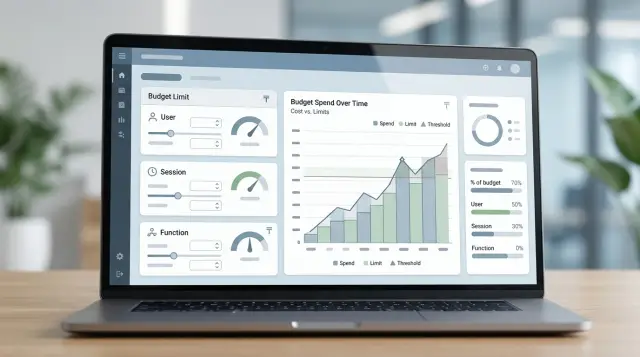
Budget limits for LLM features help keep spend under control: set thresholds per user, session, and feature so the bill never surprises you.
Why the bill grows unnoticed
The bill for an LLM rarely jumps because of one big mistake. More often, it is driven up by small decisions that seem harmless for a long time. The team watches answer quality, while spend keeps growing in the background and only becomes visible at the end of the month.
The most common scenario is simple: a costly model was chosen once for difficult cases, and then ordinary tasks started going through it too. Short prompts, classification, auto-replies, and drafts do not need the highest quality, but they still get processed through the most expensive route. If there are many such requests, the price difference quickly turns into a noticeable sum.
The second cause is long chats. The user keeps sending more messages, and the app sends the full history again with every new request. One conversation that looks normal can reach hundreds of thousands of tokens in a day. This happens especially often in support, where the person asks the same thing in different words, and the system pays for the full context again.
There is also a less visible source of cost inside the team: tests, debugging, and internal demos. Developers check prompts, analysts run scenarios, managers show prototypes to colleagues. Each one is small on its own. Together, these calls can easily eat a meaningful part of the monthly budget if the test environment does not have separate rules.
Risk also appears in features with rare demand. PDF summarization, voice request processing, or bulk document handling may be used very little for weeks, and then suddenly receive thousands of calls after a mailing, a release, or a failure in the client app. If protection is not in place ahead of time, a rare feature can quickly become the most expensive line on the bill.
That is why it is better to set budget limits for LLM features before overspending, not after. By the time a routing mistake, a long session, or unchecked testing has already made it into the report, there is usually no time for calm adjustments.
Where to place limits
One overall cap for the whole product is almost always useless. It does not show who is spending the money and does a poor job of protecting against sharp spikes. Limits work much better on three levels: user, session, and feature.
A user limit should be separate from the team budget. Otherwise, one active customer, employee, or test account can quickly use up everyone else's monthly share. A team limit is still needed, but it has a different job: to keep the total spend under control, not the behavior of one person.
A session limit helps control long conversations. This matters especially for chats where context grows with every message and each new request costs more than the last one. If you set a cap in money or tokens per session, the system can trim the context in time, suggest starting a new chat, or stop an expensive flow.
Each feature should also have its own limit. Knowledge base search, email generation, and document processing use different amounts of tokens and deliver different business value. If they all share the same budget, the expensive operation will quickly start consuming the money needed for simple, frequent requests.
In practice, this usually looks like this:
- per user - a daily or monthly limit;
- per session - a token or cost cap;
- per feature - separate limits for money, tokens, and number of calls.
Decide right away who can raise the thresholds. If any developer or support manager can do it, the limits quickly lose their purpose. A simple rule works best: the team operates within set boundaries, and only the product owner or tech lead can approve a temporary increase, for a fixed amount and a limited time.
If requests go through a single gateway, such as AI Router, it is convenient to keep these limits near the API keys, routes, and audit logs. Then spend is visible by layer, not just as one line on the bill.
What counts as spend
If the team looks only at tokens, it will almost always misjudge cost. For budget limits, you need a monetary calculation for each call. The same token volume can cost different amounts across different models and providers.
Input and output tokens usually have different rates. A short user request may be inexpensive, while a long answer can quickly drain the budget. That is why it helps to track spend in parts: input separately, output separately, tools separately, and retries separately.
Spend usually includes more than the model call itself. Money also goes to search, external APIs, and repeated requests after errors or timeouts. In many teams, the problem is not the main prompt but the chain around it: first search, then data extraction, then moderation, and another model call for the final answer.
It is useful to split the budget into three buckets: request, generation, and tools. Request is everything you send to the model. Generation is everything the model returns. Tools are any extra steps around the answer, even if the user never sees them.
The price should be fixed at the moment of the call. If traffic is routed through different models and providers, an old request should not be recalculated at a new rate. Otherwise, the report no longer matches the real bill.
After that, it helps to compare your internal calculation with the provider invoice on a regular basis. Not at the end of the month, but while you are still working. If your internal metric shows 9,000 tenge and the bill comes to 11,800, then you are not accounting for retries, tools, or the difference between input and output pricing.
When the team counts money, not just tokens, LLM cost control becomes much more accurate. Then user, session, and feature limits work against real spend, not a rough estimate.
How to roll out limits step by step
Budget limits for LLM features are best introduced as a normal part of the product. If you wait for a big bill and then act in a hurry, you end up with random restrictions that frustrate users but do little to protect the budget.
Start with a short list of every place where the model makes a paid call. This is usually not just chat, but also auto-summaries, form checks, knowledge base search, hidden background classification, and repeat requests after errors. Teams most often forget the background calls.
Then follow a simple sequence:
- For each feature, write down the goal, how often it runs, and the cost of one typical request. A rough estimate is enough.
- Set a monthly cap for each feature separately. A support chat and a report generator rarely deserve the same budget.
- Split that cap into two layers: a user limit and a session limit.
- Set a soft threshold and a hard cutoff. At the soft threshold, the system trims context, switches to a cheaper model, or turns off an expensive mode. At the hard cutoff, it stops the call and shows a clear message.
- Test the failure path manually before launch. The user should see a clear response, and the team should see a log and a metric, not a silent error.
A small example: if the "smart chat" feature gets 300,000 tenge per month, you can give one user 3,000 tenge and one session 150 tenge. When a session reaches 120 tenge, the chat answers more briefly and does not carry extra context. After 150 tenge, it suggests continuing later or transferring the request to an operator.
A good setup answers one important question in advance: what does the system do the moment the budget runs out? If that scenario is clear, spend does not get out of control.
User limit
A user limit keeps spend under control where the overall monthly budget is no longer enough. One active person can easily burn through a noticeable share if they keep pressing "summarize," upload long files, or choose an expensive model.
It is better to distinguish thresholds by group. A new user usually needs a small free limit for a day or a week to try the feature. An active customer who really uses the product needs a larger allowance. Otherwise, you end up limiting the people who bring revenue, not the ones who create extra traffic.
Free and paid traffic should also be counted separately. For a free plan, the limit can be cut hard, for example by money per day. For a paid plan, it is better to set a soft cap and warn the user in advance instead of cutting off the conversation in the middle of work.
If the same feature can run on several models, it is better to tie the threshold to the model class. A cheaper model gives the user more requests, while a more expensive one gives fewer. This approach quickly reduces spend and needs very little manual oversight.
Do not merge one person's devices blindly. If you count only by device_id, the limit is easy to bypass. But if you combine a mobile app, a web account, and a work tablet without checking, you will get false blocks. It is safer to rely on account_id and use devices as an additional signal.
When the limit is reached, say so plainly. A message like "Your free limit for AI responses has been reached. Try again tomorrow or choose the short mode" works better than a dry 429 error. The user understands what happened and does not think the service is broken.
Session limit
One user may open only one chat, yet the bill can still keep rising. The reason is simple: long conversations quickly accumulate tokens. A session limit is not meant to punish the user, but to keep one conversation from eating the budget while the team is asleep.
Usually, the first step is to set a cap on the total number of tokens within one session. For example, a chat might run up to 20,000 to 40,000 tokens in total, including input and output. When the session gets close to the threshold, the interface warns the user and suggests starting a new conversation. That is much better than silently continuing an expensive thread.
The next simple emergency brake is a limit on the number of turns. Even short messages become expensive if the model receives the entire chat history each time. In many scenarios, 12 to 20 exchanges are enough, after which the conversation is better closed or moved into a new thread.
You also need an idle timeout. If a person leaves for a meeting and comes back two hours later, the old session is rarely useful in full. It is easier to end it after 15 to 30 minutes of inactivity and start over. That way you do not carry unnecessary context into the next request.
Before each new generation, the old context should be trimmed. Keep only what truly affects the answer: the current task, the latest messages, and a short summary of the past. Full history is rarely needed, but you pay for every token.
In practice, a set of four rules helps: token limit per session, limit on turns, automatic ending after inactivity, and compression of old context before the next request. The session often gives the biggest savings.
Feature limit
One overall cap for the whole product almost always creates imbalance. The chat eats the budget, while a short summary or a field check in a form suddenly starts getting denied. That is why the limit should be set separately for each feature.
Summaries can usually be kept within strict boundaries: a short prompt, one answer, and a low-cost model. Chat is different - long history, more repeated requests, and a higher risk of extra tokens. If they share the same budget, chat will quickly take everything.
It also helps to split spend by stage. Document search and model response are not one operation, but two. Search may spend money on embeddings, reranking, or a separate service. The model response adds its own part. If you count everything together, it is hard to see where the money went and what to cut first.
For features, a few simple rules are usually enough. Summaries get a small daily limit and a short timeout. The main chat gets a separate budget and a softer rejection threshold. Knowledge base search is counted separately from answer generation. Background and batch jobs run through a queue with their own limit. Experimental features get a much smaller budget than the main scenario.
With background tasks, it is especially important not to send everything into production at once. Overnight conversation processing, bulk call summaries, or text labeling can quietly burn through the monthly budget in a couple of hours. A queue, a batch cap, and automatic stopping after a set amount work better than manual watching.
It is convenient to keep limits next to the model routing config. Then the team can see the full picture in one place: which feature calls which model, with what fallback, and with what monetary cap.
Example: support chat in a mobile bank
A customer opens the chat in the app and asks: "What is the fee for a transfer and what is my card limit?" For a bank, this is a common and seemingly cheap scenario. But spend rises quickly if the bot keeps going back to search, builds a long summary, and answers too verbosely.
The normal request path is short. The system looks up the tariffs and limits for the relevant product, creates a compact summary for the model, and returns one clear answer without unnecessary follow-up questions. If there is enough data, the session ends in 1 to 2 turns.
In this kind of chat, three limits are usually set. The user has a daily cap in tenge. For example, after 250 tenge, the bot continues only with simple FAQ answers or suggests contacting an operator. The session gets a limit on the number of turns and the answer length - for example, no more than 6 back-and-forth messages and no more than 700 to 900 characters per answer. A separate budget is also given to the handoff to an operator, because it is often more expensive than a normal answer: you need to collect context, prepare a short summary for the employee, and save the logs.
This kind of setup keeps LLM cost under control without manual supervision. An ordinary question about fees is resolved quickly, the long session stays within bounds, and the transfer to support gets its own price and its own limit.
Common mistakes
Costs usually grow not because of one big problem, but because of small decisions that build up every day. Even well-designed limits do little if they are set too roughly.
The first mistake is one global cap for the whole product. At the start, this seems convenient, but later it breaks the picture. A few active users or one heavy feature quickly consume the whole budget, and then every scenario starts getting blocked.
The second mistake is looking only at tokens. Tokens on their own say little about spend. The same request can cost very different amounts on two models. The team needs accounting in money, otherwise overspend is noticed too late.
The third mistake is leaving the expensive model as the default for every task. A short classification, a draft email, and a support reply do not need the same level of quality. When every task goes to the expensive model, the bill grows quietly, without a clear signal.
The fourth mistake is not counting system prompts and repeated context. Many teams look only at the user text. But the price also includes instructions, chat history, safety rules, and earlier messages. Sometimes it is exactly this invisible volume that makes a session expensive.
The fifth mistake is simply cutting off the answer when the limit is reached. The user sees a blank screen or a dry error and thinks the service is broken. It is much better to prepare a fallback path ahead of time: shorten the answer, switch to a cheaper model, ask for clarification, or postpone the heavy operation.
A good limit does not get in the way of work. It holds spend back so the user can still finish the task.
Quick pre-launch checklist
Before release, check not only answer quality, but also where the system stops extra spend. If you do not set boundaries in advance, even a useful AI feature can quickly start costing more than expected.
- Set a separate monetary cap for each feature.
- Give the user two limits: one per day and one per month.
- Limit sessions by tokens, number of turns, and time.
- Log the exact reason for rejection.
- Collect reports by model and by feature.
There is a simple test before launch: open the logs and try to answer three questions in two minutes. Who spent more than expected? Which feature caused the spending spike? Which model was called at that moment? If you cannot answer any of these right away, the system is not ready for production load yet.
What to do next
Do not try to set limits for every AI scenario at once. Start with one feature where spend is already noticeable. This is often support chat, long document summarization, or answer generation for operators.
Let that feature run for a week in normal mode and collect the raw numbers: how much one request costs, how many tokens are used on average, which sessions become the most expensive, and how many users hit the upper threshold. One week is usually enough to see the real cost pattern.
After that, apply the same approach to other scenarios, but do not copy the same threshold everywhere. Knowledge base search, customer chat, and internal summarization spend budgets differently, so their limits should be different too.
If your team already has a single gateway for LLMs, it is useful to bring together request logs, PII masking, rate limits, model routing, and monetary limits in one place. For tasks like these, AI Router is a practical option: it lets you keep spend, routes, and audit data together without changing your usual SDKs and code.
When all this data is collected in one place, imbalances become visible much faster. It becomes clear who is consuming the budget, which feature is overspending, and where it is cheaper to switch models instead of just lowering the cap. Then budget stops being a manual problem and becomes a normal part of operations.
Frequently asked questions
When should you introduce limits for LLM features?
If you have chat, summarization, document parsing, or background AI tasks, limits should be in place from the start. Without them, spend grows quietly: a pricey model gets used for ordinary requests, long sessions drag in the full context, and team tests eat into the budget.
How do you choose a user limit?
Start with the money for a typical request and how often it is used. Then set a daily or monthly cap so an average user does not hit it too early, while one active account also cannot burn through everyone else's budget.
Why do you need a separate session limit?
One long conversation can easily cost more than dozens of short requests. A session limit stops context from growing out of control in time: the system can trim the history, suggest a new chat, or end an expensive flow before spend gets out of hand.
What should be included in spend besides user tokens?
Do not count only tokens. Spend also includes input and output tokens at different rates, system prompts, chat history, retries, search, external APIs, and other steps around the answer.
Why does one global limit for the whole product work poorly?
Because a single overall cap does not show where the problem comes from. One heavy feature or a few active users can consume the shared budget fast, and then every other scenario starts failing too.
What should you do when the limit has already been reached?
Do not stop the response silently. It is better to show a clear message, switch to a shorter mode, move the request to a cheaper model, suggest starting a new session, or send the user to an operator.
How can you keep tests and demos from eating the budget?
Separate production and test traffic with different rules and budgets. Give demos, debugging, and prompt runs their own thresholds, otherwise internal checks will quietly inflate the bill by the end of the month.
How do you set a soft and a hard threshold?
Set the soft threshold slightly below the hard one so the system has time to react. For example, at the soft threshold the chat trims context and answers more briefly, while at the hard threshold it stops making a new call.
Which scenarios most often cause a sudden cost overrun?
The most common issue is a long chat with full message history. Second come rare features that suddenly get a lot of calls after a release, a mailing, or a failure in the client app.
Does it make sense to keep limits alongside routes and logs in one gateway?
Yes, it is useful. If you keep limits next to model routes, API keys, and audit logs, the team can see faster who is spending money, which feature is growing, and where it is better to switch models instead of raising the cap.