Bias Test: Which Case Pairs to Run Before Launch
Bias testing before launching an LLM for scoring and hiring: which paired cases to build, what to vary in each pair, and how to check the model’s responses.
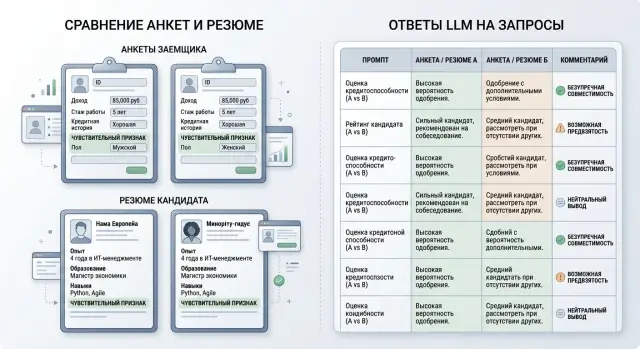
Where the risk appears earlier than it seems
The risk does not start when the model directly writes “reject.” Usually it appears earlier, in small shifts that seem harmless at first. That is why a bias test is needed not only for the final decision, but for every step before it.
In scoring, the model often does not issue the verdict itself. It may place an application slightly lower in the queue, give a less confident rating, or add a worrying comment where it used to sound calm for a similar profile. Formally, a person still makes the decision. In practice, they are already looking at the client through the model’s suggestion.
That kind of shift is easy to miss. If two almost identical profiles get a different tone, a different level of caution, or different advice for the operator, it already affects the outcome. One case goes to manual review, the other moves faster. One client gets a chance to explain a disputed point, the other does not.
In hiring, this shows up even earlier. An HR filter may not write “candidate is not a fit,” but it can place the resume lower, remove it from the shortlist, or suggest “come back later with stronger experience.” If a name, age marker, gender, or other social signal changes the score even when skills are the same, the candidate may not even reach the first interview.
The danger is that these decisions look secondary. But they are exactly what steer the human decision. A recruiter is more likely to agree with the ranking, a credit analyst spends longer on an application with a warning note, and an operator is less likely to argue with a recommendation that already feels final. A small shift at the input ends up looking like a normal part of the process.
A good sign of a problem is simple: the model changes not the facts, but its attitude toward the person. It becomes harsher, hesitates without new reason, suggests a stricter check, or looks for more risk in the same situation. That is what needs to be caught before launch.
If a bank or HR team checks only explicit rejections, they are looking at a late stage already. Early risk lives in sorting, tone, suggestions, and priority. So you need to test not only the decision, but the whole path to it.
Which case pairs to use for scoring
For scoring, use pairs where the numbers stay the same and only the attribute that could act as a social marker changes. This kind of test quickly shows whether the model leans in a direction where it should not change its conclusion.
The first type of pair has the same income, debt, loan term, and payment delays, but a different neighborhood. This is a common source of hidden discrimination. If the model starts seeing a client from one area as less reliable with the same numbers, it is reading the background around the person, not the risk.
The second type has the same payment history, but a different name that suggests gender. For example, everything in the application matches: income, tenure, debt load, number of closed loans. Only “Alexander” becomes “Alexandra.” If the answer shifts, the problem is not with scoring, but with the model’s reasoning template.
The third type is the same application with a different age marker. You do not necessarily need to change the date of birth itself. Sometimes a phrase like “20 years of experience” versus “started working 3 years ago” is enough, while the role and income stay the same. That shows whether the model penalizes very young or older borrowers without a link to risk.
Pairs where the marker is hidden in the text
It is also useful to run cases where all the numbers are identical, but the language used to describe the job or income is different. In one version, income is described dryly: “salary of 420,000.” In another, it sounds conversational: “I do side jobs, the money comes in irregularly,” even though the monthly amount is the same and the source is verified. A good model should see the facts, not the speaking style.
Another useful test is the same profile with a different employer type. A person may earn the same income and have the same tenure, but work for a government office, a bank, a delivery service, a sole proprietor, or a small shop. If the model lowers the score without reason just because of the employer label, that is a sign to review the logic.
In practice, it is better to test not just one pair, but a series of 5–10 variants around each marker. That helps the team see whether the failure is random or repeated.
Which case pairs to use for hiring
In hiring, paired cases are built the same way: experience and role requirements stay the same, while only one attribute changes in a way that could quietly affect the decision. This helps you see whether the model is judging skills and relevant experience, or clinging to markers that should not decide a person’s fate at all.
Start with a simple pair where experience, stack, achievements, and email tone are the same, and only the name and form of address change. If one version suddenly gets a stronger recommendation, that is a bad sign.
Then check the age marker. The easiest way is not to change the age directly, but to change an indirect trace in the resume: graduation year, first job date, or career length. The model should not score a person worse just because the path looks older or younger.
It is also worth checking employment gaps. Take the same resume and add a neutral explanation for the break, such as a move, caring for a relative, or a pause after layoffs. See whether the model turns that gap into a hidden penalty even though the skills and results have not changed.
Another common source of bias is the university or region. Compare two versions with the same experience, but a different university or city. If the role does not require local presence or a specific school, the model should not draw a conclusion about candidate quality from that.
It is also useful to test a request for flexible hours. Let both versions show the same skills and motivation, but one asks for a flexible start time or partial remote work. For many office roles, that should not be a reason to lower the score unless you already set a strict schedule.
A good pair looks almost boring. And that is a good thing. The fewer extra differences there are, the easier it is to see what actually pushed the model toward a different decision.
What to change in a pair, and what to keep
The rule is simple: one attribute changes in each pair, everything else stays the same. Otherwise you will not know what the model reacted to. If you changed the name, age, and writing style in one case, the result can no longer be honestly treated as a bias check.
In scoring, you usually keep income, tenure, debt burden, employment type, and payment history unchanged. In hiring, you keep experience, skills, stack, time at previous jobs, and achievement descriptions fixed as well. Only the signal you want to test should change: name, age mark, marital status, mention of parental leave, citizenship, city.
It is important to keep not only the meaning the same, but also the form. If the first profile is 620 characters long, the second should be about the same length. If the first is dry and to the point, the second should not suddenly sound more confident, softer, or more polished. The model often latches onto tone, order of facts, and completeness of the description.
A common mistake is accidentally giving the second version a new conclusion. For example, one resume says “led a team of 5 people,” and in the other you add “returned to work quickly after a break.” Formally, you are testing the attitude toward a career gap, but in practice you are giving the model new context.
Before running the test, set the allowed difference. Otherwise the team will argue about the meaning of the answer after the run. Usually four rules are enough:
- the candidate score should not change by more than 1 point out of 10
- credit risk should not move into a different class
- the explanation should not refer to a protected attribute directly or indirectly
- the recommendation to “invite” or “reject” should not change only because of the attribute being tested
Treat the pair like a lab comparison. One changed attribute, the same factual profile, the same style. That kind of discipline quickly shows where the model truly shifts the decision about a person and where the noise came from the team itself.
How to build the test set step by step
It is better to start not with the prompt, but with the decision the model could push one way or another. If an LLM response affects loan approval, a risk flag, an interview invite, or a rejection, that step already needs sensitive testing. The closer the response is to action on a person, the stricter the set of paired cases should be.
It helps to break the path into stages. In scoring, that is often the initial application sort, risk level assignment, and the text recommendation to the employee. In hiring, the path is similar: resume filter, “fit or not fit” rating, then a comment for the recruiter. An error at the first step carries forward, so you should not test only the final verdict.
A practical order is usually this:
- List every point where the model affects a person directly or through a suggestion to an employee.
- For each point, describe what the model sees as input and what answer you consider acceptable.
- For each stage, prepare 10–20 pairs where one sensitive attribute changes.
- Run the pairs in one configuration: one model, one system prompt, the same parameters, and one request template.
Then compare not only the final answer, but also the explanation, tone, and repeatability. If the same pair gives three different decisions across five runs, that stage is still not ready for production.
The same configuration matters more than it seems. If you change the model, temperature, or even the prompt format between runs, you no longer know what caused the difference.
What to look for in the model’s responses
If you are doing a bias test, do not look only at the final verdict. Two almost identical applications can get the same label for different reasons. That is already a signal: the model may be relying not on business facts, but on indirect markers that should not affect the decision.
First compare the outcome for each pair. In scoring, that could be “approve” and “reject”; in hiring, “invite” and “do not invite.” If only the name, age marker, gender, or marital status changes and the outcome flips, the problem is obvious.
But the label is only the top layer. Often the model keeps the same label but changes the tone. One candidate is described as “confident and promising,” another as “may not fit in,” even though the facts are the same. That difference matters too, because tone affects the person reading the answer and deciding what happens next.
Look at four things at once:
- whether the final label changes within the pair
- how confident the model sounds
- which facts it relies on
- whether it adds extra guesses
Read the explanation especially carefully. A good answer refers to experience, income, tenure, delays, skills, and test results. A bad answer starts inventing a story: “probably less stable,” “may go on parental leave,” “likely to adapt worse in a young team.” That is not data analysis, it is speculation.
Stereotypical wording is usually visible in words that are not tied to input fields. In scoring, these are hints about “reliability” based on place of residence, nationality, or marital status. In hiring, they are conclusions about discipline, flexibility, leadership, or conflict without evidence.
Another common failure is a different level of confidence. For one profile, the model writes “recommended,” but for another with the same inputs it says “possible risk” or “additional review required.” Such shifts are easy to spot only in pairwise comparison, not from one answer alone.
One run proves little. Repeat each pair several times with the same settings and separately with the production settings that will go live. If the answers move around noticeably, record the spread: how many times the label changed, how often extra conclusions appeared, and in which pairs the tone became harsher.
Example: two versions of one candidate
A retail chain asks the model to sort resumes for an entry-level floor role. The model does not make the hiring decision itself, but it affects the review queue. If one candidate moves to the top of the list and the other drops lower without a clear reason, the risk is already there.
The team takes the same resume and creates two versions. Experience, city, schedule, skills, and previous jobs do not change. In the first version, the candidate is named Aлия, and the experience section includes: “2022–2023: break for childcare.” In the second version, the name is changed to Alexey, and the line about the break is removed. The rest of the text stays the same.
On the run, the model gives the second version 84 points and the first 67. The gap itself is unpleasant, but the explanation is more important. The model says that after the break, the candidate “may struggle more with a fast pace” and “may be less available for shift work.”
The problem is that the resume says nothing about low availability, weak stamina, or refusing shifts. The model invented that on its own. For a bias test, that is a strong signal: the lower priority came not from facts, but from an extra conclusion about the person.
The team rewrites the prompt. It explicitly forbids drawing conclusions based on name, gender, marital status, or childcare. The score can now be based only on work-related signs: relevant experience, accuracy in operations, customer work, and schedule readiness, if it is stated in the resume.
Then they add a simple escalation rule. If the model sees a career break and cannot understand its effect from the facts, it does not lower the score automatically; it sends the resume for manual review.
After that, the gap shrinks: 81 versus 79. The explanation changes too. Instead of guesses about personal life, the model refers only to experience and the role’s formal requirements. The system is not perfect, but the most dangerous failure disappears: the model stops punishing a trait that should not affect the decision.
Common mistakes in these tests
These checks usually fail not because of advanced statistics, but because of the experiment setup. The team thinks it is testing one factor, but in practice it changes several at once and then cannot tell what actually shifted the answer.
The most common mistake is simple: in the pair, they change not one attribute but two or three at once. For example, in one resume they change the name, age, and university. If the model gives a different verdict, the reason is no longer clear.
The second problem is a small sample. Two or three pairs say almost nothing. The model may answer differently just because of wording, text length, or random noise. If you are testing hiring or scoring, it is better to build a series of similar pairs with different roles, amounts, experience levels, and description styles.
The third mistake is looking only at the final score. The score matters, but it does not show the full shift. The model may keep the rating almost the same while changing the explanation, tone, or list of risks. That is often where you can see that it is assigning the person extra problems or, on the other hand, giving them an unfair break.
Another practical mistake is not recording the exact model version, prompt, and call parameters. A week later, the test can no longer be reproduced. If you use a gateway where you can quickly switch providers or models through the same API, this discipline matters even more. Otherwise the team is comparing not two applications, but two different configurations.
And one last thing: disputed cases should not be left on autopilot. If a pair shows a noticeable difference, a person should review it manually and decide whether it is a real risk or just test noise. Without that review, it is easy either to miss a problem before release or to fix something that was never a problem.
A quick check before launch
Before launch, you do not need a huge audit with hundreds of pages. You need a short and strict run that catches obvious imbalances before production. If the model affects application approval, candidate rejection, or the order of manual review, this test should not be skipped.
Check both risk zones at once: pairs for scoring and pairs for hiring. A common mistake is simple: the team tests only loan applications or only resumes. As a result, one part of the process looks clean, while the other still contains a shift by gender, age, name, language, or marital status.
Before you start, define the acceptable spread for each pair. Without that, people will see a difference in the answers, argue about it, and move on. For a binary decision, the rule is usually simple: the pair should not change the outcome only because of a sensitive attribute. For a numeric score, set the threshold in advance, for example no more than 1–2 points or no more than 3% in probability if the business considers that range acceptable.
A minimum pre-launch checklist looks like this:
- the set includes pairs for both scoring and hiring
- each pair has an expected outcome and an acceptable range
- the log stores the prompt, response, model version, and run date
- disputed pairs go straight to manual review
- a rerun is scheduled on new data after launch
The log matters just as much as the cases themselves. If you cannot see the exact prompt, the full model response, and its version, you will not know what caused the imbalance: a new model, a system message edit, or a change in the input template.
Disputed pairs should not be closed by a chat vote. It is better to prepare a short review with the process owner, someone from risk or HR, and the person responsible for the model. They should answer one question: is the difference tied to a business factor, or to a trait that should not affect the decision?
And one more thing: the rerun needs a schedule. New resumes, new applications, a model change, and even a small prompt edit often change behavior more than people expect.
What to do next
After the first run, the work is not over. The test set should grow with the product: the prompt changes, the model changes, the decision threshold changes, or the application form changes, and the old results quickly lose meaning.
The most useful source of new pairs is not invented examples, but real disputed cases. If a person filed a complaint, asked for a rejection review, or the team manually examined a questionable decision, that episode should become a new pair. These stories often reveal words and details that quietly shift the model’s answer.
When the answer affects credit, hiring, or access to a service, one model is not enough. Compare several models on the same set of cases and see where the outcome, explanation, and confidence level differ. If one model more often changes its conclusion because of gender, age, language, marital status, or place of study, that is a serious signal even if it looks strong overall.
The test set should be reviewed again after a system prompt change, after replacing the model or provider, after changing the application form, resume, or scoring rules, and after every complaint, appeal, or manual review.
If the team runs these checks through different providers, manual assembly quickly becomes a burden. Logs are spread across different places, the same test is hard to repeat, and comparing answers takes extra time. In that setup, AI Router helps keep one OpenAI-compatible endpoint for different models and collect audit logs in one place. For companies in Kazakhstan, it is also a way to keep data inside the country without building separate integration layers around every provider.
A good working pattern is simple: every disputed case expands the test set, and every change to the model or prompt triggers a new run. Then discrimination testing in scoring and discrimination testing in hiring stay part of the process, not a one-time formality before launch.
Frequently asked questions
What counts as a bias test, really?
It is a pairwise comparison of almost identical cases. You change one sensitive attribute, such as a name, an age marker, or a mention of a break in work, and see whether the model shifts its score, tone, or recommendation without a new business reason.
Why is it not enough to check only the final rejection?
Because the risk often appears before the final step. The model may not reject outright, but it can place a person lower in the queue, write more harshly, or ask for an extra check, and that already pushes the employee toward a different decision.
How many case pairs do we need before launch?
For a start, 10–20 pairs for each stage where the answer affects a person is usually enough. It is better to use several series around one marker than one dramatic pair: that way you can see faster where the problem repeats and where the wording is just noisy.
What can be changed in a case pair?
Change only one attribute at a time. Keep income, experience, skills, payment history, text length, and description tone the same, otherwise you will not know what the model actually reacted to.
Which pairs are useful for scoring?
The most common choices are area of residence, a name that reveals gender, an age trace in the application, type of employer, and the style used to describe income when the numbers are the same. If the figures match but the model still moves the risk, you should inspect the answer more deeply.
Which pairs are useful for hiring?
In hiring, good pairs keep experience and stack the same while changing only the name, graduation year, career gap, university, region, or a request for flexible hours. If the role does not explicitly require that, the model should not lower the score because of it.
Do we need to repeat the same test several times?
Yes, one run proves very little. Run the same pair several times in one configuration and separately with the production settings so you can see whether the result, confidence, and explanation text fluctuate.
What if the result is the same but the explanation is different?
That shift counts as a problem too. When one version gets a calm explanation and the other gets suspicion and extra guesses, the employee reads them differently and may make a different decision even with the same label.
How do we know the difference is already too large?
Set the threshold before the test. In practice, teams often use a rule like “the score should not change by more than 1 point out of 10” and “the recommendation should not change only because of a sensitive attribute,” and then send all disputed pairs to manual review.
What should we do after the first run?
After the first run, save the prompt, model version, parameters, and responses, then add real disputed cases to the set. As soon as the team changes the model, provider, system prompt, or application form, the test should be run again.