Batch Inference or Online Calls for Nighttime Tasks
Batch inference suits overnight processing, but it does not always beat online LLM calls. Let’s break down extraction, categorization, and draft generation.
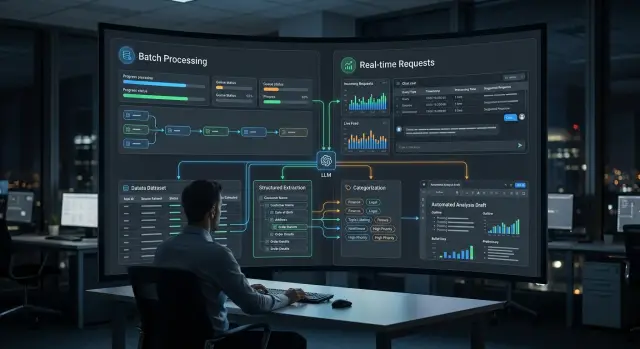
Where the choice appears
The choice usually shows up in the evening, when the queue holds hundreds or thousands of similar tasks. During the day, the system collects emails, requests, product cards, contracts, and operator replies. At night, it is convenient to run all of that in one stream: extract fields, sort by topic, assemble draft replies, or prepare a morning report.
Batch inference works well where nobody expects an answer in two seconds. If a document makes it into the report by 8 a.m., the business loses nothing. This is often how incoming mail, chat archives, invoices, reviews, internal summaries, and large document sets for categorization are processed.
But some tasks cannot wait. If a customer writes to support, a call-center agent or a doctor opens a record, any delay immediately gets in the way. In those cases, you need online LLM calls: the model responds at the moment of the request, not on a nightly schedule.
Things usually not left until morning include hints for an operator during a conversation, checking text before sending it to a customer, quickly finding an answer in a knowledge base, and routing an urgent request to the right team.
Response speed changes the economics of the process a lot. In online mode, every second matters: the user notices a pause almost immediately. For nighttime data processing, what matters more is how many tasks fit into a 4-6 hour window, how much the whole run will cost, and how the system handles a surge in volume at the end of the month.
One mode almost never covers the whole process. Emails can be classified at night, but urgent complaints are better handled right away. Draft replies can be prepared in batches, while the final version is shown to the employee on request. Even within one pipeline, field extraction often goes to batch, while short generation for a person stays online.
The choice is not between an "old" and a "new" approach, but between different parts of one job. Just answer a simple question: what must happen right away, and what can wait until morning. If the team uses a single API gateway like AI Router, where you can change request routing without touching familiar SDKs, code, or prompts, keeping both modes side by side becomes much easier.
When batch processing wins
Batch inference is better where the result is needed not now, but by a certain time. If data builds up throughout the day, a nighttime run is almost always simpler in terms of cost, control, and support. The team queues the tasks once, sets limits, and in the morning reviews a ready set of answers instead of chasing thousands of small requests during working hours.
A good example is extracting fields from a large file archive. Suppose you have 80,000 contracts, acts, and letters, and from each one you need to pull the number, date, amount, and document type. No one is sitting in front of the screen, so the archive can be safely split into chunks, clean PDFs sent to a cheaper model, and scans or complex tables sent to a stronger one. In this mode there is less fuss: it is easier to enable retries, check the response schema, and catch failing files.
Mass categorization of emails, requests, and reviews also fits batch processing well. When the rule is the same for tens of thousands of records, a batch run gives a smooth picture across the whole sample. This is convenient for support, banking operations, retail, and public services, where by morning you already need a list of topics, priorities, and disputed cases.
The same logic applies to report drafts. The day’s data is already closed, metrics are collected, and events are known. That means you can generate the first version of a report by branches, products, or request queues overnight, and in the morning an editor or analyst only needs to polish the wording. An extra 10-15 minutes does not matter if the text is ready by the start of the workday.
Another strong use case for batch processing is rerunning after a prompt or schema change. Add a new field, change the categories, tighten the response format - and you can immediately see what changed across the historical dataset. In online mode, such a recalculation quickly turns into confusion: part of the data is already processed under old rules, part under new ones. In a nighttime batch, the version is the same, and the results are easier to compare.
When online calls are better
Online calls are needed where the answer changes action right away. If an operator is waiting for a hint, a customer is looking at a form, or a manager must make a decision within a minute, a nighttime run is no longer suitable.
The clearest example is support. A customer writes in chat, and the operator gets a short summary of the message, the tone, and a draft reply within a few seconds. The person then edits the text and sends it right away. If you move this to batch mode, the point is lost: the answer is needed during the conversation, not in the morning.
The same applies to checking a document at upload time. The user attaches a file, and the system immediately sees that a page is missing, the file is unreadable, or the text shows signs of another document type. This is especially useful in banking, insurance, and HR processes, where an input error later breaks the whole route.
Online LLM calls are also needed where classification triggers the next step. For example, an incoming email must immediately go to legal, sales, or support. Until the model identifies the request type, the process is stuck. For such forks, a 2-5 second delay is usually better than waiting for nighttime processing.
Draft generation is the same story. If a manager opens a customer record and wants the basis for an email, call notes, or a short summary of correspondence right away, the answer must be immediate. Drafts are almost always edited manually, and that is normal. What matters here is not perfection, but a fast first version.
Online mode is usually chosen when a person cannot move forward without an answer, the system must check incoming data, the request route depends on the category, or the text is needed for immediate editing.
Online has its own cost: higher requirements for latency, stability, and limits. But it works well in a chain of several models. For example, a fast model can handle initial document categorization, while a stronger one generates drafts. If all of this goes through a single OpenAI-compatible endpoint, the overall flow is easier to maintain.
How to compare both approaches on one task
Comparison falls apart the moment teams test different inputs. For a fair check, take the same set of documents: for example, 5,000 emails where you need to extract fields, assign a category, and assemble a short draft reply. Do not change the prompt, model, temperature, or post-processing rules between runs.
If you compare batch inference and online LLM calls, everything should stay the same except the run mode. Otherwise, you are not testing the processing method, but a random mix of factors.
Before testing, it is worth fixing four things:
- one dataset with clear labels;
- the same prompts and model settings;
- identical retry rules for failures;
- one shared way to count errors.
Then look at more than just total time. For extraction, the share of missing fields and wrong values matters. For categorization, you need accuracy by class, not only the average percentage. For draft generation, separately mark texts that cannot be sent without editing: empty replies, broken fragments, repetitions, the wrong language, or made-up details.
Average cost can also be misleading. Count the price per 1,000 documents and for the whole overnight run. If part of the requests go through retries, the total rises quickly. Timeouts and empty responses are better counted separately rather than hidden inside one overall error rate. These are usually what keep the report from going out on time.
Check two load modes. First, the normal volume the system sees almost every day. Second, the nighttime peak, when there are 5-10 times more documents: month-end, shift close, or a batch of emails after the weekend. At low volume, online mode often looks faster and more convenient. At peak volume, the picture changes: the queue grows, retries increase, and the overnight window may not be enough.
A small example: 2,000 emails are processed online in 40 minutes and in batch mode in 55. But with 20,000 emails, online already produces many timeouts and finishes almost by noon, while the batch run fits into the night with a predictable cost. That is a working conclusion, not a matter of taste.
If the team uses a single gateway, the comparison is easier to run: you can keep one SDK and one endpoint and only change the route and run mode. Then it is easier to see whether the difference comes from the architecture or from the model itself.
Scenario: nighttime email review and morning report
Imagine a bank or a large retailer where thousands of emails, attachments, and website form requests pile up during the day. During the day, employees handle urgent cases, and the main volume is processed at night, when there are no peak queues and nobody expects an answer within seconds.
The nighttime run usually starts after the operating day closes. The system pulls new emails from mailboxes, PDFs and scans from attachments, and requests from CRM or web forms. Then the model does straightforward work: it extracts the request number, topic, customer name, problem type, deadline, and the needed department. If the data is sensitive, the team can mask PII in advance and keep audit logs. For companies in Kazakhstan, this is often a mandatory requirement, not a formality.
After field extraction, the model assigns a category to each request. For example, it separates payment complaints, delivery questions, requests for closing documents, and emails that do not need a reply at all. At this stage, the difference between clean and ambiguous cases becomes very clear. If an email seems to match two topics at once, or the attachment is a poor scan, the system is better off not guessing and instead marking the record for manual review in the morning.
Next, you can generate a short summary for the shift lead or analyst: how many requests came in overnight, which categories grew more than usual, which cases went to manual review, and where a draft reply is already ready.
In the morning, the employee opens not raw data, but a ready work queue. They quickly review ambiguous emails, correct categories, remove obvious recognition errors, and approve the summary. In practice, this saves not some abstract "time in general," but a very noticeable 20-40 minutes at the start of the day for each shift.
If the same scenario were handled through online LLM calls, each email would need to be processed as soon as it arrived. That is useful for urgent requests, but usually unnecessary for overnight reporting. Batch inference works better where the result is needed by morning, the volume is large, and a person only needs to check edge cases, not the whole stream.
What to count in money and time
The cost of an overnight run is almost always higher than it looks from the token price alone. First, calculate the cost per document: input text, system prompt, service context, and the model’s response. For field extraction, the response is usually short; for categorization, even shorter; and draft generation usually consumes the most because of the longer output.
If documents vary a lot in size, do not use one average number. It is better to measure 100-200 real examples and look at the typical case and the top 5% by size. Otherwise, the nighttime run can easily exceed the time limit even though the math on paper looked fine.
Usually, it is enough to count four things:
- tokens per document for each step;
- total document volume overnight;
- share of retries after timeouts, speed limits, and failed responses;
- the window the job must fit into, for example from 01:00 to 05:00.
A simple example: you have 40,000 emails. Extraction uses 900 input tokens and 120 output tokens, categorization uses 300 and 20, and draft generation uses 1,100 and 350. That is 2,790 tokens per email, or 111.6 million tokens overnight. If 3% of requests have to be retried, the volume rises to almost 115 million.
Then look not only at the price per million tokens, but at actual speed. With an effective throughput of 8,000 tokens per second, such a run will take about 4 hours. If your window is 3 hours, the task no longer fits, even if the budget is acceptable.
For large batches, batch inference is usually more cost-effective. You can use a cheaper model for extraction and categorization, and keep the stronger one only for drafts. If the team works through AI Router, this is easy to test on one OpenAI-compatible API: the online flow can stay on one model, while the overnight run goes to another without rewriting the code and with monthly B2B invoicing in tenge.
For small tasks, the picture changes. If only 300 documents arrive overnight, the price difference between batch and online calls may be small. In that case, retries, result checks, and failure handling eat more money. In such cases, convenience and predictable response time are sometimes more important than saving on tokens.
A good calculation looks boring, and that is normal. If it includes tokens, retries, limits, and a hard launch window, it is almost always closer to reality than comparing two price lists in a table.
Mistakes that break the overnight run
An overnight run usually breaks not because of the model, but because of the queue, retry logic, and bad test data. During the day the system looks fine, and in the morning the team sees an empty report, duplicates, or some documents without categories.
The most common mistake is putting urgent and non-urgent tasks into one queue. Then field extraction from the archive, categorization of old documents, and generation of draft emails start competing for the same limits. In the end, the urgent flow waits along with everything else. If the morning report needs new emails, it should not sit behind a nighttime reprocessing of the old archive.
Just as often, teams lose progress because there is no intermediate save point. Suppose the pipeline first extracts data, then assigns a category, then writes a draft reply. If the last step fails at 4:30, you should not rerun all three stages for every record from scratch. Save the result after each step, the prompt version, and the task status. Then the rerun will only pick up what did not finish.
Another expensive mistake is rerunning the entire dataset every night even though only new or updated records changed. That quickly burns through the budget and the processing window. Worse, rerunning old documents can produce different answers if the team changed the prompt or model, and by morning the report numbers no longer match the previous night.
Tests also often mislead. In a sandbox everything looks clean: one language, smooth text, clear structure. Real mail and documents are different: forwarded chains, poor-quality scans, a mix of Russian and Kazakh, empty fields, extra signatures, and tables from PDFs. If the test set does not include this kind of mess, the overnight run is almost guaranteed to stumble.
Before launch, it helps to check four things: are queues separated by urgency, is the result of each step saved, are you processing only new and changed records, and do you have a set of hard examples for testing.
If the team runs batch inference through a single gateway, it is worth logging the model, prompt version, number of retries, and token usage by step. Then in the morning you can see not only that a failure happened, but also exactly where.
Before you launch
An overnight run looks simple only on paper. In practice, it works well when the team has clear boundaries: by what time the result must arrive, who will review ambiguous answers, and what to do if some data was not processed.
Batch inference is not right for every task. If a person expects an answer in the interface, it is better to keep online LLM calls. But for processing documents, emails, requests, and preparing drafts by morning, batch mode is often more convenient and cheaper.
Before launch, it helps to go through a short checklist:
- is there a clear deadline, not just the phrase "we’ll process it overnight";
- does the task require an immediate answer;
- can the team measure quality with clear metrics;
- is there a plan for failures and questionable cases.
Usually, it is the last point that breaks first. The model processed 92% of the dataset, and the remaining 8% got stuck because of long attachments, poor OCR, or an ambiguous wording. If the team did not solve this in advance, the morning report will have holes.
It is also useful to choose a small control set ahead of time. For example, 200 emails from last week: some for field extraction, some for document categorization, some for draft generation. With such a set, it quickly becomes clear where the model confuses topics, where it misses details, and where it writes text that is too generic.
If you work in banking, telecom, or the public sector, add one more practical question: where the data and logs will be stored. For teams in Kazakhstan, this is often a mandatory condition. In such scenarios, people look in advance at in-country data storage, PII masking, audit logs, and key limits so that an overnight run does not turn into a morning problem.
If even two of these points are unclear, it is better to delay the launch by a day and close the gaps.
What to do next
Do not try to redesign the whole setup at once. Take one repetitive task where the result is easy to see: field extraction from emails, document categorization, or draft generation for the morning report. That is enough to understand where batch inference gives you a win and where the online path is better.
The pilot is best done on identical data. Take the same set of emails or documents for 5-7 days, fix the prompt, and compare the two modes without any special treatment. If one test gives the model an easier set, the conclusions will be empty.
Look at more than just answer quality. For an overnight run, total duration, number of retries, price per 1,000 documents, and the share of cases that still go to manual review are usually more important. Sometimes online LLM calls give a slightly faster response on one document, but lose badly when 40,000 emails need to be processed one after another overnight.
After such a test, the decision usually becomes simple. Keep urgent work online: answers for operators, interface hints, fast checks for a single document. Move bulk work to batch: nighttime processing, archive re-scoring, report drafts, and large queue handling.
If you have a mixed scenario, do not argue about the "right" architecture. Split the flow. Let online handle what a person needs right now, and let batch processing take everything where a delay until morning is acceptable. That setup is usually calmer to operate and easier on the budget.
Teams in Kazakhstan are often held back not by the pipeline logic itself, but by a zoo of providers, keys, and billing. In that case, you can use a single gateway like AI Router: one OpenAI-compatible endpoint, access to different models, data storage inside the country, and payment in tenge. For a pilot, this is convenient because the same scenario can be run through different models without rewriting the integration.
A good next step is very simple: run a small overnight batch this week, and in the morning review the numbers with the team. In a few days, you will have not an opinion, but a proper comparison of cost, time, and quality.