Backpressure for an LLM Service Without a Cascade Failure
Backpressure for an LLM service helps you survive traffic spikes: we break down queues, limits, and dropping low-priority requests without a cascade failure.
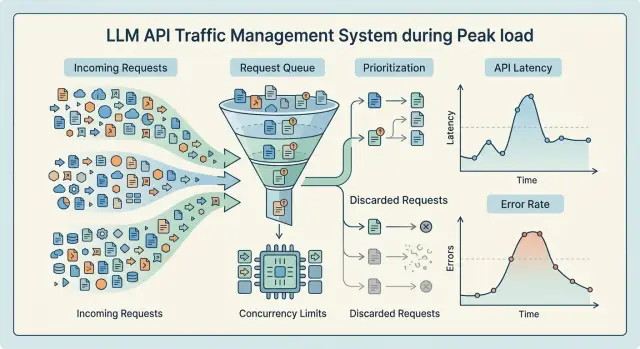
What breaks when requests flood in
When traffic spikes suddenly, a service rarely falls over with 5xx right away. Latency rises first. The incoming queue gets longer, workers stay busy for more time, and connections hang until timeout. The user still gets a response, but not in 2 seconds anymore — now it is 10 to 15.
This is the most unpleasant moment. From the outside, the system still looks alive, but inside, the buffer is almost gone. If you only watch errors, it is easy to miss the point after which the queue can no longer recover.
For LLMs, this is a normal pattern. A long request does more than occupy an execution slot. It uses memory, network, a connection pool, and sometimes logging, moderation, and PII masking too. That is why latency grows before noticeable 5xx errors appear.
Clients often make the peak worse themselves
When the response is slow, clients start retrying. Sometimes the SDK does this, sometimes the user just clicks the button again. One original request turns into two or three, and overload grows right when the system is already struggling.
The usual chain looks like this: the client timeout fires before the service finishes, the client sends a repeat request, and the old request is still being processed. The queue starts growing faster than the service can clear it.
This kind of spike does not look like one big failure in a single second. It arrives in waves. First latency increases, then local timeouts start, then part of the cluster gets overloaded, and repeated requests hit the neighboring parts of the system too.
A single slow node is another separate problem. If a provider, GPU host, or worker starts responding worse than the others, load balancing does not always save you. Requests to that node wait longer, occupy slots, and the whole queue slows down the path. In a gateway like AI Router, it can look like this: one model route slows down, and then the response time of the entire OpenAI-compatible endpoint rises because the shared resource pool is already busy.
A cascade failure almost never starts as a full outage. More often, it is a series of small failures that keep pushing on each other. First the service just got a little slower. A few minutes later it can no longer clear the backlog, and even normal traffic starts to look like an attack.
If you do not cut the queue, limit parallelism, and drop secondary requests at that point, the system will keep degrading until it starts taking down the traffic that matters most.
Where the bottleneck appears
When traffic surges, the bottleneck rarely starts in the model alone. More often it appears earlier, at the front door: the API accepts requests faster than the system can validate them, label them, mask PII, and send them for execution. If the entry API and execution live in the same layer, workers get stuck on long model responses, and new traffic puts pressure on the whole service at once.
That is why it is better to separate the entry API from the execution queue. The first layer should do simple things quickly: authentication, validation, basic limits, and writing the job into the queue. The second layer should pick up tasks only when slots are free. Then a short spike does not turn into a full traffic jam.
The next common bottleneck is concurrent calls to models and providers. Every model has its own speed, and every provider has its own quotas and latency. One shared limit for everything almost always works poorly. Short requests start waiting behind heavy ones, and the light route suffers because of a slow neighbor. This becomes especially obvious when part of the traffic goes to external models and part goes to your own GPUs: the queue is one, but the limits on those paths are different.
The traffic is most often slowed by mixed queues, concurrency limits for a specific model or provider, the outgoing connection pool, and timeout values that are too long. Logging, audit logs, the database, and storage create just as many problems. These components often look secondary until they suddenly start slowing down the whole request.
Context length also changes the picture. One request with a large context can hold a slot longer than ten short ones. From the outside, it looks like a random dip, although the reason is simple: the system counts requests one by one, while resources are spent by tokens and execution time.
The connection pool is often underestimated. If it is too small, requests wait for a free connection before the model is even called. If the timeouts are too generous, stuck requests keep sockets and workers occupied for longer. In the end, the queue grows even at moderate RPS.
Another layer people often forget is event recording. A slow database, synchronous audit logs, or heavy response logging can slow things down almost as much as the model itself. For services that need in-country data storage, PII masking, and auditing, this is especially noticeable.
Look at the whole request path, not just model response time. If you use a gateway like AI Router, it helps to split metrics by entry API, queue, provider calls, and service records. Then the bottleneck is visible right away, and it is easier to stop it before an outage.
Which limits to set in advance
An infinite queue almost always causes harm. From the outside, it looks like the service is still holding on, but inside debt is building up: latency rises, memory is consumed by buffers, workers stay busy longer than usual, and retries eat into the remaining margin. Sometimes it is better to reject part of the traffic right away than to drag the whole system down.
The first limit is queue length. And it is worth limiting not only by request count, but also by the expected token volume. Short classification and long generation put different kinds of load on the system. If you only count jobs, the queue may look safe even though the model pool is already full.
The second limit is the number of in-flight requests per route. Not one shared limit for the whole API, but separate limits for heavy and light paths. Interactive chat, embeddings, and nightly batch processing should not fight over the same remaining capacity. In a gateway that sends traffic to different models and providers through one endpoint, this becomes obvious very quickly: one slow route drags down the others.
Timeouts are also better split by stage. One global 60-second limit rarely helps you understand where the bottleneck started. It is more practical to set a short budget for waiting in the queue, a separate budget for the connection and upstream response, its own limit for generation or streaming, and another short limit for post-processing and logging. If a stage does not fit its budget, the service should end it immediately. Otherwise overload builds silently: the client is still waiting, but the system has already lost.
Retries need to be strict. A common mistake is allowing both the client and the proxy to retry the same request several times. Then one failure multiplies the load two or three times. Usually a small budget is enough: one retry for a short idempotent request, and zero retries for long generation after the model has started. It also helps to limit retries per client per minute so that one noisy integrator does not burn through everyone’s API load limits.
Priorities should also be separated clearly. And not only by API key, but by type of work. Live chat, human review, and fraud scoring should be protected more strongly than archive summarization, backfills, or experiments. The same client often sends both urgent and secondary tasks. If you split only by token, useful traffic can easily drown together with background work.
A solid starting setup is simple: a small queue, a strict in-flight limit, short timeouts per step, 0-1 retry, and separate quotas for high and low priority. Such a system does not become softer. But when it fails, it fails predictably and does not drag neighboring services down with it.
How to set up a queue without extra latency
A long queue looks like insurance, but for an LLM service it often makes things worse. The user is no longer willing to wait 20 to 30 seconds, while the system is still honestly keeping the request in memory and consuming space. It is better to keep the queue short and enforce a hard limit on the number of jobs. If there are no free slots, the service should reject immediately instead of promising work it will not finish in time.
The queue should smooth out a short burst, not hide overload. If your service usually handles 50 requests per second, a queue with thousands of tasks will not save it. It only shifts the failure in time and increases latency for everyone.
Every task should have its own deadline stored next to the request data. Not in a separate table and not only in client logic, but directly in the queue record. Then, before calling the model, the worker can quickly check whether the request is still needed or whether it has already expired. Expired tasks should be removed before the model call. Otherwise the GPU or external API wastes time on a response nobody needs anymore.
Separate queues by purpose
Interactive and batch requests should not be mixed. A chat response, an operator hint, or a form check needs seconds. Overnight document processing or bulk description generation can wait. If everything goes into one queue, batch load can easily steal the slot needed by a live user.
In practice, at least two queues are enough: a short one for interactive requests with a small timeout, and a separate one for background tasks with softer limits. It is better to keep different worker limits and different rejection rules for them. That setup is easier to control and easier to explain to the team.
This is especially useful when the same gateway serves both user-facing scenarios and background pipelines. In AI Router, this breakdown by route and workload type helps you see faster where the backlog started to build: at the front door, at a specific provider, or on your own model hosting.
If the queue has already hit its limit, reject immediately and clearly. A fast response with a clear reason is better than 40 seconds of silence and the same rejection at the end. The client can then retry later, lower the priority, or fall back to another path.
A good queue does not need to be large. It needs to be predictable. When the size is limited, the deadline is stored in each task, and expired work is cleared before model execution, latency stays under control even during a peak.
How to drop secondary requests
When load rises, the system should not pretend that all requests are equal. First separate the flows that barely affect the business if they are rejected: background summaries, repeated generations "for convenience," batch evaluations, and non-urgent embeddings. If the answer is needed on screen right now, or if it affects money, risk, or compliance, that flow should be cut last.
Usually a simple rule is enough. Keep high priority for cases with a direct user scenario or a decision that cannot be delayed. For a bank, that means operator chat and risk checks. For retail, it means support answers and anti-fraud at payment time. Nightly catalog relabeling or mass recommendation recalculation is better sent to a separate queue with no right to compete for the main resource.
Rejection itself should be tied to two things: priority and request age. Low priority can be rejected immediately if the queue is already above the threshold. You can also give it a short window, for example 2 to 5 seconds, and remove it from processing after that. An old secondary request is almost always worse than a new urgent one.
Do not leave the client hanging. If it is clear the request will not go through, answer right away. A fast rejection is better than 25 seconds of waiting and the same rejection at the end. For an API, an explicit reason like "low_priority_dropped" and a short hint are usually enough: retry later, switch to async mode, or reduce the request size.
Logs matter here for a reason. It is useful to record the request type, priority, queue age, expected generation size, tenant or API key, and the rejection reason. Also count the loss volume separately: how many requests were rejected, how many tokens were not processed, and which scenarios were affected. In a gateway like AI Router, it is especially helpful to watch key-based rate limits and audit logs: they quickly show whose background load started choking live traffic.
How to roll it out step by step
It is better to introduce backpressure gradually. If you turn on all protections at once, there will be fewer outages, but the team will not understand which limit actually helped and which one just hid the problem.
-
Collect baseline metrics. Watch p95 and p99 latency, queue depth, the number of in-flight requests, and the error rate. Break the data down by route, model, and task type. The average almost always looks better than the real picture under peak load.
-
Find the first component that hits its limit. This could be an external LLM API, the connection pool, a GPU worker, or the logging database. Put the limit exactly where latency starts to rise sharply and clients begin retrying. If the team works through one gateway, it is useful to keep limits at the API key, model, and provider levels.
-
After the limit, add a small queue and short timeouts. The queue should smooth out a short burst, not build a backlog for minutes ahead. If a request has not started within a few seconds, it is better to return an error quickly than to make the client wait and then retry even harder.
-
Then separate traffic by priority. Usually two or three classes are enough: interactive user requests, background jobs, and secondary mass operations. Under overload, the system should cut low priority first. Otherwise one heavy batch job can easily take out chat, search, or a support bot.
-
After that, run a hard test. Create a burst, turn on client retries, and see how the queue, latency, and in-flight count grow. Then test the manual emergency mode: can the on-call person quickly disable low priority, tighten limits, or temporarily move part of the traffic to a faster model?
Do not roll out this setup to all traffic at once in production. Start with part of the traffic, compare metrics before and after, and only then expand. If the queue drains quickly after a burst, p99 does not spike, and secondary requests drop before user-facing ones, the setup is already holding up.
A peak-hour example
Imagine an evening peak in a bank’s chat assistant. From 6:30 PM to 8:00 PM, people check payments, disputed charges, and application status. Traffic grows almost 4x, while the system is handling not only customer chats but also background jobs: draft replies for operators, chat summarization, and batch processing of requests.
The problem does not start at the front door, but in the worker slots. Suppose the service has 40 slots. A short customer question takes 2 to 4 seconds, but a long request with a large chat history or database search can run for 25 to 40 seconds. If ten to fifteen such requests arrive in a row, they take almost all the slots. Live chat feels it immediately: the queue grows, latency jumps, and timeouts multiply.
In that scenario, priorities need to be strict, not decorative. The live customer must go first. Everything else can be tightened.
What this looks like in practice
The team splits the load into three classes. The first is real-time customer responses. The second is operator hints and short internal summaries. The third is drafts, nightly recalculations, batch jobs, and other work that can wait.
Then they introduce simple rules: 24 of the 40 slots are reserved for live chat, long requests are kept in a separate pool with no more than 8 slots, tasks older than 8 seconds in the queue are canceled, and a provider call is cut off if it does not answer within 20 seconds. The third class is the first to be dropped when the queue grows.
After that, the service stops trying to save everything at once. Drafts are answered less often, batch tasks fail or restart more often, but the customer in chat still gets a response in 3 to 6 seconds even at peak time.
Before such limits, the picture is usually worse: almost all request types are formally still "in progress," but the system is drowning as a whole. After the limits, secondary tasks lose success rate, and that is normal. The main scenario stays up.
For a bank or retailer, that is a reasonable tradeoff. The user should not have to wait because the system is writing a draft response for an operator or running an evening batch in the background. If the service survives the peak and keeps the live conversation going, the setup worked.
Mistakes that take a system down fast
Backpressure usually breaks not because of one big failure, but because of several bad decisions that reinforce each other. The service still holds up, then the model or provider slows down a bit, and the queue starts growing on its own.
The most common mistake is enabling retries on both the client and the server. One failed request quickly turns into three or nine. If the external LLM API is already responding slowly, this setup creates a retry storm and takes down the queue faster than the original load. Usually only one side should control retries, with a strict attempt limit.
A single shared queue for all traffic is just as harmful. A background batch job suddenly starts competing for resources with live chat or application review. In the end, secondary work chokes the things people need right now. For LLMs, it is better to separate flows at least by priority: interactive requests on one side, batch on the other.
Long timeouts also rarely save the day. When the team leaves 60 or 120 seconds in the hope that the model will finish, it simply keeps connections, memory, and workers occupied for longer. The user is still unhappy, and the system loses its ability to recover quickly. A short, clear rejection is almost always better than a silent hang.
Another bad habit is hiding rejection behind a blank timeout with no proper reason code. Then the client does not know whether it should retry, switch to a cheaper model, or show the user an overload message. For LLM request queues, this is especially painful: code 429, 503, or a specific marker like "dropped_by_priority" gives you a chance to respond correctly.
Another risk is trying to save the service by simply adding more workers after the queue has already gotten out of control. Autoscaling is late. New workers arrive when downstream is already overheated, and they only increase pressure on the model gateway, database, cache, and network. First you need to stop the inflow of extra work, drop low priority, and only then add capacity carefully.
In practice, the chain often looks like this: the provider responds 4 seconds slower than usual, the client and server both retry, the shared queue swells, long timeouts keep sockets open, and monitoring only shows "timeouts." A few minutes later, not one function but the whole service goes down.
A quick pre-launch check
Before release, it is better to test not the average load, but the moment when the system is already full. That is when you can see whether the protection against a cascade failure really works or simply delays the outage by a couple of minutes.
Start with the queue. It should have a hard length limit. If it can grow almost without end, you are not saving the service — you are just moving the problem a little further in time. Then users get long timeouts, and workers waste memory on tasks nobody needs anymore.
Check priority separation too. Interactive user requests should be kept apart from batch jobs, background recalculations, and large-scale runs. Otherwise one nightly import can easily eat the whole reserve and take down chat, search, or support.
Before launch, it helps to run a short checklist:
- the queue is cut off by a hard limit, not server memory;
- interactive and batch traffic go through different priority classes;
- when space runs out, the service quickly returns 429 or 503 without long waiting;
- metrics show queue depth, age of the oldest task, and the share of dropped requests;
- the on-call team can manually disable a heavy route, model, or provider.
Also check rejection behavior separately. A 429 or 503 response should arrive quickly and predictably. The worst-looking system is the one that does not reject honestly, but keeps the connection open for 40 seconds and then fails anyway. That only worsens the user experience and adds extra load to upstream.
For a gateway like AI Router, this matters a lot: one slow provider or heavy route should not drag down all the rest of the traffic. If the team can switch off a problematic path manually, it buys time and keeps the queue from spreading across the whole system.
The final check is simple: push the service above normal, for example 2x, and watch three numbers — queue length, task age, and the share of instant rejections. If they grow in a controlled way and the interactive flow stays alive, the configuration is already close to production-ready.
What to do next
Do not roll out backpressure to all routes at once. Start with one main scenario and one secondary one. That way the team will see faster where the queue really helps and where it only hides overload.
A good first pair is simple: protect online user requests first, and put batch jobs lower in priority or cut them first. For example, keep the customer chat alive until the very end, while nightly product description generation can be postponed without much pain.
Then you need a short agreement inside the team. Product, engineering, and support should decide in advance what the system must preserve during a peak and what can be dropped without a manual review in the morning. If you do not agree ahead of time, the argument will start during the incident.
It is worth locking down just a few rules: which requests go without a queue or with a short queue, which tasks can be delayed by 5 to 15 minutes, what the system drops first when capacity is low, and who changes the limits in emergency mode.
Also describe the API client contract separately. You need clear error codes and clear retry behavior. For a temporary limit breach, 429 is usually enough; for general lack of capacity, 503 works. If the client can retry, send Retry-After and ask for rare retries with jitter. Endless retries without pauses can quickly take down even a healthy service.
If you are building an LLM API in Kazakhstan, it does not always make sense to assemble the whole stack from scratch. Sometimes it is easier to use a ready-made gateway like AI Router: one OpenAI-compatible endpoint, routing to different providers and models, key-based rate limits, audit logs, and local hosting of open-weight models when in-country data storage, low latency, or data residency matters. It does not replace your priority and limit setup, but it does remove part of the basic infrastructure work.
Once the first route survives the evening peak calmly and without surprises, add the next one. If queue metrics, drop rate, and response time stay within normal range for at least a week, the approach can be expanded further.
Frequently asked questions
Why does an LLM service start slowing down before it suddenly fails with 5xx errors?
Because overload usually hits response time first. The queue grows, workers stay busy longer, connections wait until timeout, and the service still responds, just much more slowly. If you only watch 5xx errors, you will notice the problem too late.
Where does the bottleneck usually start when requests spike?
Often the bottleneck appears before the model call: during request validation, PII masking, logging, or queue writes. Then it gets worse because of per-model limits, provider limits, the connection pool, or a slow database.
Do you need a large queue for an evening traffic peak?
No, a long queue usually does more harm than good. It hides overload, increases latency, and keeps tasks in memory even after they are no longer useful. A short queue with a hard limit and fast rejection is usually better.
How do you keep background jobs from starving live traffic?
Separate them into at least two queues and give them different worker limits. Keep chat, search, and user-facing responses apart, and keep batch jobs, summarization, and night-time tasks apart. Then background traffic will not take slots away from live requests.
What timeouts should you set for LLM requests?
Split time budgets by stage. Give the queue wait a short limit, set a separate limit for upstream connection and response, add your own generation limit, and keep post-processing short. That way you can see exactly where the service is stuck and avoid holding dead requests too long.
How many retries can you allow without putting the system at risk?
Usually one retry is enough for a short idempotent request, and zero retries after a long generation has started. The most important rule is not to retry on both the client and the server at the same time, or a single failure will quickly multiply the load.
When is it better to reject a request immediately instead of keeping it in the queue?
When the task is no longer likely to be useful. If the queue has reached its limit and the request is low priority or its deadline has expired, it is better to respond immediately. A fast rejection is better than a long wait ending in the same rejection.
Which metrics show first that backpressure is not working?
Watch p95 and p99 latency, queue depth, the age of the oldest task, the number of in-flight requests, and the share of instant rejections. It also helps to break metrics down by route, model, provider, and task type so you can find the bottleneck quickly.
How do you test backpressure before release?
Give the service traffic above normal, turn on client retries, and watch how the queue, task age, and response time behave. A good setup quickly cuts low-priority traffic, keeps the interactive flow alive, and returns to normal fast after the peak.
When does it make sense to use a gateway like AI Router instead of building everything yourself?
It is useful when you need one OpenAI-compatible endpoint for different models and providers, key-based rate limits, audit logs, and data storage inside the country. It removes part of the infrastructure work, but you still need to set priorities, limits, and rejection rules separately.