Automatic Provider Cut-Off on Failures Without Flapping
Automatic provider cut-off during failures reduces cascading errors. We look at error windows, thresholds, traffic return, and quick checks before production.
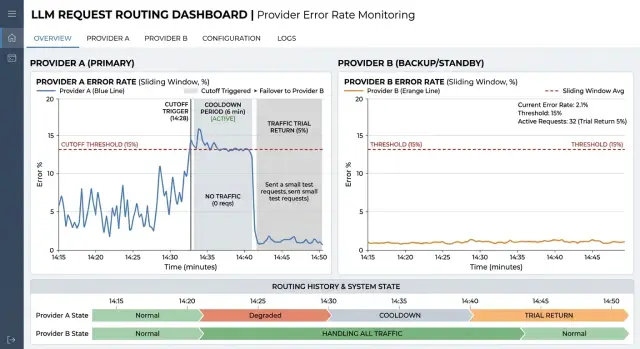
What happens when a channel goes down
A provider failure almost never looks like a sudden break. At first, timeouts increase, then individual 5xx errors appear, and then the errors come in bursts. In just a few minutes, a channel can move from "sometimes responds" to "eats the queue and returns almost nothing".
Worst of all, the degradation builds quietly. One timeout is easy to treat as a random issue. Two in a row already slow down the queue. Ten timeouts in a short period change the behavior of the whole system: workers stay busy longer, connections hang, and new requests wait. The user sees not only errors, but also a sharp increase in latency.
Retries often make things worse. If the system immediately repeats the request to the same troubled channel, it adds load exactly where the bottleneck already is. One failed call becomes two or three. The provider responds even more slowly, the queue grows faster, and the chance of success barely changes. Within minutes, traffic itself can finish off a channel that might have survived a short spike.
The problem quickly spreads beyond one route. While the router waits for a timeout or keeps several retries on a bad provider, the shared connection pool and worker threads are tied up. Because of that, even requests that could have gone to a healthy channel get an extra 200–500 ms, and sometimes more. On a graph, this shows up as latency spreading across the whole system, not just one provider.
A short spike and a real degradation can look similar in the first few seconds. The difference appears later. With a short spike, the errors end quickly, and successful responses still dominate. With degradation, the problem lasts longer than one observation window: errors and latency both rise, and the share of successful responses drops minute by minute.
In an LLM gateway, this is especially noticeable because traffic to different providers passes through one API layer. If you do not separate noise from a real outage, the system will start bouncing between routes. If you wait too long, the failing channel will drag down latency for the entire stream. The first few minutes decide almost everything.
Which errors to count
If you count every failed response in a row, the scheme quickly starts lying. It punishes the provider even when the real problem is a limit, a specific model, or the request itself.
Usually, three types of failures are counted as outages: timeouts, 5xx errors, and connection drops. These are good signals of real channel instability. The provider did not respond in time, returned a server error, or dropped the request halfway through.
429 should be counted separately. It often does not mean full unavailability, but rather that you hit a quota, a limit, or a local rate limit. If you mix 429 with timeouts and 5xx errors, the router will move traffic as if the provider were dead, when in reality it is simply asking you to slow down.
Client errors should not go in the same bucket either. A prompt that is too long, broken JSON, or an invalid model parameter is not a provider problem. 4xx codes, except for separately handled 429, are better excluded from cut-off logic.
There is another common mistake: counting only the provider as a whole. For the same partner, one model may work smoothly while another has delays and occasional 502s. If you cut off the whole pool at once, you lose a healthy channel for no benefit. That is why metrics are better collected as provider + model, with the decision to disable the whole pool made after that.
You also need a lower traffic threshold. If a model received two requests and both failed, that is still not enough data. It is more practical to start trusting the metric once there are at least 20–50 requests in the window. Separate thresholds for 5xx errors and timeouts also help: sometimes the provider is not fully down, it is just responding too slowly. For 429, it is more useful to reduce load or enable backoff than to cut the channel immediately.
This filtering makes automatic cut-off calmer. The system removes the truly broken route and does not start moving traffic around because of someone else's bad request or a short rate-limit spike.
How to choose the window and thresholds
A window that is too short makes the system nervous. A window that is too long keeps traffic in a bad channel longer than necessary. That is why the window length should be chosen based on the type of load, not copied from a default value.
For chat, 30–60 seconds is usually enough. It needs a fast reaction: if a provider starts producing 5xx errors or timeouts, users notice immediately. For batch jobs, the window can be longer, for example 3–10 minutes. Batch processing has a different cost of failure: a rare spike is less dangerous, while a false cut-off can push a large volume of requests into a more expensive or slower channel.
One threshold almost always gives poor results. It is better to combine two checks: the share of errors in the window and the number of failures in a row. The error share catches gradual degradation when the provider responds unreliably. A streak of failures catches a sharp drop when the channel is effectively dead.
As a starting point, you can use these settings:
- for chat: a 60-second window and cut-off at 20–30% errors
- for chat: immediate cut-off after 5–7 failures in a row
- for batch jobs: a 5-minute window and cut-off at 10–15% errors
- for batch jobs: a separate timeout limit if timeouts are backing up the queue
Without a lower traffic threshold, the rule often produces false signals. If only three requests went through the channel in a minute and one failed, you already see 33% errors, even though this is just noise. That is why it is useful not to make a decision until the channel has seen at least 20–50 requests in the window. For rare traffic, you can also look not only at the percentage but at the absolute number of errors.
The threshold should be tested against short spikes. For example, suppose a provider returned four timeouts out of forty requests during a network issue. If the rule triggers at that level, the route will start bouncing without real benefit. The scheme should catch a failure, not every bit of noise.
If you route models through a single gateway, thresholds are better separated by scenario. Interactive chat, batch labeling, and internal pipelines almost never should share the same error window.
How to bring traffic back without flapping
After an outage, do not reopen the channel immediately, even if the provider is responding again. A short successful stretch does not mean the problem is gone. A service often comes back for a few minutes and then starts returning 5xx errors, 429s, or slows down sharply again.
First, let the channel cool down. A cooldown of 5–15 minutes is usually enough, but the exact time depends on request frequency and the cost of another failure. If the system just disabled a route, it is better to wait a little longer than to send the stream back into an unstable channel.
Before returning production traffic, send a few test requests. They should look like real ones: same prompt size, same response type, same time limit. A formal check like "we got 200 OK" is too weak. A channel may answer, but it may do so three times slower than usual.
A simple working scheme is this: first return 5% of traffic and wait 3–5 minutes, then increase to 15%, then to 50%, and only after a stable window open 100%. Small shares reduce flapping better than an immediate full return. If the channel starts slowing down again, you lose only part of the stream, not all of the traffic.
Watch more than errors. If latency rises quickly, the return should also be canceled. For the user, a long response is almost as bad as a clear error. That is why it is useful to keep a separate latency threshold and send the channel back into cooldown if it exceeds the working limit in even one or two windows in a row.
A good rule sounds boring, but it works: any noticeable increase in errors or latency during ramp-up sends the route back into cooldown. No manual exceptions and no "let's wait a little longer." Those exceptions are usually what breaks the scheme.
How to set up the scheme step by step
First, define the goal. Not for the platform as a whole, but for each scenario separately. Customer chat, internal search, and overnight batch processing tolerate different latency and different error rates. If you mix them into one rule set, you will quickly get false cut-offs.
The setup usually goes like this:
- Describe 2–4 scenarios and set an SLO for each one. For online chat, fast response and a low timeout rate matter. For batch jobs, the overall success rate matters more.
- Choose the metrics that really affect the user experience: error rate, latency, and timeout rate. That is usually enough.
- Use past incidents and set starting thresholds based on facts, not guesses. If during an outage the timeout rate rose above 7% and p95 latency went over 10 seconds, start with those numbers.
- Run the rules on historical logs. This will show how many times the scheme would have cut off a provider in vain and where the window was chosen poorly.
- Enable fallback on a small share of traffic first. Often 5–10% is enough to test the logic under real load without causing unnecessary request shifting.
After that, add manual cut-off for the on-call team. Automation cannot keep up with every rare case: partial degradation, a problem in one region, or a strange spike in 429 errors. The on-call engineer should have a simple way to remove a provider from rotation for 15–30 minutes and then bring it back after checking.
If you work through a single gateway, it is convenient to apply these rules at the provider, model, and API key levels. Then the team sees not a vague "everything is bad," but an exact picture: which provider is seeing more latency, where the timeouts started, and on which traffic the backup route has already helped.
A good starting scheme is usually boring. That is a plus. It cuts only obvious failures, does not bounce traffic every five minutes, and leaves the on-call team with clear manual control.
Example with two providers
Imagine a customer support chatbot for a bank. It answers frequent questions: balance, card blocking, transfer status, and limit changes. On a normal day, almost all traffic goes through the primary provider because it has stable latency and rarely fails.
The problem does not start in one second. First, responses just slow down, then timeouts increase, and after a couple of minutes the channel is already pulling the whole service down. If you keep sending requests back and forth at that moment, users will see either silence or sudden delays. That is why the cut-off scheme is better built not on one failed request, but on an error window and a minimum traffic volume.
A bank could use a rule like this: a 120-second window, count only timeouts and 5xx errors, and ignore 4xx. The channel is cut off if at least 200 requests passed through that window and the failure rate exceeded 18%. One random spike will not cross the threshold. But a real incident will be detected quickly.
Then the picture looks like this:
- at 10:00 the primary provider responds normally, and average latency stays within normal limits
- by 10:01, the number of timeouts increases, but there are still too few to trigger a cut-off
- by 10:02, the last 120 seconds include 240 requests, 52 of which end in a timeout or
5xx - the rule triggers, and the backup route takes all traffic until the incident ends
A minimum request count is especially useful here. Without it, a channel can be cut off because of three errors on a tiny stream, even though that is just noise. In a bank support center, this is easy to see at night, when there are fewer requests and a random failure looks worse than it really is.
When the incident at the primary provider ends, do not send the whole stream back right away. After a cooldown, for example five minutes without any new signs of trouble, the system sends back only 10% of traffic for testing. If timeouts do not increase, the share can be raised further: to 25%, then 50%, and only after that to 100%.
This scheme reduces downtime without flapping. The bot keeps answering through the backup path, and the primary channel gets time to recover calmly and prove that it can handle normal load again.
Where teams go wrong
The most common mistake is using the same threshold for all models, all providers, and all scenarios. That almost always creates a skew. A short classification request and a long chat operate at different rhythms, and a small open-weight model and a large frontier model have different norms for latency and timeouts. If the rule is the same for everything, you either cut off a healthy channel too early or keep a dead one alive for too long.
Another mistake is looking only at the number of errors without considering traffic volume in the window. Three failed requests in a row sound alarming, but at night that may be only 12 requests in 10 minutes. Then the system reacts not to a provider outage, but to noise. With low traffic, you need a minimum request count, for example 30 or 50 attempts in the window.
Many teams count 400 and 422 responses as provider failures. That breaks the scheme. These codes often point to a bad request, too long a context, an invalid format, or a validation error. If you mix them with 5xx errors, timeouts, and network drops, routing starts treating the wrong problem.
There is just as much confusion around 429. Rate limit and full unavailability are different things. If the provider has limited the speed, sometimes all you need is to reduce the traffic share, enable a queue, or move part of the requests to a backup channel. If you treat 429 the same as a timeout, the system will cut the route too aggressively and create an unnecessary traffic spike for the neighboring provider.
The most expensive mistake happens during traffic return. The channel gives one successful response, and the team immediately sends 100% of requests back to it. A minute later it fails again, then comes back, and flapping begins. A normal scheme returns traffic in steps: 5%, then 20%, then 50%, and only after a stable window the full volume.
There is also a quieter mistake: rules are tested during the day on test load and then the night and peak periods are forgotten. The same window behaves very differently at 40 requests per minute and at 4,000. That is why thresholds should be checked separately for low, normal, and peak traffic.
Pre-launch checklist
Before launch, it helps to go through a short checklist.
- The window should contain enough requests. If a model gets 3–5 requests per minute, a short window means very little. For rare traffic, use a longer window and set a minimum number of observations, such as 30–50 requests.
- Separate
429and 5xx.429usually means a limit, not a failure. In that case, it is better to reduce traffic share or enablebackofffirst. - Set a
cooldownafter cut-off. Until it ends, do not return the normal stream. First send a small test share, for example 1–5%, and watch the next error window. - The dashboard should show metrics separately by provider and by model. Otherwise you will only see overall degradation and will not know whether the whole channel is failing or just one specific model.
- The team should have a manual override and a decision log. The on-call engineer should be able to exclude a provider, return it to rotation, and then open a record with the reason: which threshold fired, in which window, and who changed the state.
Before production, it is useful to run a short test on test traffic. Increase the 5xx rate for one provider, simulate 429 separately, and check that the scheme behaves differently in each case. If every decision is visible in the log and the problematic model is easy to find on the dashboard, the launch will go much more smoothly.
What to do after the first release
After launch, do not change the rules on the second day. Let the scheme live for at least a week and collect the metrics in one place: error share for each provider, number of cut-offs, outage duration, traffic return time, and application-side complaints. Over that week, it usually becomes clear where the system is truly catching failures and where it is reacting to short noise.
Then review the real incidents manually. Look not only at the failure itself, but also at the cost of the reaction. Sometimes the scheme correctly moves requests away from a failing channel. Sometimes it switches traffic too early to a more expensive or slower route. That is normal. The first adjustments almost always come after this review.
Once a month, it is useful to revisit the error window and thresholds based on the incident log, not on the team's memory. Usually, it is enough to answer four questions: how many false cut-offs there were, how many failures the scheme missed, how quickly traffic returned after recovery, and how much the switch cost in latency and money.
At least once, it is worth running a training failure on test traffic. Force one provider to return a series of 5xx errors, timeouts, or a sharp latency increase and check that the system cuts off the channel, does not flap, and calmly returns the stream afterward. Better to find the problem on 1% of test requests than in full production.
After that, check not only the technical side, but also the data requirements. Routing should not break data storage in the required country, PII masking, or the audit trail. If some requests cannot leave the country, and others must be stored with a full action trail, that should be built into the route rules and tests.
If the team finds it hard to maintain this logic across several APIs and providers, this layer is often moved into a separate gateway. For example, AI Router on airouter.kz provides one OpenAI-compatible endpoint for different models and providers. In that case, it is easier to keep routing, audit logging, PII masking, and in-country data storage requirements in one place without changing each service separately.
Frequently asked questions
Which errors should really count as a provider failure?
Count timeouts, 5xx, and connection drops. These signals usually mean the channel is genuinely unstable.
Keep 429 separate: it more often points to a limit than to a full outage. Do not include client errors like 400 or 422 in cut-off logic, because they are caused by the request itself.
Why not just retry the request on the same failing channel?
Because you are adding load to the weak spot yourself. One failed call quickly turns into two or three, the queue grows, and the chance of success barely changes.
It is better to route the request to a backup path quickly or apply backoff than to keep hitting the same channel with retries.
What error window should I choose for chat and for batch jobs?
For chat, a window of 30–60 seconds is usually enough. Users notice delays quickly, so the router needs to react without waiting too long.
For batch jobs, the window should be longer, often 3–10 minutes. That way you do not disable a route because of a short spike and move a large volume into a more expensive channel.
Do I need a minimum number of requests in the window?
Yes, without it the rule often reacts to noise. If only three requests passed through the window and one failed, the percentage looks scary, but it is too early to draw a conclusion.
At the start, it is practical to require at least 20–50 requests in the window. For low traffic, you can make the window longer and look not only at the percentage but also at the absolute number of failures.
Why is it better to track metrics by provider and model together?
Because one model from the same provider may work fine while another keeps returning 502 and timeouts. If you cut off the whole provider, you lose a healthy route for no reason.
Collect metrics by provider + model, and only then decide whether to disable the whole pool.
What threshold should I start with if I do not have exact data yet?
Usually, it works better to use two checks instead of one. The first looks at the error rate in the window, and the second catches a run of failures in a row.
For chat, you can start with a 60-second window, cut off at 20–30% errors, and immediate shutdown after 5–7 failures in a row. For batch, a 5-minute window and a 10–15% threshold often work well, plus separate timeout control.
How do I bring traffic back after a failure without causing flapping?
Do not reopen the channel for the full stream right away. First give it a cooldown of 5–15 minutes, then send a few test requests that look like real ones.
If the responses are healthy, return traffic step by step: first a small share, then a medium one, and only after a stable window the full volume. If errors or latency start rising again, put the route back into cooldown immediately.
What should I do with 429 errors?
First reduce the load on that route. Often backoff, a queue, or moving part of the requests to a backup channel helps.
Do not mix 429 with timeouts and 5xx. Otherwise the router will think the provider is down, when in reality it is only asking you to slow down.
Where do teams most often make mistakes in this kind of scheme?
A common mistake is using the same threshold for all scenarios, not setting a minimum traffic level in the window, and treating client 4xx errors as provider failures. Because of that, the scheme either cuts off a healthy channel or keeps a bad one alive for too long.
Another expensive mistake is returning 100% of traffic after a single successful response. That almost always leads to another failure a few minutes later.
When should thresholds be reviewed, and what should be checked after the first release?
After launch, do not change the settings on the first day. Let the scheme live for at least a week, and collect the number of cut-offs, outage duration, time to traffic return, and application-side complaints.
Then review the real incidents manually and compare the thresholds with the incident log once a month. If you work through a single gateway, also check the data rules right away: country storage, PII masking, and audit logging should not break when traffic is rerouted.