Assistant Personalization Without Extra Profile or Risk
Assistant personalization works better when you store only the signals that change the answer: role, language, request goal, and fresh context.
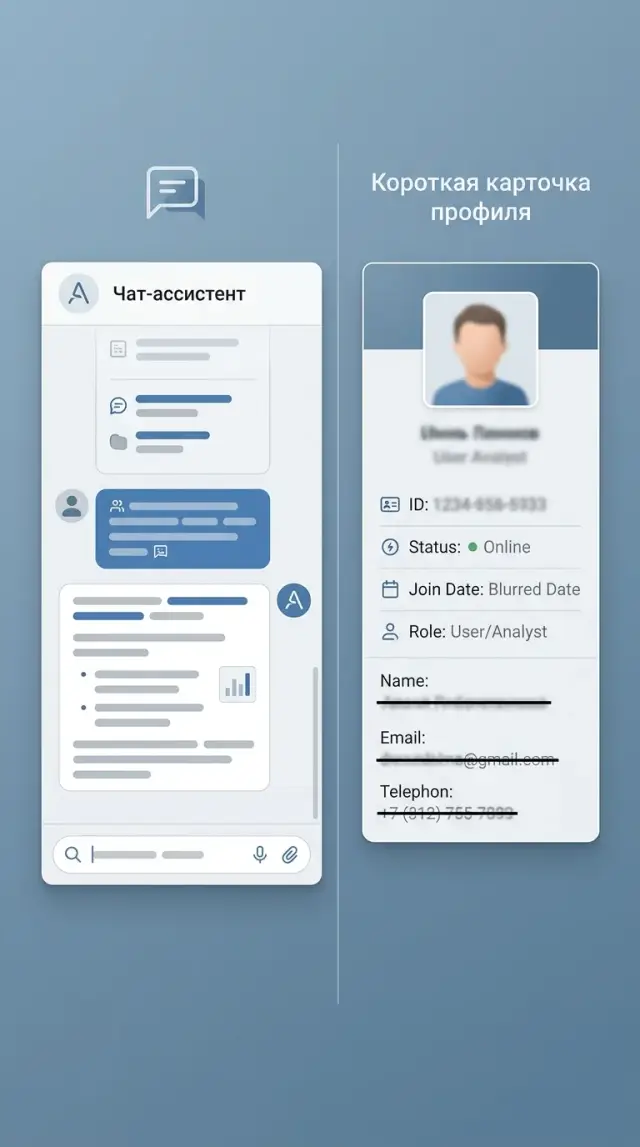
Why an oversized profile gets in the way
A good answer does not come from a huge dossier, but from the right context for the current request. If a person asks where their order is, the assistant needs the order number, the response language, and sometimes the delivery city. Date of birth, three years of purchase history, and marital status are just noise here.
When there are too many fields, the model more often latches onto something that looks plausible but is not relevant. The user writes: “When will my order arrive?” And the assistant suddenly suggests a more expensive replacement because the profile has a tag that says “buys premium.” The answer sounds confident, but it does not solve the problem.
Old data is even more harmful. A profile may still contain an old address, an old plan, or a long-standing preference for a certain tone of communication. The model treats that as fact and builds the answer around it. The user has already explained the new situation, but the assistant is still arguing with the past version of the profile.
For most tasks, a short set of signals is enough: what the person wants to do now, which data directly applies to that task, and what is needed for the format of the answer, such as language or a short style. Everything else should be added only when the answer truly breaks without it.
Sensitive details raise the cost of mistakes. If an ID number, passport data, health information, or income data gets into the context, even a small inaccuracy starts to look like an incident. Users quickly lose trust. Later, the team has to explain why those data were needed at all. That is why PII masking helps, but it is even better not to pass anything unnecessary in the first place.
A large profile is harder to maintain. The developer does not immediately understand which field pushes the answer in the wrong direction. The product team argues about what can be stored and what cannot. Legal asks for a simple justification for each field, and at that point it often turns out that half the data was collected “just in case.”
There is also a simple human reason. An oversized profile is hard to explain to the user. If a person asks why the assistant knows their old tickets, personal habits, and unrelated details, it is hard to give a clear answer. Personalization works better when it is narrow, fresh, and understandable.
Which signals really affect the answer
Usually, a full profile is not what helps, but a few signals that change the answer itself. If a signal does not affect the wording, the steps, or the available actions, it is better not to put it into LLM memory. Good personalization almost always comes from the current context, not from a dossier about the person.
The first useful signal is the language and tone of communication. The assistant only needs to know whether to write in Russian or Kazakh, briefly or in detail, formally or more simply. For support, that makes a noticeable difference. One person wants a two-line instruction; another needs a calm explanation without jargon.
The second signal is the user’s role in the current scenario. The same question sounds similar, but the answer changes if the person in front of you is a customer, support agent, manager, or developer. A customer needs a clear next step. An employee needs the rule and the access limits. A developer needs an exact format and parameters.
The task itself and the type of response have the biggest impact on quality. It helps if the assistant knows what is needed now: a short summary, a step-by-step guide, an email, a table, JSON, or a brief explanation. That is almost always more useful than age, a job title from CRM, or a long biography.
Another working signal is a short history of recent actions. Not the full conversation for the month, but only the fresh trail: what the user already opened, what they tried, and where they stopped. If a person just changed their plan, saw error 429, and opened the limits page, the assistant should explain the reason and the next step instead of starting from scratch with the help article.
There are also hard constraints that prevent the answer from drifting off course. These include the country, the available plan, product rules, and company policies. For some teams in Kazakhstan, the requirement to keep data inside the country already changes the system architecture. If a company works through AI Router, the recommendations are influenced by a single OpenAI-compatible endpoint, key-level limits, PII masking, audit logs, and local data storage requirements.
A useful minimum usually looks like this: language, role, current task, recent action history, and a set of constraints. You do not need a full name, an exact address, or extra fields from a form for that. If a signal cannot be tied to a concrete improvement in the answer, it usually adds risk rather than value.
What not to store
The more unnecessary data you collect, the higher the risk of leaks, mistakes, and odd model conclusions. A good answer usually needs the user’s current context, not a complete dossier.
Passport data, ID numbers, and other official identifiers should not be stored if the task does not require them right now. For booking a doctor’s appointment, checking delivery, or choosing a product, they are usually not needed. If the user is simply asking about order status, the assistant only needs the order number and, sometimes, a confirmed phone number or email.
A full conversation history for months rarely helps either. LLM memory quickly turns into a pile of old complaints, random jokes, outdated addresses, and canceled orders. As a result, the model latches onto the wrong fact and answers worse. It is usually more useful to store a short summary: the current goal, the last confirmed status, and a few facts that are still valid.
Another risk is guessing. Do not save assumptions about income, health, family situation, religion, political views, or private life unless the person gave those details themselves for a specific service. Even if the model inferred something from the conversation, that is not a fact. Such records easily turn into mistakes, and sometimes into a direct data issue.
Duplicates are also harmful. The same phone number may live in CRM, in a feedback form, in chat, and in an agent’s notes. The assistant sees several versions of one fact and starts getting confused. It is better to keep one source for each fact and the date it was last confirmed.
Raw documents are not always needed either. If the task can be solved with short facts, extract them and remove the source document from working memory. Instead of storing an ID scan, keep the fact “identity verified.” Instead of a full contract, keep the plan, validity period, and customer number.
In practice, it helps to keep only what changes the answer: the communication language, the user’s current task, the latest confirmed data about the order or service, explicit preferences the person set themselves, and the lifetime of each fact. If you still accept sensitive data, apply PII masking before sending it to the model and do not place raw fields into long-term memory without a reason.
How to collect the minimum data step by step
Good personalization rarely needs a large profile. Usually it needs one or two signals that directly change the answer: language, role, current stage of the task, a recent fact from the session. If a signal does not change the text, tone, or next action, it is better not to collect it.
Start with one scenario where the error is already noticeable. Not with a broad idea like “let’s make answers smarter,” but with a specific failure. For example, the assistant mixes up the tone for new and existing customers, or keeps asking for the request number even though it is already in the conversation. That makes it easier to see what context is actually needed.
Then the process is simple:
- Pick one answer you want to make more accurate. State the task in one line: “the assistant should correctly explain the ticket status to an existing customer.”
- List only the signals without which the answer breaks. For this example, the customer status, response language, and request number are enough.
- Check each signal with a simple question: if you remove it, does the final answer change? If not, the field goes away.
- Give each signal a lifetime. The interface language can be stored for longer. The order number, the current topic, or a temporary status is better kept for hours or days.
- Store facts separately from the full history. The model does not need the whole chat for three weeks if three facts are enough for the answer: “the user is already authenticated,” “the order is paid,” and “the response should be in Russian.”
That is data minimization in practice. You are not debating principles; you are keeping only what changes the model’s decision. At the same time, LLM memory gets cheaper: a short set of facts goes into the prompt instead of a long conversation.
You should be even stricter with personal data. If the assistant can answer after PII masking, store the cleaned fact rather than the original string. Instead of a full address, a city is often enough. Instead of an ID number, a signal that identity has already been checked. This layer of memory is easier to delete, update, and show to security teams.
There is a useful test. Imagine each field leaking on its own. If the leak would be unpleasant and the field barely affects the answer, remove it right away. That is usually the right decision.
Example: an online store support assistant
In store support, personalization often looks very modest. A buyer writes: “Сәлеметсіз бе, менің тапсырысым қайда? Қысқа жазыңыз.” To answer properly, the assistant does not need a large profile. It needs the context for this task: the message language, the request for a short reply, the order number, and the current delivery status.
If the system already sees the customer’s last message, it can detect Kazakh without a separate permanent field in the profile. The same goes for response length. The person already showed that they want a short text, and that is enough for the current conversation.
A working request to the model usually needs only a few items:
- language: Kazakh
- response format: short
- order number
- delivery status
- delivery window or delay reason, if needed
With that set, the assistant answers precisely: it confirms the status, gives the next step, and does not start unnecessary conversation. The customer’s name may help only in the greeting. “Айгерим, сәлеметсіз бе” sounds warmer, but it barely affects the solution.
Extra data gets in the way faster than you might think. Suppose the profile stores an old complaint about a return from three months ago. The customer now writes about a new order, but the model latches onto the old conflict, apologizes again, and drifts off topic. That is how LLM memory creates noise instead of value.
The same logic applies to personal data. For order checks, you usually do not need the full phone number, address, or email. The order number and the status from the internal system are enough. If an additional signal is needed, it is better to pass masked data: the last digits of the phone or a hidden part of the email, not the full field.
After delivery is complete, some context quickly loses meaning. If there is no dispute over the order, the delivery status can be removed from the assistant’s working memory after a week. It no longer helps new requests, but it still carries data risk. Only what is truly needed for service, reporting, or mandatory audit should be kept.
For such an assistant, the rule is simple: one active order, one short set of signals. It answers more accurately, gets confused less often, and does not collect an unnecessary “just in case” profile.
Where people most often go wrong
Problems start not when there is too little data, but when data is collected without thought. Personalization almost always breaks for one reason: the team stores everything it can, and only then asks why the model needs it.
The most common mistake is saving the entire chat instead of a short summary. A full history quickly fills up with extra details: random phrases, old conversation tone, one-off requests. The model latches onto that noise and answers worse. If the user asked a week ago for shorter replies, that might still be useful. If they once asked about delivery in Astana, that does not mean the address or the whole conversation is needed all the time.
When memory grows without value
Another common confusion is mixing analytics with data that is actually needed for the answer. For a team report, it is useful to know how many times a person opened the chat, which step they left at, or which topics come up most often. For the model itself, that is usually useless. If you send that tail into the prompt, the assistant will not become smarter. It will just get more text and more chances to make a mistake.
Many people forget to clean signals when the task changes. A person may have once been choosing office products, and later come with a question about a return. Old interests, previous categories, and earlier intentions now get in the way. Good LLM memory lives for a short time and updates on events instead of accumulating for months by inertia.
Another problem appears when internal notes end up in the same layer as the user context. A support team might write for themselves: “customer is upset,” “offer a discount on repeat contact,” “check manually.” These are working notes, not user data. If the model sees everything at once, it may start answering strangely, reveal internal logic, or take a temporary comment for a fact.
When access is too broad
Developers often give the model the whole profile by default. That is convenient at the start, but it is a bad habit. The assistant rarely needs the full set of fields. Usually, a few signals are enough: language, current task, order status, selected plan, or the latest confirmed preferences.
A quick check helps catch the extra stuff:
- does this signal need to be used for the answer right now
- will it become outdated after the scenario changes
- can a short summary replace the raw conversation
- is this user data or an internal team note
- what breaks if the model does not see this field
If the answer to the last question is “nothing,” the field is better removed. This approach works well with data minimization, PII masking, and access auditing. The narrower the context, the calmer the launch and the more predictable the answer.
Quick check before launch
Before release, it helps to review the data itself, not just the model. Most of the unnecessary risk does not come from the assistant’s answer, but from the habit of putting everything into the profile “just in case.” That kind of buffer usually does not improve quality, but it does make the system heavier, more expensive, and more dangerous for users.
Each field should answer one simple question: what exactly does it change in the answer? If the team cannot explain that in one sentence, the field should probably not be stored. “The city is needed to show the nearest pickup point” is a good reason. “Date of birth might be useful later” is not.
Before launch, it is useful to go through a short checklist:
- every field has a clear purpose
- every field has a lifetime: an hour, a day, a month, or until the request is closed
- personal and sensitive data are masked before they reach the prompt, logs, or analytics
- an operator can open the card and immediately see what is stored, where it came from, and when it will be deleted
- the team has tested answers in two modes: with the profile and without it
The last point is often skipped, even though it quickly clears things up. If the answer hardly changes without the profile, the profile is bloated. If it does change, the team should see which signals actually added value. Otherwise, it is easy to credit the whole data set for the improvement, even though only the language, the customer type, and the latest support case actually made the difference.
Also check PII masking separately. Names, phone numbers, ID numbers, addresses, card numbers, and medical details should not go to the model in raw form if they are not necessary. For some tasks, markers like “user_1,” “city_A,” or “order_4581” are enough. The meaning of the request stays the same, and the risk goes down.
It is also useful to show this screen to support agents. They quickly notice things the developer may miss: a field pulled from an old CRM, a customer status that has not been updated in six months, or a storage reason that nobody can explain. Transparency matters more here than a pretty interface.
If requests go through an LLM gateway, it is better to enable PII masking and audit logs from day one. For teams in Kazakhstan, this is especially practical: requirements for data storage, field origin, and deletion periods usually do not show up during the pilot, but only once the service is already running on real users.
A good launch looks boring, and that is a plus. There are few fields in the profile, each one has a reason, each one has a lifetime, and any questionable attribute can be turned off without pain and tested again.
What to do next
The benefit appears only when each signal noticeably changes the answer. So the first step is simple: pick one function where context really matters. For example, a support assistant often only needs the language, order status, and delivery city. The name, date of birth, exact address, and history of old tickets usually do not help in that scenario.
For the first release, keep the profile short. Often 3–5 fields with a clear reason for storage are enough. For each field, it is useful to note two questions right away: “How does this improve the answer?” and “What breaks if this field is missing?” If the team cannot answer both, the field should not be collected.
The working plan is simple too:
- choose one scenario and one type of user
- collect 20–30 real conversations
- run the answers with the profile and without it
- note which fields actually improved accuracy, speed, or relevance
- remove signals that did not add noticeable value
This kind of test quickly shows the real picture. Teams often think broad context will help, and then discover that the assistant answers better from only two or three signals. Everything else only increases data risk and makes control harder.
Also add signal access auditing. Log not the whole profile, but the fact of access: which fields the assistant read, in which request, and whether they affected the answer. Then you can quickly see that the “customer segment” field is barely used, while “current plan” changes the answer all the time. That is a good way to clean up the profile based on logs, not gut feeling.
If you are launching the system in Kazakhstan, it is better to account for data requirements from the start. It helps to use infrastructure that already has PII masking, audit logs, in-country storage, and clear key-level restrictions. For these tasks, AI Router on airouter.kz can be a convenient base: it is a single OpenAI-compatible API gateway that covers local data storage requirements and helps avoid spreading sensitive context across multiple providers.
A good result at this stage looks modest: one scenario, a short profile, clear logs, and 20–30 verified conversations. That is enough to understand which signals to keep in production and which ones are better left alone entirely.
Frequently asked questions
How much data does an assistant need for normal personalization?
For most scenarios, 3–5 signals are enough if they directly change the answer. Usually that means language, user role, current task, a fresh session fact, and one or two constraints like plan or country.
Which signals really improve the answer?
The most useful signals are the response language, the required format, the role in the current scenario, the status of the request or order, and the latest confirmed actions. These change the answer itself and the next step, so they are genuinely helpful.
What data is better not to store at all?
Do not store ID numbers, passport details, a full address, raw documents, or guesses about income, health, or personal life unless the task truly requires them right now. These fields rarely help the answer, but they greatly increase the risk of errors and leaks.
Should we save the entire chat history?
No, a full chat usually gets in the way. It is better to keep a short summary: what the person wants now, which status has already been confirmed, and what is still relevant at this point.
How can I quickly tell whether a profile field is unnecessary?
Use a simple check: if you remove the field, does the final answer change? If nothing breaks, the field is unnecessary and should be removed from the model’s memory.
What retention period should we set for different data?
Give each fact its own lifetime. Language can be kept longer, while an order number, a conversation topic, or a temporary status is better removed after hours, days, or when the case is closed.
What should we do with ID numbers, addresses, and other sensitive data?
First mask PII, then decide whether the model needs that fact at all. Instead of a full address, the city is often enough; instead of an ID number, a signal that identity has already been verified is enough.
Can we personalize an assistant without a permanent profile?
Yes, and often that is the better choice. The assistant can take language, style, and part of the intent from the current message instead of a permanent profile, if those signals are enough to answer.
What most often breaks personalization?
Often the answer gets thrown off by old data, internal notes, and too much access to the profile. The model sees noise, latches onto an outdated fact, and starts answering the wrong question.
What should we check before launching such a system?
Compare answers with and without the profile on real conversations. Then check that every field has a clear reason, a deletion period, PII masking, and an access log; for teams in Kazakhstan, it is also important to keep data inside the country and maintain audit trails, and those requirements are easy to cover through a local gateway like AI Router.