Sandbox for AI Tools: Write Access Without Extra Permissions
A sandbox for AI tools helps isolate writes in CRM, databases, and documents so the agent changes only the needed fields and does not get extra access.
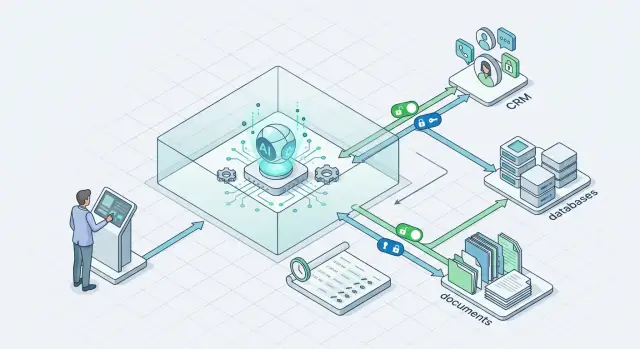
Why writes from an agent are riskier than reads
Reading rarely changes how work gets done. An agent can misunderstand data and give a bad answer, but a write changes the system itself: it edits a customer record, updates a status, adds a comment, or closes a task. After that, the mistake lives not in the chat, but in the CRM, database, or document.
The most common problem is simple: the agent confuses similar entities. Two customers have similar names, two deals have almost the same number, or contacts share a surname. A person often catches these differences from context. An agent often picks the first close enough match and writes the data to the wrong place.
One wrong edit rarely stays alone. A field change in CRM can immediately trigger a chain: change the deal stage, recalculate a segment, send an email, create a task for a manager, update a report. The error spreads fast, and the team then has to fix not one fact, but the whole trail of automatic actions.
A manager usually notices the problem too late. While everything still looks believable, nobody checks every field by hand. The alarm comes after a customer call, a broken report, or a strange email from a mailing list. By then, the agent may have made several more writes, and finding the first mistake is already difficult.
There is another risk too: writing creates false confidence. A wrong answer in chat can be asked again or deleted. A wrong write is treated as fact, copied into documents, and used in day-to-day work.
If you do not have proper logs, finding the cause takes much longer. The team sees that the status changed, but does not know who changed it, by what rule, or from which request. Then the guessing starts: they check integrations, employees, and workflows. But the source is one thing only: a bad action from the agent.
A sandbox is not about formality. Write permissions give access not to data, but to consequences. A read error costs time. A write error changes the working reality for the whole team.
What to isolate first
Start by separating everything that changes the business “source of truth.” A mistake in a draft answer is unpleasant, but manageable. A mistake in CRM, a database, or a contract template lives longer and drags in invoices, notifications, tasks, and questionable numbers in reports.
Usually, the first isolation layer covers five areas:
- CRM fields where deal status, amount, or owner changes
- records with personal data: phone, email, address, IIN, communication history
- tables where the agent can create, merge, or delete records
- document and email templates used for contracts, acts, and messages
- actions that automatically trigger an invoice, notification, or task
CRM should usually be moved into a separate boundary first. Even one wrong field can break the process: a deal suddenly moves to “won,” the amount enters the forecast, and the owner changes and loses context. It is much safer when the agent suggests a change instead of writing directly into the live record.
Fields with personal data should be isolated separately from regular notes and tags. If an action does not need the full phone number or IIN, do not show it at all. For teams in Kazakhstan, this is also a matter of local data storage requirements and change logs.
Tables where the agent creates or deletes records often cause the most expensive failures. A duplicate customer appears easily. Deleting the wrong record is even easier. The basic rule is simple: deletion is disabled by default, and new records first go into a staging layer or get a “draft” status.
Contract, act, and email templates are also better kept under lock. The agent can fill variables in a copy of the document, but should not rewrite the master template. Otherwise, one bad edit can spread across dozens of files.
Also isolate actions with external effects. If a field change immediately triggers an invoice, an email to a customer, or a task for the team, send that action through a queue, a validation rule, or manual approval. It is useful to log each such write with “before” and “after” fields, a timestamp, and the agent ID. That saves hours later.
How to assign permissions without extra access
If an agent reads and writes through the same access, it almost always gets more than it needs. That is a poor starting point for writes. First split access into two layers: read separately, write separately.
Reading can be broader if the data has already been masked and the agent truly needs context. Writing should be narrow from the start. Not “CRM access,” but permission for one action in one scenario.
A good rule sounds like this: one agent, one role, one write path. If the agent updates a lead card after a call, do not give it the right to change the deal owner, delete notes, or trigger a bulk import. It should be able to do exactly what you connected it for.
What to limit in permissions
The most common mistake is to grant access at the user or service level and then hope the prompt will handle the rest. A prompt does not replace permission control. Restrictions must be built into the integration itself:
- allow only the needed command, such as update, but not delete
- open only specific fields, such as “status,” “next step,” or “contact date”
- block bulk edits, export, and any schema changes
- tie the write to one object or one object type
Deletion is almost always better left to a person. Bulk edits too. One bad request can damage thousands of records in minutes, and then the team will have to sort through the consequences manually.
A separate token for each tool is another basic rule. Do not use one shared secret for CRM, the database, and documents. If one token leaks or the agent starts behaving oddly, you can quickly shut down just that channel instead of the whole stack.
It is also useful to bind the token not only to the system, but also to a list of allowed commands. For example, a CRM token may change two fields in a deal, while a database token may only create a draft record in a service table. The setup is boring, but it protects well against surprises.
The working setup looks like this: the agent reads through a safe layer, forms an action, and a separate narrow tool with a short list of permissions performs the write. If the scenario grows, create a new role and a new token. Do not stretch old permissions “just in case.”
How to build the sandbox step by step
First, define what the agent is allowed to change at all. Not “working with CRM,” but a short closed set of actions: create a task, update a deal status, add a comment, fill in one field. It should not delete records or change the customer owner. The narrower the list, the fewer accidental edits.
It helps to define the restrictions in advance:
- change only selected fields
- work only with one object type
- write only to a test or service segment
- do not perform deletion or bulk updates
- stop execution on any uncertainty
Then create separate service accounts. Do not give the agent an employee token or a shared integration token “for all cases.” For CRM, databases, and documents, it is better to create different accounts with different roles. If the agent updates customer cards, it does not need access to financial reports, HR files, or pipeline settings.
The next step is a test environment. Take a copy of the data and remove the extra stuff: personal data, real phone numbers, internal notes that are not needed for the scenario. On such a copy, it is easy to test how the agent behaves with bad emails, duplicates, empty fields, and strange date formats. Even if the model goes through a gateway like AI Router, write permissions should still be separated from the model call itself.
Then set a hard limit on the number of edits per run. This simple rule often prevents big problems. If the agent should update 20 records, do not allow 200. If you see a spike in operations, the system should stop the task and ask for manual review.
Logging is needed from day one. Save who launched the scenario, which prompt was sent to the model, which tool the agent called, what the data looked like before the change, and what it looked like after. For a fast rollback, it helps to store a snapshot of the changed fields or record changes as separate events so you can restore the previous state with one command.
A good sandbox usually starts not with the model, but with simple boundaries: few permissions, a small test environment, a short list of actions, and a clear rollback. It is boring, but these measures work most often.
What rules to set before writing
Before any write, the agent should pass several hard checks. Otherwise, one error in email parsing or field recognition turns into a wrong amount in CRM, a broken deal status, or a write to the wrong customer.
The first rule is simple: verify the ID, date, amount, and format of each field. Not “looks right,” but “matches.” For IDs, that means an exact match. For dates, a clear format and an acceptable range. For amounts, the currency, sign, and number of decimal places. If a field fails validation, the agent changes nothing.
Second rule: before every edit, compare the object with the source. Even if the agent read the card five seconds ago, it should request the current version of the record again. Otherwise, it will overwrite someone else’s change. That is a normal CRM story: a manager already corrected the deal stage, and the agent wrote the old value back over the new one.
Ambiguous matches must not be guessed. If an email could belong to two orders, if a customer has two contracts for the same amount, if the date in a document is unclear, the chain should stop. Proper isolation does not reward guessing. The system should ask for confirmation and log why it did not allow the edit.
For high-risk cases, it is better to send a draft to a person instead of a ready-made change. This is needed for discounts, bank details, payment statuses, row deletions, and any edits that are hard to roll back. A person should see three things: what the agent wants to change, where the data came from, and which fields are still uncertain.
Also close off the most dangerous write paths:
- arbitrary SQL
- free-form API calls without a whitelist
- bulk updates without a row limit
- deleting and overwriting files without versioning
For secure database access and CRM action isolation, it is better to give the agent narrow commands, not broad access. Not “write anywhere,” but “update deal amount,” “create a draft note,” “add a tag.” That makes it easier to check write permissions for the AI agent, audit AI changes, and quickly roll back mistakes.
Example: an agent updates CRM after an email
What you should test is not whether the agent can write to CRM, but how little it can change there. The clearest scenario: a customer asks to move the delivery date for an order. The agent reads the email, but does not edit the deal right away.
First it finds the right card using two signals: the order number in the email and the thread subject. One match by customer name is not enough. If two similar deals appear or the number does not match, the chain stops and the email is sent to a person.
Next, the agent prepares a draft of changes. For example: new delivery date — June 18; task for the manager — “confirm the warehouse slot and reply to the customer.” The draft shows not only the new values, but also the basis: the part of the email where the customer asked for the change.
The manager sees this in the interface as a suggestion, not as an already applied change. They can approve it with one button or reject it. If the date looks strange, they correct it manually. If the email is ambiguous, they close the draft without writing anything.
After approval, the system writes only to two allowed deal fields:
- planned delivery date
- manager task
The deal amount, pipeline stage, owner, contacts, and comments remain closed to the agent. This simple limitation sharply reduces risk. Even if the model misunderstood the email, it cannot accidentally move the deal to another stage or change customer data.
It is also useful to add three more things: show the old and new values side by side, store the email ID that led to the suggested change, and log who approved the change and when.
That kind of scenario already brings value. The manager does not waste time finding the deal and manually moving the date, while control stays with the person. For a first pilot, that is usually enough: narrow search, one draft, explicit approval, and writes only to what you allowed in advance.
Where teams most often go wrong
The first mistake is simple: the team gives the agent one token for everything. With that same token, it reads customer cards, changes CRM fields, creates notes, and sometimes even starts an export. On day one, that feels convenient. Later, nobody understands which action was performed by whom or where to stop an extra write. If the token leaks, the problem hits every area at once.
The second mistake appears when people rush. To get started quickly, the team opens the whole CRM to the agent, even though it only needs access to two or three fields and one object. In practice, an agent rarely needs to see the full customer profile, sales history, and internal comments. If the task is “update the lead status after an email,” full CRM access is extra risk, not help.
Testing can be even worse. Many teams test writes directly on live data, without a copy and without a separate environment. One wrong prompt, one parsing error in an email — and the agent changes dozens of records. Then the team manually searches for what it touched. The point of a sandbox is exactly to run the scenario on a copy first, see the errors, fix the rules, and only then allow writes in production.
Another weak point is logging. The team stores the final change, but not the original agent request or the full tool response. In that setup, it is almost impossible to review a disputed case. You can see that a CRM field changed, but not why the agent decided to do that, what data it received, or what the tool returned.
A dangerous scenario often hides in the call chain. The agent is allowed to call a second tool without a limit and without separate approval. For example, it first updates CRM, then goes to the database on its own, creates a task in another system, and edits a document. One bad step pulls several others with it.
Usually, five hard limits are enough:
- a separate token for each action type
- access only to the needed fields and objects
- tests on copied data
- a full log of the request, response, and changes
- a limit on calling follow-up tools
If the team skips even one of these points, mistakes rarely stay small. They just stay hidden longer.
Short checklist before launch
Before the first launch, check not only the prompt, but also the access boundaries. A reading error usually creates noise. A write error changes real data: deal status, amount, deadline, or document text.
If the team argues over any item below for more than five minutes, the agent is not ready for write access. First settle the disagreement, then open access.
- Each action has a specific owner. If the agent changes a deal stage, writes a CRM comment, or updates a database record, there should be a person responsible for that action and for handling disputed cases.
- The list of writable fields is fixed in advance. The agent should not “improvise” and choose fields on its own. Allow only what is defined in the schema: for example, “next_step” and “summary,” but not a discount, bank details, or the deal owner.
- Bulk edits run in a separate scenario. Updating one record after an email is one thing. Rewriting 10,000 rows in a table is another. Batch operations need a separate run, a limit, and approval.
- Rollback takes minutes. The team should be able to quickly restore previous values through the change log, a snapshot, or a command queue. If rollback requires a full day of manual work, the system is not ready yet.
- Changing the model does not change access rules. Today the agent runs on one model, tomorrow on another, but write permissions stay the same. These rules should live outside the prompt and outside the model.
Also check the audit trail. You should be able to see who launched the action, exactly what the agent changed, and which rule allowed it. Without that trail, CRM action isolation quickly turns into a “looks like the bot did it” argument.
A good test is simple: give the agent 20–30 real pilot tasks and try to break the process yourself. Ask it to write data into the wrong field, perform a bulk edit, and repeat the same action twice. If the system calmly refuses, logs the attempt, and lets you roll back changes quickly, the access layer is already working well.
What to do after the pilot
After a pilot, teams often get too confident. The agent once updated a CRM record carefully, and right away people want to open more fields, more tables, and more actions. That is a common mistake. It is better to expand permissions more slowly than trust in the system grows.
Keep one write scenario and a very narrow field set. If the pilot only changed the deal status and added a short note after a customer email, do not immediately let it change the deal owner, amount, tags, and related contacts. The narrower the write area, the easier it is to understand where the agent makes mistakes and who has to fix the consequences.
Start collecting hard metrics right away, not general team impressions. It helps to track:
- how many writes needed manual approval
- how many changes had to be rolled back
- which fields the agent gets wrong most often
- how much time goes into reviewing disputed cases
- how often the agent tries to write extra data
These numbers are a quick reality check. Sometimes the model sounds confident, but gets every tenth update wrong, and for CRM, customer databases, or documents that is already expensive.
It is also useful to run the same rule set through two or three models and compare behavior on identical input. Change only the model. Keep the access policy, validation, data masking, and audit unchanged. Then the difference is fair: which model asks for confirmation more often, which one mixes up fields, and which one leads to fewer rollbacks.
If the team uses a single gateway like AI Router on airouter.kz, model comparison becomes even easier. Request routing can be changed separately from the write policy, and that is a convenient way to test models without extra risk for CRM and databases.
Expand permissions only after a calm series of runs. Usually that means the agent has worked in one scenario for several weeks without more rollbacks, manual investigations, or strange writes. After that, add one new field or one new action and watch the metrics again. That pace may feel slow, but it is almost always faster than dealing with a major failure after overly generous permissions.
Frequently asked questions
Where should I start if I want to give an agent write access?
Start with reads and drafts. Let the agent first find the record, suggest a change, and show where it got the data. It is better to open direct writes to the production CRM later, once you have already tested logs, rollback, and action limits.
Why is writing more dangerous than simple reading?
Because writing changes real work data, not just a chat response. One mistake can change a deal status, send an email, create a task, and break a report. Then the team has to fix not one field, but the whole chain of consequences.
What should be isolated first?
First isolate everything that changes the source of truth: statuses, amounts, owners, personal data, record creation and deletion, document templates, and any action after which the system sends or calculates something on its own. If you are unsure, close off CRM and external effects first.
How do I give an agent the minimum permissions?
Do not give broad system access. Give a separate role for one scenario and allow only the fields that are needed. If the agent updates a contact date and the next step, it does not need delete, export, deal owner, or CRM settings access.
Do I need a separate token for every tool?
Yes, almost always. One token for all tools makes failures broader and makes it harder to turn off the problem channel quickly. It is much safer when CRM, databases, and documents each have their own tokens and command set.
What does a good write sandbox look like?
Create a separate test environment with a copy of the data and remove anything unnecessary from it, especially personal fields. In that environment it is easy to test duplicates, empty fields, strange dates, and ambiguous matches. If the agent makes a mistake, it will not touch live records.
What checks should be in place before every write?
Check exact matches for the ID, date, amount, and field format. Then read the current version of the record again so you do not overwrite someone else’s change. If you find two similar objects or the data does not match, the agent should stop and ask for confirmation.
Which actions should be blocked right away?
Do not let the agent use general SQL, free-form API calls, deletes without versioning, or bulk updates without a row limit. It is better to give narrow commands like “update deal status” or “create a draft note.” Those actions are easier to verify, log, and roll back.
What should be in the change log?
Keep who started the scenario, what request went to the model, which tool the agent called, what the data looked like before the change, and what it looked like after. It also helps to save the email or document ID that the agent used as the basis for the suggested change. Then you can review a disputed case without guessing.
How should I expand permissions after the pilot?
Keep one narrow scenario and watch the hard numbers: how many writes needed manual approval, how many had to be rolled back, where the agent makes mistakes most often, and how often it tries to write extra data. If the metrics stay calm for several weeks, add one new field and check the result again.