AI Tasks Through a Queue: When to Move to an Async Pipeline
We’ll look at when AI tasks through a queue work better than a web request, how to build an async pipeline, and where it lowers timeouts, cost, and failure risk.
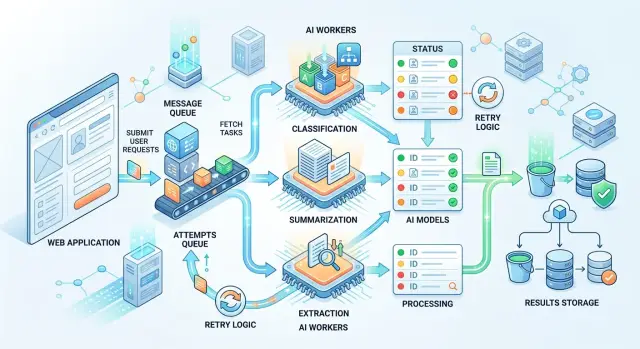
Where the direct web request breaks down
The problem usually starts not with the model, but with the wait. The user clicks a button, and the page hangs for 8, 15, or 30 seconds while the LLM reads the text, thinks, and assembles an answer. For chat, that is sometimes tolerable. For document classification, call summarization, or extracting fields from a file, it is not.
A normal web request works well when the answer is needed almost immediately. AI call latency jumps around. One request finishes in 2 seconds, the next in 18. If the chain includes file upload, OCR, several prompts, and a recheck of the result, the delay grows even more. The user sees a spinner and then often gets an error, even though the task itself was fine.
Then timeouts arrive. The browser, load balancer, nginx, backend, and model SDK all have their own limits. Even if your function is willing to wait a minute, someone in the chain will cut the request off earlier. The worst case is simple: the model is almost done, but the client has already disconnected, and the whole flow breaks right at the end.
There is another problem too: traffic spikes. When ten users send large documents for summarization at the same time, it is not only the AI part that slows down. Regular pages, login, order cards, and search also suffer. One heavy synchronous path can easily clog application workers and consume the connection pool.
You can usually see this through a few signals:
- p95 and p99 grow much faster than the average response time
- some requests fail right around the timeout limit
- repeated clicks and retries create a new wave of load
- an AI provider outage breaks the entire user flow
That last point is often underestimated. If the model is unavailable, the user should not lose a form, a payment, or an already uploaded file. But with a direct AI call inside the HTTP request, a model failure often turns into a broken operation. The person clicks "Send", and the system returns 500, even though it could have accepted the task, put it in a queue, and returned a "accepted for processing" status.
Even if the team uses a single gateway and can quickly switch the model or provider, the synchronous flow itself remains fragile. A queue does not make the model faster. But it does separate long AI work from the user click. In most cases, that matters more.
Which tasks should be moved to the background
Work is better sent to the background when the answer is not needed in the same second, and the operation itself may take noticeable time, hit a timeout, or need a retry. These are usually tasks with long inputs, many documents, or a soft response deadline. If the result is needed in a minute, an hour, or in the next report, a queue is almost always more convenient than a direct web request.
Most often, this is not chat, but data processing after an event. An email arrives, a call recording is uploaded, a form is saved, a stack of receipts builds up during the day — and the system calmly processes them without pressure from the user.
Good fits include classification of incoming requests, summarization of long emails, calls, and documents, field extraction from forms, contracts, and receipts, as well as batch processing on a schedule. At night you can process accumulated documents, recalculate tags, update customer cards, or generate summaries by department.
These tasks share one trait: the result matters, but the answer does not need to be instant. They often share a second trait too — the work is done over many objects at once. If you have 5,000 forms a day, it is better to queue them than to try to process everything inside user requests.
A queue is especially useful where quality depends on retries and checks. On the first try, the model may miss a field, return an empty answer, or output a format that does not match the schema. In the background, that is easier to fix: you can add retries, send the task to another model, record the status, and keep an audit log.
A simple example: a contact center uploads call recordings every 15 minutes. The system creates a transcript first, then a short summary, then assigns a category to the request. The operator does not need to wait for this on screen. The manager sees the final result later, but without timeouts or manual restarts.
When the answer is needed right away
If a person is looking at the screen and waiting for the next step, it is better to return the answer in the same request. A queue only gets in the way here: it adds extra seconds and complicates the interface. For a short chat, a form hint, or a quick answer check, a synchronous call is usually more honest and simpler.
The rule of thumb is simple: the user has not yet looked away from the screen, and the result is needed to continue the action. If the model reads 2-3 paragraphs, responds in a second, and the error must be shown immediately, an async pipeline will not help. It is needed where the work can be delayed without losing meaning.
This is easiest to see in chat. The user sends a short question, waits for clarification, and then writes the next message. If you move such an exchange to the background, the conversation starts to break: the status spins, the answer arrives later, and the person has already clicked again or left.
The same applies to checking a form against one simple condition. For example, you ask the model to quickly determine whether a contract number is present in the text, whether a forbidden word appears, or whether the language matches the selected field. If this check decides whether the user can click "Send", the answer is needed right away.
Sometimes a synchronous call is needed not for the final answer, but to choose the next step. A common example is short routing before the main request. First you give the model 1-2 sentences: "Is this classification, search in the database, or summarization?" After that, the code chooses a different prompt, token limit, or even the model itself. That first call needs to be fast, or it will slow down the whole chain.
A synchronous path usually fits when the user expects an answer right now, the text is short and predictable in length, the error must be shown on the current screen, and the result affects the next call in the same second.
In many teams the setup is simple: one fast call determines the route, and the second does the main work. But if both stay within normal response time, a queue is not needed. For small tasks, extra async logic usually makes the code more complicated, not more useful.
How to build a simple async pipeline
The simplest setup has five parts: an API, a queue, a worker, a results store, and a way to check status. The user sends text, and the server does not keep the connection open until processing is complete. It creates a task, writes it to the database, puts a message in the queue, and immediately returns a job_id.
This approach is useful when AI tasks run in dozens or hundreds in a row. A web request lives for seconds, while processing a document, a batch of reviews, or a long chat often lives much longer. If you do not separate the two, the application starts freezing under load.
Minimal setup
In the queue message, it is better to store only what the worker needs to start, not everything. Usually job_id, the work type, a link to the text or the text itself, a deadline, and a couple of service fields like customer or priority are enough. If the document is large, it is better to store the file separately and pass a link to it in the queue.
Then the worker picks up the task and decides which model to call. For simple classification, a fast and cheap model is often enough. For extracting fields from a complex contract, a stronger model may be needed. If the team uses one OpenAI-compatible layer, switching providers or models is easier because the business logic does not depend on a specific API.
The result and the status should be stored separately. The status answers the question "what is happening right now": queued, running, done, failed. A separate result record stores the model response itself, processing time, the error in case of failure, and, if needed, audit metadata. That makes retries easier and keeps service data separate from useful output.
A user can receive the finished answer in two common ways. First, the app checks the status by job_id every few seconds. Second, the system sends an event when the task is finished. Polling is often enough for an internal dashboard. For a chain of multiple services, an event is more convenient.
In practice, it looks simple. A manager uploads 500 customer requests for summarization. The interface immediately shows that the batch was accepted and gives a task number. A couple of minutes later the screen updates, and the manager sees the final file instead of a stuck request that would have timed out long ago.
What to put in the queue message
A queue message should answer three questions: what to process, how to process it, and when it is already too late. If that information is missing, the worker starts guessing, and those guesses are expensive to track down in logs later.
First, send the object ID and the text source. The ID is needed so the result can be saved to the right record, and the source helps avoid moving big chunks of data through the queue without reason. For an email, a ticket, or a product card, a pair like document_id=84521 and source=crm.ticket_body is usually enough. If the text is short and safe, it can be placed directly in the message. If it is large or contains personal data, it is better to pass a link to internal storage or a path to the record.
Next, add the prompt version and the expected response format. This saves you from confusion when yesterday you asked for a "short summary" and today you expect JSON with category, confidence, and reason. It is better to write something like prompt_version=summary_v3 and response_schema=incident_extract_v2 in the message. Then reprocessing follows the same rules, and the result can be compared with the previous run.
You also need a delivery deadline. A background task almost always has one, even if it does not look strict. A report summary for an internal dashboard can wait 10 minutes, but a request breakdown for an operator should finish, for example, within 30 seconds. Keep the retry count and current attempt number nearby. If the model or provider is unavailable, the worker should not keep retrying forever.
It is also worth passing priority and a cost limit. This is especially useful where requests go through a model router. The same task can be sent to a faster or cheaper model if the priority is low and the budget is limited. For an urgent task, the rule is different: it is better to answer faster and a little more expensively than to keep the user waiting.
One more field often saves a lot of time: a unique key for deduplication. If the same document accidentally lands in the queue twice, the system should understand that. Usually this key is built from the task type, the object ID, and the prompt version, for example ticket-84521-classify-v2. Then the worker will either skip the duplicate or update an existing task, rather than create two different records with different answers.
A good queue message does more than just launch the LLM. It makes the task reproducible, controllable by deadline, and predictable in cost.
Example from a normal workflow
Imagine a bank that receives thousands of requests every day from the mobile app, the website, and chat. People write in all kinds of ways: "money was charged twice", "I cannot see the transfer", "I want to close the loan early". If every such message is sent to the LLM directly during the web request, the form starts to lag, and during peak hours some requests simply never get a response.
So it is better to split the flow into two steps. First, the form accepts the text, saves it, and immediately confirms receipt. The customer almost instantly sees the request number and does not think about the fact that classification or summarization is happening inside the system right now.
Then the async pipeline takes over. After the request is saved, the system puts a task in the queue. The worker picks it up, determines the issue type, and writes a short summary. If needed, it adds service notes: whether it is a payment complaint, whether urgent handling is needed, and whether the text contains signs of fraud or a disputed transaction.
A minute later, and often sooner, the employee opens not an empty card with the customer’s long message, but a prepared record. It already has the category, a short description, and fields for the handling route. That saves not abstract efficiency, but a very real 20-40 seconds on each request.
The flow usually looks like this: the customer sends text and immediately gets confirmation, the system puts the task in a queue, the worker classifies and summarizes it briefly, the result goes into the request card, and the employee sees an already tagged request.
There will still be mistakes, and that is normal. The model may confuse a payment refund with a regular card complaint, or take a request to change a phone number for a login issue. That is why questionable tasks should not be pushed forward automatically. If the answer looks doubtful, the system sends the task for another pass through a different model or flags it for manual review.
This is exactly the kind of flow where background AI tasks create a clear effect. The customer does not wait for an AI response, the interface does not hang, and the support team gets requests already broken down almost immediately after submission.
Why a queue does not always save you
AI tasks through a queue work only when the queue itself stays simple and predictable. If you do not set the rules in advance, you simply move the problems from the web request into the background: delays grow, answers are duplicated, and old tasks hang around forever.
Where things break in practice
A common mistake is to put the entire PDF, audio file, or a large JSON object into the queue message instead of a link to the file. The queue quickly grows because of this, retries take longer, and workers waste resources moving data around. It is almost always better to pass the object path, file hash, size, and a few service fields.
Another mistake is to run urgent tasks and nightly batch processing through the same stream. During the day, this is especially painful: a short call summary waits while the system chews through an archive of thousands of documents. Separate queues by at least priority and work type.
Another problem appears when the team does not save the prompt, model name, and settings version. After a few days, results start to drift, and the reason can no longer be found. For classification and data extraction, this breaks quality checks and error analysis.
After a failure, a task is sometimes restarted without a stable identifier. In the end, one document gets two summaries, the CRM creates two notes, and the report counts one case twice. A retry must be safe, otherwise the queue itself produces junk.
Finally, many people forget about the task lifetime. If processing arrives a day later, the answer may no longer make sense: the customer has already been answered, the request is closed, or the data has changed. It is better to cancel an old task than to quietly process it too late.
If you have one OpenAI-compatible endpoint and the underlying model can change, fix the exact model name, prompt version, and important parameters in the task. Otherwise, any argument about quality turns into guesswork.
A healthy minimum looks like this: a small queue message, separate queues for urgent and batch work, a task ID to protect against duplicates, and a deadline after which the job no longer matters. Without that, even a good queue for summarization does not save you. It just neatly puts old problems into a new box.
Check before launch
A queue does not help every time. Sometimes it just hides a slow and fragile process behind the word "async". Before launch, it is worth answering a few questions honestly.
Can the user close the page and come back later without losing meaning? This is a common case for document classification, batch call summarization, and field extraction from files. Can the task wait minutes instead of seconds? If the result is needed in 5-10 minutes, a queue is a good fit. If the person clicks a button and wants an answer right now, it is better to keep the direct call.
Does the interface show status? The person should not see a blank screen, but clear states: "queued", "processing", "done", "error". Does the team know what to do if the model fails or does not answer? You need simple rules: how many times to retry, when to send the task to manual review, and when to mark it as failed.
Do you track the cost of one task and the cost of a retry? Without that, a queue quickly turns into a black box that quietly burns budget.
The most common failure is not in the code, but in expectations. The team moves the task to the background, but the user still sits there waiting for the same result on the same screen. Then there is almost no gain. A queue only makes sense where the process can be released and the result collected later.
A good sign is when the result naturally arrives after an event. For example, a manager uploads 300 reviews, goes to a meeting, and a few minutes later gets ready-made tags and a short summary. A bad sign is when a call center operator cannot continue working until the LLM returns an answer.
Also check the cost of retries separately. One failed attempt is rarely a problem. Ten automatic retries on a large document are already noticeable.
If the answer to almost all questions is "yes", background AI tasks through a queue are usually justified. If you are unsure in even two places, start small: move only the longest operations to async and keep the fast path for everything else.
How to start without unnecessary rework
Do not move the entire flow to a queue all at once. It is easier to take one slow case where long text already creates delays: a call transcription, a large PDF, a batch of reviews, or an email with attachments. That kind of start quickly shows whether you need AI tasks through a queue in your product at all.
A good first candidate is summarization or field extraction from a 10-20 page document. The user uploads a file, the system immediately says the task has been accepted, and then calmly processes it in the background. The interface does not freeze for 30-60 seconds, and the server does not keep an open web request for no reason.
Keep short requests on the direct path for now. If a person expects an answer in chat, a hint in a form, or classification of one paragraph, an extra queue often only adds delay. The simple rule is this: move long input and non-urgent output to the background, and keep short input and instant response as they are.
To avoid having to redo the integration later, hide the model call behind one OpenAI-compatible layer. Then the application talks not to a specific provider directly, but to one internal client. Later you can change base_url, add a fallback route, or choose another model class without rewriting the business logic.
For teams in Kazakhstan, this is especially convenient if you need one predictable path to different models and clear operational rules right away. For example, AI Router on api.airouter.kz provides an OpenAI-compatible endpoint, monthly B2B invoicing in tenge, and tools like audit logs, PII masking, and local data storage when required.
At the start, five steps are enough:
- choose one long and non-urgent process
- keep the synchronous path for short requests
- move the model call into a single client
- record
task_id, status, processing time, and cost - return the result to the interface or a webhook after completion
Within a week, you will already see whether the setup works. Compare average latency, error rate, and cost per task before and after the queue. If the difference is noticeable, expand the approach to neighboring processes instead of the whole system at once.
Frequently asked questions
When is a queue better than a direct web request?
Move a task to a queue when you do not need the answer in the same second and the call may take longer than a normal HTTP request. This works especially well for long documents, OCR, chains of several prompts, and batch processing.
Which AI tasks are usually moved to the background?
The most common background tasks are ticket classification, summarizing emails and calls, extracting fields from forms, contracts, and receipts, and nightly batch runs. The common trait is simple: the result matters, but the user does not need it on screen right away.
When is it better to keep a synchronous call?
Keep the call synchronous when the person expects the next step immediately. This fits a short chat, a quick form check, or short routing before the main request.
What should happen after the user clicks a button?
Accept the task right away, save it, and return a job_id or processing number. The user should see a clear status, not a spinner until the model finishes.
What should go into a queue message?
Usually job_id, task type, a link to the text or file, prompt version, response schema, deadline, priority, and attempt number are enough. Do not put large files in the queue — store them separately and pass a link.
How do you protect against duplicates?
Build a persistent identifier from the task type, object ID, and prompt version. Then the system understands that the same document is already being processed and will not create a second result on top of the first.
How should retries and errors be handled?
Do not retry forever. Set a retry limit, record the error, and for unclear cases send the task to another model or to manual review.
Why might a queue still not solve the problem?
A queue will not save you if you mix urgent tasks with nightly batches, do not set a deadline, or do not save the prompt version and model name. In that case, the problems just move from the web request into the background.
How should task status be shown to the user?
Show simple states: queued, running, done, failed. For an internal dashboard, polling by job_id is usually enough, while service chains are better served by sending an event after completion.
Where should you start if you do not want to refactor the whole product?
Start with one long scenario: a large PDF, a call transcription, or a batch of reviews. Move the model call into a single client, record status, time, and cost, and keep short requests on the direct path for now.