AI Agent State Storage: Redis, DB, or Event Log
How AI agent state is stored affects pauses, approvals, and restarts. We look at when to choose Redis, a database, or an event log.
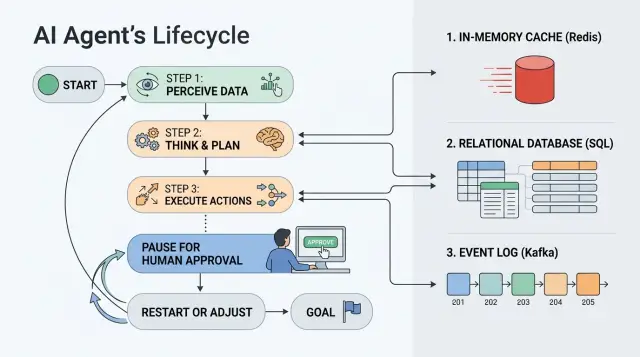
Where state gets lost between steps
Problems do not start when the agent answers a request. They start when it has to wait. One hour of pause, overnight, manual approval - and it becomes clear whether the process has proper state storage or whether everything depends on worker memory and luck.
The scenario is usually simple. The agent gathered the data, sent a request for review, and is waiting for an employee to respond. While nothing is happening, the worker may restart, the container may move to another node, and the queue may deliver the task again. If the state lived only in process memory, after a restart the agent no longer knows where it stopped.
The model window does not help here. The model can "remember" text that you put back into the prompt, but it does not store timers, approval status, an external operation ID, or the fact that an email or payment has already been sent. Context continues the conversation. State continues the process.
This is especially noticeable in production, where LLM calls go through an API gateway or a regular OpenAI-compatible endpoint. The model call may go through just fine, but the business step between calls still has to live separately: in Redis, in a database, or in an event log.
After a worker restart, three things usually break. The current step disappears if it was not written to persistent storage. Temporary flags like "waiting for approval until 6:00 PM" are lost. Local memory of whether an external call has already run disappears.
Duplicates after a timeout are even quieter. One service sends a request, does not get a response within 30 seconds, and repeats it. The first run may have finished half the work, but the confirmation of completion was lost. The second run picks up the same task and sends the email again, creates a second record, or calls the external API again.
In practice, the source of lost state is almost always the same: the step exists in code logic, but not as a record that can be read again after a failure. As long as the task lives for seconds, this is not very visible. As soon as pauses, manual decisions, and restarts appear, the gaps quickly show up.
What the agent should remember
Chat history is not enough. The agent needs working context: what it has already done, where it stopped, and what can be repeated without extra actions.
First, save the task input in the same form the agent received it. Keep the prompt version рядом. A week later, the team may change the instruction or the model output schema, and without that pair it will be hard to understand why the new result does not match the old one.
Next comes the execution flow: the current step, the task status, and the owner. Keep statuses simple: created, in progress, waiting for approval, completed, error. The owner should also be explicit. Otherwise, after a pause, nobody will know who should press the button, check the document, or investigate the failure.
Also store traces of external actions. If the agent has already sent a request to an external system, uploaded a file, or posted a message, save the IDs. This protects against duplicates. Without them, a retry can easily send the email twice, create another request, or charge money again.
Usually this set is enough: input data and prompt version, current step and status, task owner, IDs of requests to external APIs, files, and messages, the user or group for the next approval, the error reason, and the time of the last attempt.
The last two fields are often forgotten. Unfairly so. If a step fails, the agent should remember not only the error itself, but also the reason: timeout, empty response, external service rejection, invalid format. The time of the last attempt also needs to be saved, otherwise it is easy to get an endless retry loop every few seconds.
If the team calls models through a gateway like AI Router, it is useful to store the model request ID, the selected model, and service tags for response matching and audit. This is not decoration in the schema; it is ordinary insurance when you need to repeat a call or investigate a disputed case.
Good state answers three questions: what the agent knew at the start, what it has already done, and what should happen next. If any one of those lacks a precise answer, a pause and a restart quickly turn into manual troubleshooting.
When Redis is enough
Redis is a good fit for state that lives briefly and is read often. If the agent takes several steps in a row, waits 30 seconds for a service response, or pauses for 10-20 minutes for manual confirmation, this is usually enough.
This option is convenient when the worker needs to grab context quickly, update it, and move to the next step without extra requests to the main database. It works well where latency matters more than a detailed history of old actions.
Where Redis is most useful
Redis is especially useful when queues, locks, and TTL already live in one place. There you can keep the current step state, a temporary model result, a lock flag, the state lifespan timer, and a short retry counter.
This is a good fit for "hot" state that should stay close to the worker. For example, a contact center agent collected data, sent a request to an LLM through a gateway, received a draft reply, and is waiting for a quick operator approval. While the pause is short, Redis is usually simpler and faster than a separate schema in the database.
Another plus is TTL. You can set an expiration for temporary data right away and avoid cleaning it up manually. For temporary sessions, rate limits, task deduplication, and short retries, this is very convenient.
But Redis has a hard limit. If you do not take state snapshots or write events to persistent storage, history disappears too easily. After a failure, you often know only the current value, not why the agent arrived there.
Long waits also create problems quickly. If a task can sit for a day, a week, or needs searching through old runs, Redis becomes inconvenient. Complex queries, audit trails, state version comparisons, and disputed cases are better handled in a database or an event log.
A simple rule is this: if the state is short-lived, read often, and does not need a full history, Redis solves the problem without extra complexity.
When a regular database is better
A regular database wins where the task lives for days, not minutes. The agent takes a step, waits for a person, then continues again. For such a process, Redis is too temporary, and an event log may still be overkill.
If employees are part of the process, tables give you a clear model. There is a task record, status, owner, time of the last step, and reason for the pause. A manager opens the list and immediately sees what is stuck in approval, what was sent back for revision, and what can move forward.
This is often the calmest option. You tie state to a clear business object: a request, ticket, order, or form. The object has a current status, a step number, continuation data, and a link to the person who should make the next decision. After a failure, the system reads that record and resumes from the right place.
A database has another advantage: it is easier to build interfaces and reports around. If an operator, manager, or support team needs to see the current state of the process, tables are the best fit. It is easy to show filters by status, overdue approvals, errors, and owners.
But there is a limit here too. One row with the current status does not explain how the system got there. For many tasks, that is enough. For disputed decisions, restarts, and audits, it is not. Then a separate event log or at least a history table usually appears alongside the database.
If you have a long business process, manual decisions, and a clear object around which everything is built, a regular database is almost always a good first choice.
When you need an event log
You need an event log where the current state by itself explains nothing. The full chain of actions matters: when the agent got the task, which step it completed, where it stopped, who stepped in manually, and what happened after the retry.
Instead of one row with a status, you store a sequence of events: request created, document checked, task sent for approval, operator changed the decision, agent reran the step. For processes with pauses, this is often more convenient than trying to guess the past from the last value in the record.
If you need to restore a task after a failure, the log makes the work much easier. The system can replay the events and rebuild the state at any point in time. This is also useful in disputed cases. When the team investigates an error or complaint, it does not have to trust the last status at face value.
Where a log is justified
A log is especially useful when a process includes manual approval or rejection, the same step is sometimes run again, disputed decisions need to be reviewed from the action history, or audit logs with exact timestamps for every change matter.
A simple example: the agent processes a request, pulls data from an external service, and creates a task for manual review. Eight hours later, an employee changes the decision, and at night the external service sends an updated response. If you store only the current state, you see the final result. If you have a log, you see the full route of the request and understand why the agent went that way.
This approach has a cost. If you read state only from the log, each load becomes more expensive over time. A long process can accumulate hundreds or thousands of events, and building the object from scratch becomes slow. That is why a state snapshot almost always sits next to it. The log keeps the history, and the snapshot gives fast access to the current version.
Volume also grows quickly. This is especially noticeable in LLM scenarios, where the agent writes many intermediate steps, model answers, and service notes. It is better to set retention in advance: what to keep for a month, what for six months, and what can go to archive.
Choose an event log for tasks where replay after failure, verifiable history, and exact state recovery matter. For a short process, it is often too heavy.
How to choose a setup without extra complexity
Choose state storage not by fashion, but by task lifetime and the cost of an error. If the process lives for 30 seconds, the requirements are one thing. If a request can wait two days for approval and then continue, you need a different setup.
First answer three questions: how long one run lives, who can stop or approve a step, and whether you need to restore the flow exactly later. These answers quickly eliminate unnecessary options.
A simple order of choice
If a task lives for minutes or hours, and after a failure it is enough to continue from the last step, Redis is often enough. It works well for hot state: current step, timeout, retry counter, temporary data.
If a task lives for days, people look at it, and statuses are needed in the interface and reports, a regular database is usually better. It is easier to store requests, manager decisions, approval time, comment, and the actor there.
If you need to know not only the current state, but every change in order, you need an event log. It is useful where exact replay matters. In banking, telecom, or the public sector, this is not rare.
In practice, one tool often does not win; role separation does. Hot state is kept separately from history. Then the agent reads the current state quickly, while audit and incident review use a separate event record.
If you want a very short rule, it looks like this:
- Redis - for short pauses, locks, and fast resume.
- Database - for long processes, manual approval, and working screens.
- Event log - for exact replay and audit.
- Mixed setup - when you need both fast access and full history.
It is better to start small. Often run_id, status, current_step, updated_at, retry_count, approved_by, and the record version are enough. What matters more than the number of tables is clear update logic: who changes the status, how the agent knows a step has already run, and what to do on a retry.
If you route requests through AI Router and can change the provider or model without changing the SDK or code, the process state should still live outside the model layer. Then changing the route does not break pauses, approvals, or retries.
Example with a request and manual approval
Imagine a request for a credit limit or a corporate purchase. The agent received the form, checked the required fields, found an empty IIN or an invalid phone format, asked for corrections, and saved a clean version of the data. After that, it sent the request to a manager for manual approval.
Then the process can sit for several hours. The manager is busy, away in a meeting, or only replies at the end of the day. If you keep all state only in process memory at that moment, the agent will forget where it stopped after a restart. Then it will start over, check the form again, and may send notifications again.
In a working setup, the roles are separated. Redis holds what lives briefly: the waiting timer, the processing lock, the reminder queue. The database stores the current request state: status, step number, normalized form fields, and who should approve the request. The event log writes the history: "form checked", "request sent to manager", "approval received", "scoring finished with error".
When the manager clicks "Approve", the system reads the record from the database and continues not from the beginning, but from the needed step. If the next stage is scoring, the agent takes the already checked fields, calls the scoring service, and moves on. The form does not need to be validated again because it has already been recorded.
If scoring fails because of an external service, the team does not need to rerun the whole scenario. They repeat only that step. The database shows that the request is already approved and waiting for the scoring result. The event log helps explain exactly what happened before the failure and lets the team safely restart just one part of the process.
This example shows a simple idea very well. Redis is convenient for quick waiting and coordination, the database keeps the current "where we are now", and the log is needed where error analysis, audit, and exact step replay matter.
Mistakes that break restart
Problems rarely start on launch day. They appear later, when a step fails, a person delays approval for a day, and the process needs to be resumed from the same point instead of starting over.
Most often, it is not the agent logic itself that breaks, but the way data is written. The team stores everything in one large JSON, and at first it seems convenient. Later, it becomes impossible to quickly tell which step the process stopped at, who gave approval, what input the step received, and what exactly needs to be recalculated. Worse, when the schema changes, old JSON objects turn into a lottery.
It is safer to store fields separately: process status, step number, step input, step result, update time, schema version. Then restart follows clear rules instead of guesses.
Another common mistake is putting state, cache, and audit in one place. Cache lives briefly and can go stale. Audit is needed for history. State is needed for the current decision: continue, wait, or roll back a step. If all of this lives in one record, the agent can easily mistake old cache for fact, and the log turns into a mess of service and business events.
In practice, it looks like this: the agent sees status "ready" even though it was a temporary model-response cache; a retry uses old approval data even though the user already canceled the request; the team cannot rebuild the action chain because the audit was overwritten by new state; after a code update, old processes are read incorrectly because nobody stored the schema version; the same step runs twice because the request has no idempotency key.
Without a schema version and an idempotency key, restart quickly becomes dangerous. The agent may send an email twice, charge money twice, or create the same CRM task again. In systems with manual approval, this is especially unpleasant: the operator is sure they confirmed the action once, but the system does it twice.
TTL is also often used for the wrong reasons. If a record must survive a pause of several hours or days, TTL cannot be treated as an archive. It is good for cache, but not for process state. Otherwise, the request simply disappears before the person returns to approve it.
There is also a separate trap with the event log. The team writes the event "step completed" but does not record the step result in the current state. In the log everything looks finished, but the working record is empty. After a failure, the system no longer knows whether to continue, repeat the step, or wait for the operator.
A more reliable setup is simple: separate current state, separate audit, separate cache, a schema version in every record, and an idempotency key for every step with an external effect. Then restart does not guess; it does exactly one clear action.
Quick check before launch
Before production, do not argue about storage design at the idea level. Test it with simple failures and retries. Five short checks usually show more than a long diagram.
- Restart the worker in the middle of a task and see whether the agent returns to the right step instead of starting over.
- Stop the scenario at manual approval and check who exactly can see the status: the operator, the service, the admin panel, the task log.
- Run the same step twice in a row with the same input and check whether duplicates were created.
- Review the state history through a security lens: where personal data is stored, who sees the audit, when records are deleted.
- Estimate storage volume in advance: tasks per day, average step size, attachments, logs, state snapshots.
The first test quickly shows whether you can trust your source of truth at all. If the task loses progress after a restart, Redis is probably acting as temporary memory rather than reliable storage. That is fine for a queue. It is not fine for a long request with a pause for approval.
A pause during approval often breaks the process most quietly. The agent waits for a decision, but different people see different pictures: the operator sees "under review", the worker sees a timeout, the database is empty. If the status cannot be found within 10 seconds, manual troubleshooting will begin in production.
Running the same step twice is not just a formality. It immediately exposes missing idempotency. If one step creates two requests, two emails, or two charges, the problem is not the model. The problem is that the system cannot tell a step retry from new work.
With data, it is better to be boring and strict. Even if model calls go through AI Router, where there is in-country data storage, PII masking, audit logs, and key-level rate limits, you still need to check your own storage separately. Raw fields often remain in the state table, in the event payload, or in the worker debug log.
Volume estimates are also sobering. An event log grows very quickly if you store every prompt, model response, and intermediate snapshot. The difference between "store everything" and "store only status changes plus final result" can sometimes mean not percentages, but a multiple increase in the monthly bill.
If these checks pass without manual hacks, the setup already looks workable. If even one test fails, it is better to fix it before launch, not after the first stuck request.
What to do next
Do not try to build memory for the entire agent at once. Take one scenario where the error is expensive but the volume is still manageable in your head. A good starting point is a request that waits for manual approval and then continues from the same place.
Before the first line of code, describe the state on paper or in a table. Not in general words, but by fields: status, current step, input data, who approved, when the pause expires, what has already been sent to external systems, what can be retried. If a field is not named in advance, it almost always appears in a rush later and breaks restart.
For a start, five actions are usually enough:
- choose one pilot scenario, not the whole agent at once;
- list the state fields and the events that change the task;
- decide where the fast state lives and where the history of decisions and actions lives;
- mark what must survive a failure, a pause, and manual approval;
- check which data is needed for audit.
Often a simple setup is enough. Current task state, status, and links to the business object are best kept in a regular database. Fast temporary state, locks, and short timeouts can be moved to Redis. Full history should live somewhere it is easy to verify in a dispute, failure, or internal review.
For teams in Kazakhstan, there is another practical filter: check right away where the data will live, whether audit logs are needed, how you mask PII, and which records cannot leave the country. It is better to build those requirements into the state design from the start than to bolt them on later over an already working process.
If the agent uses different LLMs through a gateway like AI Router, store the ID of each model request next to the task. If the team works through an OpenAI-compatible endpoint like api.airouter.kz and changes only base_url, that does not change the basic rule: the source of truth for the process should live separately from the model. Then it is easier to switch providers, investigate failures, and safely restart individual steps.
If you want the first working version without extra complexity, start with the database as the main source of truth and add Redis only where it already hurts without it. After one pilot, it will be clear whether you need an event log or whether it is still too early.
Frequently asked questions
How is agent state different from model context?
The model context helps the model continue a conversation, but it does not store task status, timers, approval, or the fact that an external action already happened. Keep process state separately so that after a pause or restart the agent returns to the right step instead of starting over.
What should be saved in state first?
First save the task input, the prompt version, status, current_step, and who is responsible for the next step. Also record external request IDs, the error reason, and the time of the last attempt so the agent does not duplicate actions or loop on retries.
When is Redis actually enough?
Use Redis for short pauses, frequent reads, locks, and fast retries. It works well for hot state that lives for minutes or tens of minutes, but it is a poor fit for long history, audit trails, and tasks that live for days.
When is it better to choose a regular database?
A database works best when the process lives for a long time and people need to look at it. If you have a request, ticket, or order with a status, owner, and manual approval, tables give you a clear source of truth and make interfaces, reports, and support easier.
When do you really need an event log?
You need an event log when a single current status is not enough and you care about the full chain of actions. It helps restore the process after a failure, review a disputed case, and know exactly who changed a decision and when.
Usually the log sits next to a snapshot of the current state. That way the system can read the current value quickly without rebuilding the object from scratch on every request.
Can I store all state in one JSON?
For a prototype, you can get away with it, but in a real process one large JSON quickly becomes a problem. The team loses fast answers to simple questions: where the process stopped, who approved the step, what already went out to an external system, and which schema the current code reads.
It is safer to store important fields separately and add a schema version to each record.
How do I avoid duplicates after a timeout or restart?
Store the external action ID before you retry the step and check it before making a new call. If an email, payment, or CRM record already has its ID, the retry should reuse the old result instead of doing the action again.
Why store the prompt version and schema version?
A prompt version helps you understand why the agent gave one result yesterday and a different one today. A schema version matters just as much: without it, new code can easily misread an old record and break a restart.
If I work through AI Router, do I still need separate state storage?
No, it does not replace it. The gateway handles model calls, routing, and model request tracking, but it does not store your request status, manual approval, or external business actions.
Keep the source of truth for the process separately, and store the model request ID next to it. That way the team can switch models or providers without breaking the process.
Where should I start if I do not want to build a complex setup right away?
Start with one scenario that has a pause and a noticeable cost of failure, such as a request that waits for manual approval. Use the database as the main source of truth, add Redis only for locks and short timeouts, and connect the event log after the pilot if you already need more history.
Before launch, restart the worker in the middle of a task, delay approval, and repeat the same step with the same input. These checks quickly show whether the setup survives failures and avoids duplicates.