Admission control for long prompts in an LLM service
Admission control for long prompts helps keep an LLM service available under load. We will cover priorities, truncation, rejections, and quick checks.
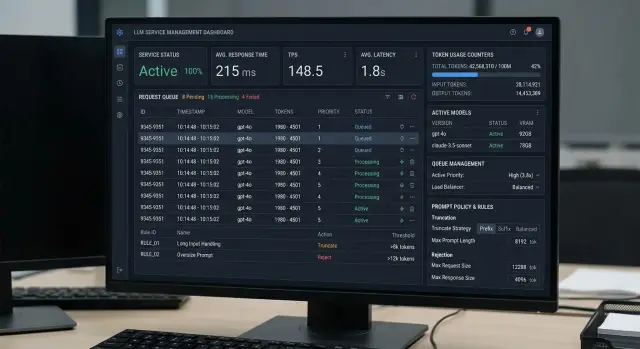
Why long prompts clog the queue
A long prompt puts pressure on the service not just because of its size. It also takes longer to pass through the prefill stage, when the model reads the entire input context and prepares the state for a response. During that time, the slot is occupied and other requests wait.
The problem is that one such call can delay dozens of short ones. A user with a chat of 300–500 tokens expects an almost instant reply, but ends up in the same queue as a 40,000-token request. For the queue, these are not just two requests. They are a light task and a very heavy task competing for the same resource.
That is why the queue grows even without an RPS spike. From the outside, traffic looks normal: the request count barely changes. But the average processing time per call rises, and the system quickly builds a backlog.
This is often visible in internal assistants. During the day, employees ask short questions about policies and procedures, while at night another service sends large batches of documents for analysis. If the traffic is not separated, batch jobs start hurting response times for ordinary chats within minutes.
The worst part is that SLA often drops before CPU shows anything obvious. The bottleneck is usually not the processor, but the time spent handling long context, occupied GPU slots, memory, and overall token throughput. The dashboard may still look fine, while users are already complaining about delays.
It usually shows up like this:
- p95 and p99 rise before the average response time
- short requests wait behind heavy batch jobs
- retries create new traffic and lengthen the queue
- the service looks unstable even though the hardware is not yet at its limit
If both regular conversations and large prompts for document analysis go through one endpoint, the effect becomes noticeable very quickly. Without admission control, long inputs take away the service’s shared capacity. It is better to protect the queue in advance, not after the first complaints.
What to count as a request budget
If you measure request budget with a single number, the service will eventually hit the queue. For admission control, it is more useful to split the budget into parts. Then you can see what actually consumes resources: prefill, answer generation, or supporting overhead.
What the budget consists of
Start by separating input and output tokens. Input load affects prefill and memory, while output consumes generation time. Two requests with the same total limit can behave very differently. A request with 20,000 input tokens and 500 output tokens is usually heavier for the service than one with 2,000 input tokens and 5,000 output tokens.
That is why it is better to keep two limits: one for prefill and one for the response. The prefill limit protects the queue from overly long documents and conversations. The response limit prevents a single call from taking too much generation time. A total limit is still useful, but on its own it does not solve much.
Do not count only the user’s text. Leave room for the system prompt, roles, response format, and service instructions. This part is often forgotten, and then people wonder why the same user text sometimes gets through and sometimes does not. Usually the reason is simple: the app added several hundred or even thousands of tokens on top.
Count tool calls separately. When the model calls search, SQL, RAG, or an internal function, it gets back new text. That text enters the context again and quickly inflates the budget. The same applies to attachments: PDFs, emails, customer records, and knowledge base excerpts. One 30-page file can easily consume the entire prefill limit.
A simple rule
In practice, it helps to split the budget into four buckets:
- system and service context
- user input
- attachments and retrieved documents
- expected answer and possible tool calls
If at least one bucket exceeds the limit, trim that one or reject the request. Simply lowering max_tokens rarely helps when the problem is already in the input.
A simple example: a support agent sends a customer complaint, a long conversation thread, and two PDFs. If you only look at the total request size, you will realize too late why the queue grew. If the budget is split into parts, the decision is obvious right away: reduce attachments, shorten the answer, or stop the request before it goes any further.
How to set priorities
Priority should be based on the cost of delay, not on who asks loudest for resources. If a person is waiting for an answer in chat, an extra 2–3 seconds is noticeable right away. If a process is generating a report, labeling an archive, or running overnight batch processing, it can wait.
That is why traffic should be split into at least three classes: chat, batch, and background tasks. That is already enough to keep long prompts from clogging the shared queue. The requests may look the same from the outside, but their needs are different. Chat needs low latency. Batch prefers volume. Background tasks can easily tolerate a pause.
The basic rule is simple. Chat and requests from interfaces where the user is waiting for an answer get high priority. Batch jobs run in their own quota and do not use more than a defined share of tokens or slots. Background jobs get low priority and slow down first during peak load. Time windows matter too: daytime is for online traffic, while nighttime can expand the quota for large jobs.
Do not look only at traffic type. Client, product, and time of day matter too. A paid customer chat and an internal test service have different delay costs. A bank has one mode during business hours, while internal analytics has another at night. If support and bulk document processing go through the same gateway, unrestricted batch traffic will quickly consume the queue for live requests.
Large jobs are better controlled with quotas, not by the on-call engineer making manual decisions. For example, one team can be given up to 20% of tokens for batch processing, another 10%, as long as interactive traffic stays above the threshold. Then the system behaves predictably: teams know the limits, and the service does not slow down because of one large run.
If the scheme cannot be reduced to a simple table with classes, limits, and time windows, it is still too vague for production.
How to trim a prompt without losing meaning
Bad truncation breaks the answer more than the long request itself. If you remove the user’s last messages or the system instruction, the model starts guessing. That is why you do not trim a prompt just from the end. You trim by order: first noise, then secondary context, and only then the parts the request can still survive without.
Start by removing duplicates and old messages. In long chats, there are almost always repeated instructions, previous model answers, outdated clarifications, and context fragments that no longer affect the current question. In practice, this layer eats a noticeable share of tokens.
With documents, rough cutting rarely helps. If you put a 20-page contract into context, there is no point in keeping the first 5 pages just because they fit the limit. It is better to create a short summary: parties, amounts, deadlines, restrictions, and add 1–2 exact quotes from the relevant section. For a question about penalties, one paragraph about penalties is more useful than the entire document.
Usually, this order works best: keep the system instruction and working rules, keep the latest messages that show the user’s current goal, remove duplicates and old branches of the dialogue, and compress large documents into a short fact-based summary. Everything that does not help answer the current question should be removed.
Recent messages are almost always more important than older ones. The user may have changed goals two turns ago, and if you cut that part, the model will answer the old task. That is why the latest messages should be kept in full, while earlier history should be reduced to a short summary.
Another common mistake is using the entire input limit and leaving no room for the answer. If a model accepts 32k tokens, that does not mean all 32k should be given to the prompt. Reserve part of the budget for completion first. If you need an 800-token answer, those 800 tokens should be set aside in advance. Otherwise, the service will return a cut-off answer or a limit rejection.
It helps to record every truncation in the log. Note which messages or documents were removed, how many tokens were saved, what the original text was replaced with, and which rule triggered the truncation. Later, this saves a lot of time: when answer quality drops, the team sees not an abstract "model error" but a concrete reason.
When it is better to reject immediately
Rejection is not only about protecting limits. It also saves the shared queue when a request already looks bad on arrival. If the service cannot process that prompt anyway, there is no point in keeping it alongside normal requests and occupying a slot.
The first obvious case is a hard token limit. If the request is larger than the model’s context window, larger than the tenant limit, or larger than the internal budget for one call, it is better to reject it right away. Trying to squeeze such a request into the queue usually ends the same way, just later and at a higher cost for everyone.
The user should not have to guess what went wrong. The response should clearly state the reason and the allowed size: how many tokens came in, what the current limit is, and what to do next. For example: "The request contains 240000 tokens. This model supports 128000. Please shorten the context or send the task in async mode."
Large tasks should not be forced through the online path at all. If a user uploads a long contract, a conversation archive, or a batch of documents for analysis, that scenario is better sent straight to background processing. The user gets a job id and waits for the result separately, instead of holding an active connection and clogging the shared queue.
There are four typical reasons for an immediate rejection:
- the prompt exceeds the model’s hard limit or the customer policy limit
- the estimated cost is over the budget for a single call
- the request clearly needs batch or async handling but arrived as sync
- the input is broken: empty text, invalid JSON, or duplicated context spanning hundreds of pages
If the team works through a single gateway, it is better to run this check before routing to providers. Then a clearly bad request will not move farther, will not consume rate limit, and will not create extra audit logs.
A fast and clear rejection is almost always better than 40 seconds of waiting, a growing queue, and the same rejection at the end.
Step-by-step admission control flow
Admission control works best as a short chain of checks before the model call. The idea is simple: the service should decide the fate of a request in milliseconds, before it has taken up queue space, context, and money.
The worst setup is the one where all requests enter a shared queue first and only then get reviewed. One very long prompt can easily take a slot, and then dozens of short requests that could have passed almost immediately start slowing down.
- Estimate the request size in tokens. Count not only the user text, but also the system prompt, chat history, attached documents, and the expected response size.
- Check customer limits. Remaining quota, rate limit, number of active requests, and current queue length are best reviewed together.
- Assign a service class. An interactive support chat gets high priority, overnight batch document processing gets low priority, and sandbox experiments get even lower priority.
- If the request is too large, apply truncation according to predefined rules. First remove old messages, then duplicates, then less important attachments. The system prompt, fresh messages, and required fields should not be touched.
- Then make one of three decisions: send the request immediately, move it to a separate queue, or reject it.
In practice, it looks simple: a short support chat request goes through right away, a 300-page report waits for a separate time window, and a request that is too heavy is asked to be shortened. If the rules are defined at the key and customer level, the queue behaves much more calmly even under load.
A simple production example
A bank chatbot receives a customer message: "Why was I charged a fee?" By this point, the conversation already has 120 messages. There are old questions, repeats, service phrases from the agent, and pieces of text that no longer affect the answer.
If you send the entire history to the model at once, one such request can easily consume as many resources as ten short ones. The queue grows, and even simple answers, such as checking a card status or transfer limit, start to slow down.
In practice, the flow is split into two classes. The short customer reply goes into the fast class. It contains only what is needed right now: the customer’s latest message, the last few turns, system instructions, and a short summary of the previous conversation.
The full transcript is not lost. The system sends it to a batch job, where the model calmly reviews the entire conversation: it looks for the cause of the dispute, gathers facts for the agent, flags the risk of a complaint, or prepares an internal summary. The live chat is no longer blocked.
Usually, the truncation rule looks like this: keep the customer’s latest message, the last 6–8 turns of the dialogue, a short summary of the older part of the conversation, and the required service fields. Everything else is better trimmed away: greetings, repeats, outdated branches, and long quotes from earlier messages.
If the customer was arguing about a fee an hour ago and is now asking about a card reissue, the old dispute should not take up space in the fast request.
This approach is especially useful on an LLM gateway, where short user requests and heavy analysis tasks live side by side. One entry point for all models simplifies integration, and admission control rules can be applied even before choosing a specific route.
Mistakes that quickly clog the service
Admission control usually fails not because of complicated math, but because of a couple of rough settings. The service holds up for a while, then a spike of long requests arrives, the queue fills up, and latency rises for everyone.
The first mistake is using one shared limit for every scenario. A chat with a short history, a knowledge base search, and a large analytical request consume budget in different ways. If they all share one threshold, long requests start moving too far down the pipeline and occupy the queue longer than expected.
The second mistake is truncating by characters instead of tokens. On paper, it sounds simple, but Russian text, JSON, code, and logs split into tokens in very different ways. Because of that, truncation happens too late or too early. In the first case, the model receives an overfilled context. In the second, you cut useful parts for no reason.
The third mistake appears in almost every first rollout: the team counts only the input. It adjusts the request exactly to the model window and leaves no room for the response, system inserts, tool calls, or gateway service tokens. The service accepts the request and then hits the ceiling during generation. The user sees a timeout or a cut-off answer, even though the real reason is fairly simple: zero room for completion.
Another quick way to cause overload is retrying without backoff after a token or queue-length rejection. One customer gets rejected and immediately sends the same request again, then again. A local issue turns into a wave of duplicates. A minute later, the queue is full not with new requests, but with copies of old ones that still will not pass.
Poor metrics are no less harmful. If the dashboard shows only errors and average latency, the team is arguing in the dark. It is better to count truncation and rejection reasons separately: input exceeded the token limit, the total budget left no room for the answer, the system trimmed chat history, the system trimmed retrieved context, the client kept hammering the service with retries after rejection.
For an API gateway that sends requests to different models, this discipline matters even more. The same prompt may pass comfortably through one route and hit a limit immediately on another. If the rules are too rough, the service starts to look unstable.
Checklist before launch
Before release, check not only average load but also bad scenarios. Admission control usually breaks not on normal requests, but when one client sends a huge chat history and another uploads a file with hundreds of pages.
The most useful approach is simple: decide in advance what the service accepts, what it trims, and what it rejects immediately. If these rules are not set before launch, the LLM request queue will start growing in bursts, and latency will become unpredictable even for short calls.
A minimal checklist looks like this:
- set a hard upper limit for input tokens before the request enters the queue
- separate batch jobs from interactive traffic and give them their own quota
- log the exact reason for every truncation and every rejection
- configure alerts not only for errors, but also for queue length and prefill time
- run tests with long chat histories, large files, and mixed scenarios
It is also useful to check behavior after truncation separately. If the system trims old messages or parts of a document, the answer should not become random. A short but accurate answer is better than 40 seconds of waiting and the same token rejection.
If you use multiple routes or multiple models, keep the rules consistent. Otherwise, one route will honestly reject requests in advance, while another will accept the same request and bring down the whole service.
What to do next
If you already have token limits, that is not enough. Admission control is better moved into a separate layer in front of the model. It should decide for itself what to do with a request: let it through, trim the context, lower the priority, or reject it immediately. Then the rules will not spread across different services, and the team will not have to fix the same thing in three places.
The practical plan is also quite simple. First, write down the policy clearly: the input token limit, the total request budget, priority rules by customer type, and acceptable rejection reasons. Then compare the limits with data and audit requirements. If the service stores history, masks PII, or writes audit logs, that affects both the request route and the allowed context size.
After that, split the scenarios by execution location. Some requests make sense to route through external providers, while others are better kept on a local model. Such a policy should be tested not with a couple of manual examples, but with real logs covering at least a week. Long load tails are almost always worse than they look at first glance.
If the team uses one gateway for multiple models, it is best to keep the rules there. In the case of AI Router, that feels natural: the service provides one OpenAI-compatible endpoint, key-level rate limits, and audit logs, so the basic checks can happen before routing. For teams in Kazakhstan and Central Asia, this also makes it easier to handle scenarios where data residency and PII masking matter.
A small test quickly reveals weak spots. Take the last 1,000 requests, artificially inflate the prompts, and run them through the new policy. Look not only at the rejection rate, but also at the response time for normal requests. If short requests are again waiting behind long ones, the rule is still too rough.
A good result for the first version is simple: the rules live separately, audit and limits do not fight each other, and one long prompt does not take the whole service down.