ACL in RAG: How to Lock Down Access at the Document Level
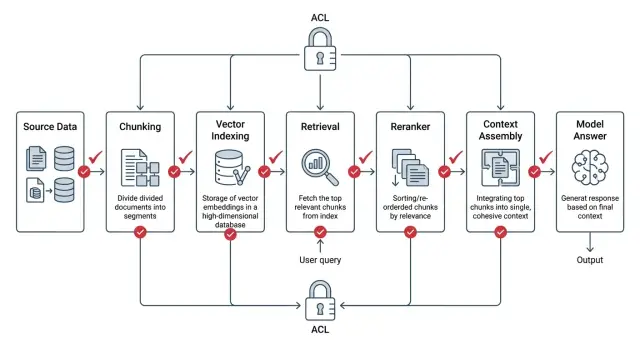
ACL in RAG must be applied before search, during ranking, and while assembling context. We show the setup, common mistakes, and a short checklist.
Why ordinary RAG leaks too much
Ordinary RAG often checks access rights too late. The system first finds similar fragments, then ranks them, assembles context, and only at the end decides whether it can show the text to the user. From a security point of view, that is the wrong order.
The problem starts as early as the search step. A vector index understands the meaning of a query, but it does not know the person’s job title, department, or clearance level. If you do not build ACL in from the start, a call center employee’s query can easily surface an internal legal or HR document simply because the wording is similar.
The usual chain looks like this: search finds the closest document, even if it is restricted; the reranker reads the full retrieved fragments; the context builder stitches chunks together from different places; logs, cache, or debugging traces store that package. Even if the final answer does not show the secret paragraph, the leak has already happened. Someone else’s text has reached process memory, a service log, or a cache for repeat requests.
The reranker adds a separate risk. It reads text more deeply than a simple embedding search and can push a restricted fragment above an open one if it answers the question better. The system itself helps someone else’s document move further down the pipeline.
There is also a quieter mistake: mixing chunks. One document is open to the whole team, another is available only to finance. If the context builder stitches them together around a quarterly report, the model receives a package where part of the data should not have been visible. Later it may restate the meaning of the restricted piece in its own words, without quoting it directly. These leaks are especially easy to miss.
In ACL for RAG, the whole view of security changes. You cannot treat the final answer screen as the only safe point. Checks must happen before search, during search, and before every handoff of text further down the chain.
A simple test makes this obvious. Imagine a bank where a retail employee asks about limits on a credit product. If the system read an internal risk memo with private thresholds along the way, it has already seen too much, even if the chat answer looks harmless.
Where the leak appears in the chain
A leak rarely lives in one place. It is usually a series of small decisions that each look safe on their own.
Indexing pulls files from cloud folders, CRM, wiki pages, and email. If the pipeline stored the text and only partially carried over the access rules, perhaps by the old group or only at the folder level, the index already contains too much. After that, vector search picks the most similar chunks, and the permission filter is applied later. That is fast, but the restricted pieces have already entered the candidate set.
Then the reranker kicks in. It reads the raw candidate text to sort results by relevance. If you did not cut out the extra material earlier, it will see a contract, an HR email, or a financial report the user should not open. The response generator can then make the mistake worse. If permissions sit on the document while citations and chunks live separately, the model may take a useful sentence from a restricted piece and insert it into the answer.
Logs and traces are often the weakest point. Teams write the retrieved chunks, the prompt before generation, and the post-rerank text there, and then developers, analysts, or an external monitoring system read those records. In the end, the document never appeared in the interface, but part of it ended up somewhere else.
Imagine a simple case in a bank. A branch employee searches for "new supplier contract." They only have access to documents from their own department, but the retriever pulls ten similar chunks, and two of them sit in a restricted legal folder. The final answer may not show those pieces, but the reranker has already read them, and the traces saved the file name, part of the amount, and several lines from the terms.
The rule here is strict: every component that reads text must receive only what the user is allowed to see. If a component should not see a document, it must not get the text, a snippet, an embedding, or a quote.
How to keep permissions next to the document
If ACL lives only on the source file, RAG almost always breaks at the chunk level. The index searches chunks, not whole documents. That means every chunk must carry its permissions alongside the text.
Each chunk in the index needs a short but complete set of metadata. Usually document_id and chunk_id are enough to tie the fragment back to its source, acl_version and content_version keep old and new rights from getting mixed up, and a list of users, groups, roles, and allowed actions such as read, search, and quote.
It is better to store not only allow rules but also explicit denies, if your system has them. Then the index does not guess during search; it simply compares the chunk metadata with the current user’s rights.
Inheritance-based permissions are best calculated ahead of time, before anything is written to the index. If access comes from a folder, project, department, or document class, build the final rule once and write it into every chunk in ready-to-use form. Otherwise, extra IAM lookups, version races, and strange mismatches will appear at answer time. One service already sees the new rule while another still holds the old one, and the leak happens right there.
There is also a more complex case. A document about credit policy is available to the whole risk team, but an appendix with calculations inside it is open only to group leads. After chunking, those parts can no longer share one common file-level ACL. The chunks with the appendix need their own, tighter set of permissions.
Version ACL separately from content. If the text changes, content_version changes. If permissions change, acl_version changes, even when the text stays the same.
After a permission change, do not wait for nightly reindexing. Old chunks should be removed immediately from the vector index, caches, and intermediate stores, or quickly rebuilt with the new ACL version.
The hard rule is simple: if a chunk does not have a full ACL, permission version, and clear link to the document, it should not be indexed.
How to build ACL into search
If ACL in RAG is checked after search, the system has already seen too much. The correct order is different: the app first identifies who is making the request, turns that into an access filter, and only then queries the index. The reranker, cache, and model all work inside the allowed set.
At the вход, identify the access subject. That can be a specific user, their role, department, service account, or a combination of these. Do not rely only on the role in the token if access also depends on the team, project, or a temporary grant.
Before querying the index, build the allowed set. In practice, this is not always a list of document IDs. More often it is a filter over ACL fields: department, owner, sensitivity level, tenant, expiration date of access. If the permissions service is unavailable, it is better to stop search than to answer without a filter.
The same filter must work in every search mode. Lexical, vector, and hybrid search should see the same access boundaries. If the vector database cannot filter candidates before returning them, you should not pull a broad top-k and trim it later in code. That is already too late.
Only candidates that have already passed ACL should go into the reranker. The same rule applies to context assembly. A chunk may inherit permission from the document, or it may have its own stricter rule, for example for an appendix to a contract or a hidden section. Only fragments that pass both checks should reach the prompt.
The chain does not end there. Before the answer is returned, permissions should be checked again. The bug often sits at the tail of the pipeline: the response template pulls in the title of a forbidden file, the cache saves someone else’s context for the same question, and the logs write out the full text of the retrieved fragments.
The cache should consider not only the query text, but also the access-rights fingerprint. Logs and traces are better stored by document ID, scores, and service markers, without raw text fragments. If model calls go through AI Router, this can help at the adjacent infrastructure layer: the service supports audit logs, PII masking, and data storage inside Kazakhstan. But ACL inside retrieval still has to be built in your own index.
A short example. A sales employee asks for the terms of a partner contract. In the index, there is a very similar contract from legal, and by meaning it is even closer to the question. If the role-and-department filter runs before candidate search, that document will be invisible to search, the reranker, and the model.
Example with roles and departments
Imagine one corporate knowledge base. It contains support instructions, contract templates, HR policies, and internal analyses of customer complaints. Everyone shares the same search, but everyone must get different answers.
A support employee enters the query: "return rules for goods without a receipt." The system searches only within their lane: support knowledge base articles, approved scripts, and current return rules. It does not touch the legal folder with contract clauses and it does not pull HR documents, even if they contain similar words like "request," "complaint," or "response time."
A lawyer writes almost the same thing: "contract template for returns." The words overlap, but the document set is different. Search pulls only legal department documents: templates, approved versions, and comments on clauses. If the support database has an article with the word "contract," the model still must not see that chunk.
The same goes for HR. Suppose an HR specialist searches for "employee complaint." The vector index may find similar pieces from customer support, because that area also uses the word "complaint" often. If access rights are built correctly, the system cuts those chunks out before ranking and before handing anything to the model. HR gets only personnel policies, intake forms, and escalation instructions.
The same search behaves differently depending on the user’s context. Support sees return articles and customer conversation scripts. Legal sees contracts, appendices, and its own team’s edits. HR sees personnel procedures and internal request forms. No one gets chunks from another department "just in case."
Now imagine moving an employee from support to quality control. This is where many setups break. If the system stores access at the document level and checks permissions on every request, the set of available chunks changes as soon as the role is updated. Old search results, saved collections, and cache entries also need to be recalculated or cleared. Otherwise, the person has already moved to a new department, but search still shows the old access scope for a while.
A good check is simple: give three employees similar queries and compare not only the final answer, but also the list of chunks that went into the model. If the sets overlap where they should not, there is already a problem.
Mistakes that expose too much
Most leaks are not caused by the model, but by the order of operations around search. One small compromise quickly breaks the whole setup: the user should not see the document, but the system still takes its text at an intermediate step and only then tries to filter something out.
The most common mistake looks harmless. The team first gets top-k results from the index, then removes forbidden documents and thinks everything is fine. But the extra text has already made it into ranking, cache, logs, or the next step’s context. The filter must run before candidates are exposed.
Another problem appears when access rights are stored at file level and the file is later split into chunks without inheriting the rules. In the end, one PDF is closed to the sales team, but its pieces sit in the index as ordinary records without ACL. Search finds such a chunk through a strong match, and the model receives a paragraph the user should not have seen.
The cache often causes more trouble than the index itself. If the system stores search results only by query, and not by user, role, and permission set, another person can receive someone else’s results. This is especially unpleasant with short questions like "hiring plan" or "contract terms," where matches repeat often.
There is also a less visible failure: test data gets mixed with production. A developer loads examples, old exports, or documents for search-quality checks, and then forgets to remove them. Everything looks normal on the surface, but some answers start pulling pieces from data that should never have been in production at all.
Debugging also opens the door too wide. Teams enable dumps of queries, retrieved chunks, and the final prompt to understand why search failed. That is useful for a couple of days. But if those dumps live for weeks, they become a separate archive of sensitive data. Sometimes the source document has already been deleted, while its text still sits in logs.
For a quick self-check, five questions are enough. Is ACL applied before candidate search? Are permissions inherited for each chunk, not only for the file? Is the cache tied to the user, role, and permission version? Are test data separated from production data? Do debug dumps have a short lifetime? If you are unsure about even one answer, there is already risk.
Checks before release
Before release, it is more useful to run short tests on live data than to look at a pretty diagram. ACL in RAG breaks at the point where search, reranking, cache, and logs meet. If you only check the final answer, you can miss a leak before the model even starts writing.
Start with two roles and one query. The system should return a different set of chunks if the roles have different permissions. Look not only at the final answer, but also at the list of candidates after retrieval. If a finance employee and a support employee get the same results where they should not, the filter is too late.
Check the reranker separately. It should not receive a single restricted chunk, even if that chunk will not end up in the final context. This is a common mistake: the team filters results after reranking and thinks it has fixed the issue. In reality, the restricted text has already passed through an intermediate step.
Then request a document you cannot access and read the answer as an ordinary user. A good system does not quote the restricted fragment, does not name its title, and does not restate the meaning of the paragraph in its own words. The refusal should be short and blunt. If the model says something like "I can't show the document, but it says...", the test has failed.
Next, change the permissions on one document and measure the time. After the ACL change, the index, retrieval cache, prompt cache, and any saved candidate sets should be updated. You need a clear timeframe: immediately or within a few minutes. "After the nightly job" is too weak here.
Finally, open the audit log and find one specific request. It should contain the actor ID, tenant, role, the set of filters that fired, chunk IDs before and after filtering, and the reason for refusal, if there was one. If you use a separate gateway for model calls, it is worth checking that this trail does not get lost between search, policies, and the actual LLM call.
There is one nuance that often gets missed. Test not only the "correct" queries, but also edge cases: typos, very short phrasing, broad queries, and repeat queries right after a permission change. That is where old cache entries or a wrong fallback usually show up.
If these checks pass consistently, the chance of an unpleasant surprise in production is much lower. If even one of them wobbles, it is better to delay release for a day than to investigate a leak in logs later.
What to do after launch
Right after launch, do not connect every data source at once. Start with one source and a simple role matrix that is easy to check by hand. For example, keep a few roles with clear boundaries: HR sees personnel documents, lawyers see contracts, and everyone else sees neither. This narrow start shows faster where ACL in RAG works honestly and where search still pulls too much.
Then build negative tests. They are more useful than ordinary happy-path checks. You need queries from people who should not get a single chunk, a document title, or a piece of metadata. Simple scenarios work well: a sales employee searches HR orders by a colleague’s surname; a contractor asks a general question that used to find internal policies; a manager searches for an old document name after it was renamed; a user without access phrases the query through synonyms and abbreviations.
If the model answers too confidently in such tests, the problem is usually not the model itself. More often the leak is in the retrieval filter, reranking, or context assembly.
In the first weeks, it helps to watch three metrics separately instead of one overall graph: recall after ACL, latency, and the number of refusals. If search starts returning far fewer relevant chunks after filters are turned on, you may have cut access too aggressively. If latency rises, check where you are filtering: before vector search, after it, or at both stages. If refusals suddenly spike, the link between user role and document attributes is often broken.
It is better to break these metrics down by role and by source. Then you can see that the problem is not in the whole system, but perhaps only in one index or one group of employees.
If you are building an LLM service in Kazakhstan, it is better to account for legal constraints from the start. Before connecting real documents, check where the data is stored, whether it remains inside the country, how PII is masked, and who can see the audit trail. It is boring work, but it is usually what saves you from the worst surprises after the pilot.
The infrastructure layer for model calls should also be separated from ACL logic in search. If your team needs a single OpenAI-compatible gateway with data storage inside Kazakhstan, PII masking, and audit logs, you can separately evaluate AI Router at airouter.kz. It does not replace document filtering in your own index, but it closes the adjacent risk: who sends requests to models, where they go, and with what data.
The main idea is simple: in secure RAG, the model should not see extra material at all. Not in the final answer, not in the reranker, not in the cache, and not in the logs. If a restricted chunk enters the chain even once, the problem has already happened.